How to Shuffle a Photo Album on iPhone Lock Screen - MacRumorsOpen MenuShow RoundupsShow Forums menuVisit ForumsOpen Sidebar
Skip to Content

How to Shuffle a Photo Album on iPhone Lock Screen

by

When Apple released iOS 17.1, it included a new Lock Screen personalization option for iPhones. Here's how to make your Lock Screen wallpaper shuffle through photos from a specific album in your photo library.
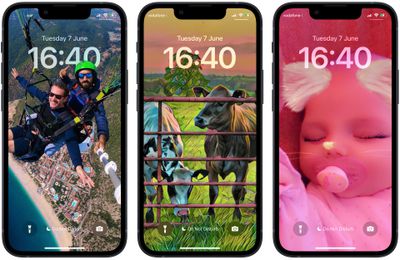
shuffle photos lock screen
In recent versions of iOS, Apple has made it possible for users to customize the Lock Screen in ways that were simply not possible in earlier versions of its mobile software, and one feature in particular that has proven popular is the ability to shuffle photos on your Lock Screen wallpaper at specific intervals or whenever you wake or tap the screen.

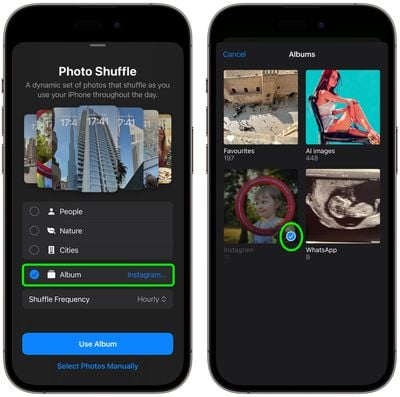
In iOS 17.1 and later, Apple has extended this feature so that you can now shuffle pictures from a specific album from your photo library, rather than having to manually select individual photos or rely on Apple's preset options of People, Pets, Nature, and Cities. The following steps show you how it's done.

  1. Wake your iPhone and use Face ID to unlock it, but don't swipe up on the Lock Screen.
  2. Press and hold on the Lock Screen until the wallpaper gallery appears, then tap the blue + button in the bottom-right corner of the screen.
  3. Select Photo Shuffle from the wallpaper menu.
    Lock Screen

  4. Tap the new Album option, then choose the album of photos from your library that you'd like to shuffle between.
  5. Next, choose a Shuffle Frequency: Daily, Hourly, On Lock, or On Tap.

  6. Tap Use Album to move on.
    shuffle

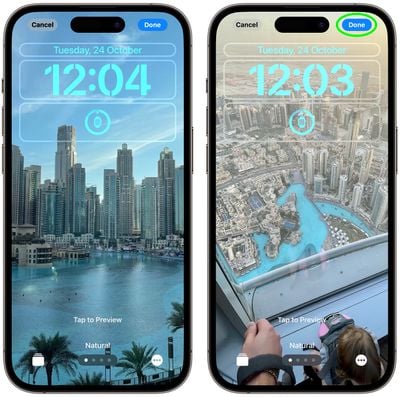
  7. Tap the screen to preview the photos in your chosen album as they will appear on your Lock Screen, and tap the clock to adjust the font style and color so that the time, date, and any widgets remain legible against all of your pictures.
  8. Tap Done in the top-right corner to finish, then choose either Set as Wallpaper Pair to finish or Customize Home Screen to tweak its look separately, then tap Done.
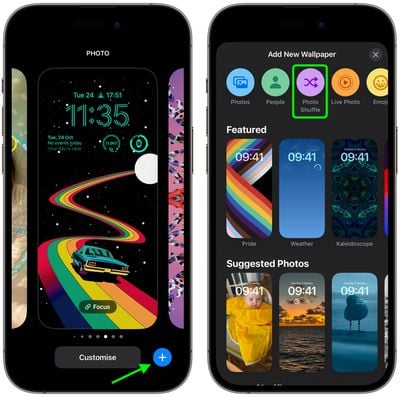
    photo shuffle

Tap your new album-specific photo shuffle wallpaper in the gallery to make it live. Then you can tap or wake your iPhone's screen to change the photo, or wait for it to change automatically, depending on your chosen option.


Top Rated Comments

34 months ago
I foretell …….17.1 users experience battery drain…..Apple’s response - turn off photo shuffle to optimise battery life between charges!🙈
Score: 13 Votes (Like | Disagree)
34 months ago

I left my bride at the altar for nothing.
You got out of marriage so not for nothing. 🤣
Score: 5 Votes (Like | Disagree)
antiprotest Avatar
34 months ago

Daaaang.... I took a day off, ordered pizza, opened a bottle of Veuve Clicquot, lit some candles and yet the iOS 17.1 didn't show up 😵‍💫
I left my bride at the altar for nothing.
Score: 4 Votes (Like | Disagree)
freezah Avatar
34 months ago
Daaaang.... I took a day off, ordered pizza, opened a bottle of Veuve Clicquot, lit some candles and yet the iOS 17.1 didn't show up 😵‍💫
Score: 4 Votes (Like | Disagree)
Tomas1988 Avatar
34 months ago
Hello battery drain 👍🏼😂
Score: 4 Votes (Like | Disagree)
34 months ago
The problem is that our only cycles through 16 pictures of the album. I tried it with a 70 picture album and it only shows the same 16 and starts over. So no use in my opinion. The same on iPad by the way
Score: 4 Votes (Like | Disagree)

Popular Stories

macOS 27 on MacBook Pro

Apple Says macOS 27 Won't Be Compatible With These Macs

Wednesday June 3, 2026 8:29 am PDT by
During WWDC 2025, Apple revealed that macOS 26 Tahoe would be the final major macOS version for Intel-based Macs. macOS 27 will be compatible with Apple silicon Macs only, meaning that you will need a Mac with an M-series chip or a MacBook Neo with an A18 Pro chip in order to install the software update. Apple will unveil macOS 27 during its WWDC 2026 keynote this Monday, June 8, and the...
MacBook Neo on Yellow Feature

MacBook Neo is So Popular That Apple Reportedly Doubled Production

Wednesday June 3, 2026 9:24 am PDT by
On an earnings call in late April, Apple's CEO Tim Cook said that customer response to the MacBook Neo was "off the charts," and the popularity of the laptop has reportedly led the company to significantly boost production. Apple supply chain analyst Ming-Chi Kuo this week said he believes that MacBook Neo shipments to Apple were doubled from an initial target of 5 million units to 10...
iphone 18 pro blue%402x

iPhone 18 Pro: Dark Cherry, Light Blue, and Dark Gray Chassis Leaked [Update]

Thursday June 4, 2026 5:18 am PDT by
Update: Since publication, new information has come to light suggesting the images have been AI-manipulated and are not in fact iPhone 18 Pro chassis parts. The original article follows. The color options Apple is reportedly planning for the upcoming iPhone 18 Pro and ‌iPhone 18 Pro‌ Max have appeared online today in the form of images of chassis parts of unknown authenticity....