

On iPhone, listening to YouTube audio in the background usually requires paying for a YouTube Premium subscription, but there is a simple workaround that allows you to keep listening to a video when you are doing other things on your iPhone or when your device is locked. Keep reading to learn how it's done.
As YouTube has grown in popularity over the years, Google has opted to park several features of the video hosting service behind a paywall, such as ad-free viewing, SharePlay on iOS, and the ability to listen to YouTube audio on your iPhone when the app is closed.
Unfortunately, YouTube Premium costs $13.99 a month to access these features. But if all you want to do is listen to YouTube-hosted audio like podcasts, music, or lectures when you are in other apps or when your iPhone is locked and in your pocket, there is a way to achieve this without paying for the subscription.
The following steps show you how it's done.
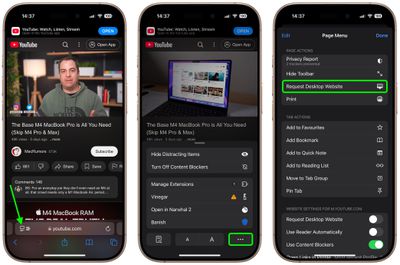
- Launch Safari on your iPhone and visit youtube.com, then search for the video whose audio you want to listen to.
- Tap the left-hand icon in Safari's address bar.
- Next, tap the More (three dots) button in the bottom-right corner, then select Request Desktop Website from the popup menu.

- Tap the play button or tap the video to begin playback, while ignoring or dismissing any popups encouraging you to open the YouTube mobile app. (You will need to watch or skip a few ads before video playback begins.)
- Now, lock your iPhone with the device's Side button. The audio will pause, but you can just tap the Play button in the Lock Screen playback controls widget to resume listening.
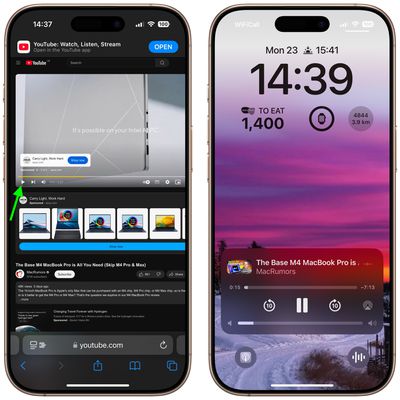
After following the above steps, the audio from YouTube will continue to play on your locked iPhone for as long as the video lasts, leaving you free to pocket your device and listen on headphones.
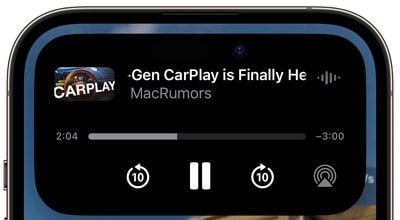
Alternatively, if you want to use other apps while listening, simply swipe up from the bottom of the screen to exit out of Safari, and then use the media controls in your iPhone's Dynamic Island or Control Center to resume playback when it automatically stops.



















