Get Creative With Sound by Layering Tracks in Voice Memos - MacRumorsOpen MenuShow RoundupsShow Forums menuVisit ForumsOpen Sidebar
Skip to Content

Get Creative With Sound by Layering Tracks in Voice Memos

by

On iPhone 16 Pro and iPhone 16 Pro Max, the Voice Memos app includes a recording feature that lets you record a second audio layer – like vocals, narration, or an extra instrument – over an existing memo, all without needing headphones. Keep reading to learn how it's done.
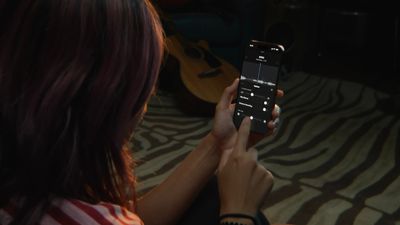
voice memos multitrack
Thanks to the A18 Pro chip's advanced audio processing, iPhone 16 Pro models can play an original Voice Memo recording through the speakers while simultaneously isolating and capturing new audio cleanly. Whether you're capturing a quick harmony, adding context to a saved memo, or simply experimenting with sound, layering recordings like this offers a seamless way to capture richer ideas.

Once finished, layered recordings can be edited, separated, and fine-tuned directly on the iPhone or easily transferred to apps like Logic Pro for more advanced mixing. For musicians, podcasters, or anyone who regularly records voice notes, it's a bit like having a mini studio setup right in your pocket. Here's how to make your first layered recording.

Add a Second Layer to a Recording

  1. Open the Voice Memos app (in the Utilities folder) on your iPhone.
  2. Tap the recording you want to add a vocal layer to, then tap the waveform icon to view the waveform.
  3. Tap the plus (+) button.
  4. When you're ready to record the second layer, tap the red record button.
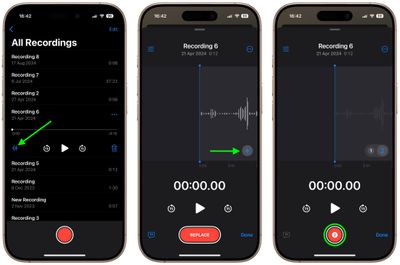
voice memos

The recording will appear in Voice Memos' list of recordings with a layered symbol (two overlapping tiles) next to it.

Mix the Layers

While viewing the waveform, you can easily mix the layers by tapping the settings button in the top-left corner and dragging the Layer Mix slider.
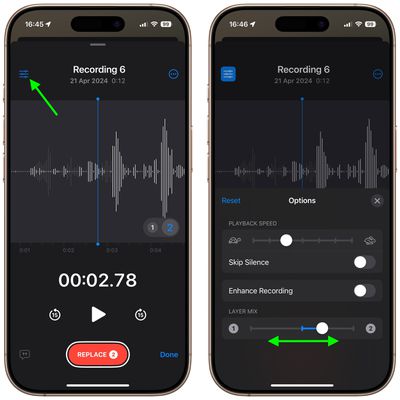
voice-memos

Separate the Layers

You can also separate the two layers to edit or play them separately: Simply tap the More button (three encircled dots) in the top-right corner, then tap Separate Layers. If you then tap Done, you'll see the two layers appear as separate recordings in the list. From there, you can select them, edit them, and play them separately.
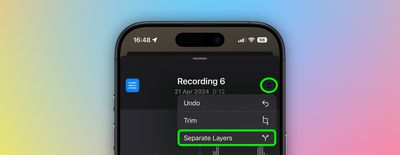
voice memos

Things to Know

While creating layered recordings is exclusive to the iPhone 16 Pro and iPhone 16 Pro Max, playback is more widely supported. Any device running iOS 18.2, iPadOS 18.2, macOS Sequoia 15.2, or later can play layered recordings without issue.
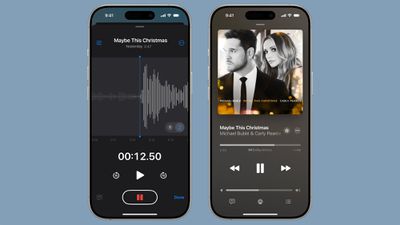
ios 18 2 layered voice memos
It's worth noting that layered recordings are saved in the QuickTime Audio (QTA) format. Devices on earlier software versions, such as iOS 18.1, iPadOS 18.1, or macOS Sequoia 15.1, won't display layered memos. However, if you separate the layers, each track is converted into an individual .m4a file, making them accessible across older devices. Also, keep in mind that only the original layer can be transcribed or recorded in stereo – additional layers are captured in mono.


Top Rated Comments

Cameront9 Avatar
18 months ago
RIP Music Memos app which automatically detected the chords you were playing and was perfect for little demos you could export into GarageBand. No idea why they got rid of that app.
Score: 9 Votes (Like | Disagree)
18 months ago

To know that multitrack recording (with only two tracks!) has been possible on any phone for a decade I should... make my own multitrack recording app?
Are you joking? You can't be serious.
I know birds can fly easily even if I can't fly.
Just like I know that multitrack recording has been a thing forever on phones. There's absolutely no hardware limitations, even on very old and weak phones.
Now, I don't know what that "enhance recording" button does, may be AI that doesn't work on weaker phone but... they could just hide it.

Blocking upgrades that aren't related to hardware on phones that are still supported and were promised OS upgrades just means they just lied for money: OS upgrades will be limited so even phones that are one or two years old don't get some software upgrades, forcing you to upgrade.
Take the AI stuff: some run locally and require hardware but all the features that don't could easily run on an iPhone 6S. And I know that because other Apps make it possible (even if I didn't develop them myself). Still Apple makes them iPhone 16 exclusives (also with those scammy ads) to make people buy it. Again, because all recent phones feel really similar.
Your rant is founded on a misunderstanding. The feature in question is not plain old two layer audio recording—the feature is doing so without the need for headphones. Up until now, in order to isolate the second track from the first, headphones were needed while recording, otherwise the second track would pick up audio from the first track in the background. In this new feature, while recording without headphones machine learning removes the first track audio from the second track to keep them isolated from each other, which takes extra processing power. It’s explained in the article as well.
Score: 2 Votes (Like | Disagree)
WarmWinterHat Avatar
18 months ago
Trying to start a new career?


Attachment Image
Score: 2 Votes (Like | Disagree)
18 months ago

Voice memos should be better at recording ambient sounds around the iPhone. The layering is cool.
I think because it’s “Voice Memos” and not a general recorder, it’s probably a feature that it doesn’t record every sound that reaches the mics. When I want to record THAT kind of audio, I use a different app. Even Apple’s Camera app is good in a pinch! (Tried using VM to capture ambient sounds, glad I listened to the recording before I left the site and re-recorded with something else!)
Score: 1 Votes (Like | Disagree)
18 months ago

Why this very simple software just on the latest phones??
Is Apple starting to rely more and more on software locks to differentiate newer and pricier phones because they've all been feeling like the same for 4 years now?
To really know the answer to that question, you’d have to try coding something like this yourself on something other than an iPhone 16. Apple has a way of bringing forward features that LOOK simple even when there’s nothing simple about them.
Score: 1 Votes (Like | Disagree)
cicalinarrot Avatar
18 months ago
Why this very simple software just on the latest phones??
Is Apple starting to rely more and more on software locks to differentiate newer and pricier phones because they've all been feeling like the same for 4 years now?
Score: 1 Votes (Like | Disagree)

Popular Stories

Apple iCloud Plus expansion hero

iCloud+ Now Includes Apple TV, Apple Arcade, and Curated Apple Music Stations in Over 100 Countries

Tuesday September 15, 2026 1:43 am PDT by
Apple today announced a new subscription initiative that turns paid iCloud+ subscriptions into a broader services bundle in more than 100 countries. In select countries, Apple says every paid iCloud+ plan, including the cheapest 50GB tier, now includes Apple TV and Apple Arcade "at no additional cost," while family sharing extends the storage, TV and Arcade access to up to five people....
Everything New Your iPhone Can Do on iOS 27 Feature 1

50 New Things Your iPhone Can Do in iOS 27 - Out Now!

Monday September 14, 2026 10:48 pm PDT by
Apple released iOS 27 this week, and despite the company's focus this year on refining its flagship operating system and nixing bugs, there are still many additional features to explore, not least of which is Apple's new context-aware Siri, re-tooled for the generative AI era. Which iPhones Support Every iOS 27 Feature? This year's major iPhone software update isn't all about AI, though,...
iOS 27 Icon iPhone

iOS 27 Available Now With These 8 New Features

Monday September 14, 2026 9:00 am PDT by
Update — 10 a.m. Pacific Time: Apple has released iOS 27. During its iPhone 18 Pro and iPhone Duo event last week, Apple announced that iOS 27 will be released widely on Monday, September 14. iOS 27 should be available around 10 a.m. Pacific Time / 1 p.m. Eastern Time today via the Settings app, under General → Software Update. Below, we have highlighted eight new features and...