

 When you take a picture in Apple's Portrait mode, iOS uses the dual cameras of your iPhone to create a depth-of-field effect, allowing you to compose a photo that keeps your subject sharp with a blurred background.
On iPhone X and later, and iPhone 8 Plus, Apple also includes a Portrait Lighting feature that you can use to apply studio-quality lighting effects to your Portrait mode images.
The full set of Portrait Lighting effects in Apple's Photos and Camera apps include Studio Light to brighten facial features, Contour Light for more dramatic directional lighting, Stage Light to isolate your subject in the spotlight, and Stage Mono for stage light in a classic black and white.
In iOS 13, Apple also added a new Portrait Lighting effect called High-Key Light Mono. High-Key Mono is a black and white effect that's similar to Stage Light Mono, but designed to add a white background rather than a black one.
Keep reading to learn how to use Portrait Lighting effects on your iPhone photos, just bear in mind that the new High-Key Mono effect demoed in the steps below is limited to the iPhone XS, XS Max, and XR.
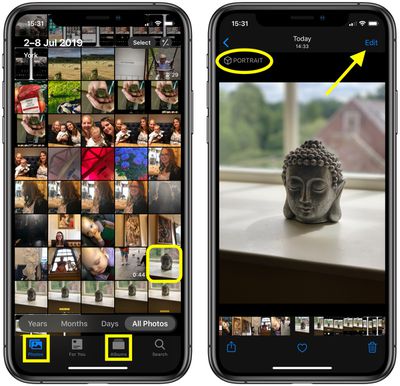
- Launch the stock Photos app on your iPhone.
- Using the Photos tab, tap to select a Portrait photo in your Photo library. If it isn't a recent Portrait photo that you want to edit, you can use the Days, Months, and Years views to whittle down your collection. Alternatively, select a photo from one of your albums via the Albums tab.

- Check the image was captured in Portrait mode by looking for the Portrait label in the top-left corner of the screen, then tap Edit in the top-right corner to enter the editing interface.
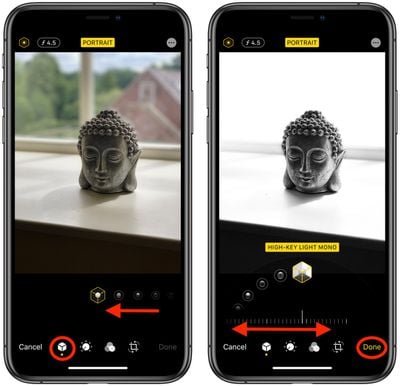
- With the Portrait icon selected in the bottom row of tools, select a lighting mode by sliding your finger along the icons below the photo.
- Once a lighting mode is selected, such as the new High-Key Light Mono effect (shown), you'll see a slider appear below it. Move your fingertip along it to dial down or ratchet up the intensity of the lighting effect.
- Tap Done when you're happy with how the image looks.
Remember, in addition to using the Photos app, you can also use these lighting tools whenever you take a Portrait mode picture using the built-in Camera app – you don't even have to unlock your device to edit the photo you just shot.














