macOS High Sierra adds integrations with several third-party apps that let you do all kinds of fun things with your photos, from making photo books to putting them on t-shirts and coffee mugs.
Third-party apps supplement the existing built-in tools that allow you to make prints or create books, slideshows, cards, and calendars
You can use these tools directly in the Photos app without having to visit a third party site, and there's even a special spot in the Mac App Store to download the integrations. Here's how it works:
Starting a Project - Downloading Apps
- Open Photos on Mac.
- Scroll down to "My Projects."
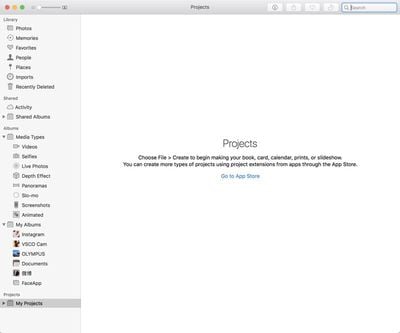
- Click on "Go to App Store."
- Clicking the link from Photos brings up a list of all Mac apps that integrate with Photos.
- Choose an App and click to download.
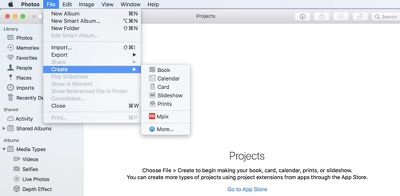
If you've already created a project, accessing a list of available apps is done by going to File --> Create and choosing the "More" App Store option.
Available Apps
Right now, there are six apps that are offering integration with Photos, but more apps will likely implement compatibility in the future. All of the apps are free, with the exception of the GoodTimes collage maker, which is priced at $19.99.
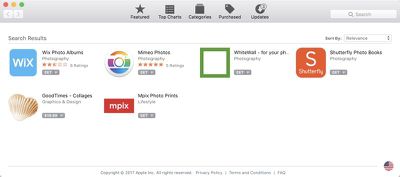
Wix
Wix is an app that lets you arrange your photos into albums that can be published online on a website using Wix's website creation tools. [Direct Link]
Mimeo Photos
Mimeo Photos has tools and templates for creating photo books, calendars, and cards with unique layout options and editing tools. [Direct Link]
WhiteWall
WhiteWall is for creating photo prints that can be hung on a wall, either solo or in photo arrangements with a wide range of frames and mounting options available. [Direct Link]
Shutterfly Photo Books
Shutterfly is for creating photo books using the Shutterfly service, which often has competitive pricing options. [Direct Link]
GoodTimes - Collages
GoodTimes is the sole paid app available for Photos right now, and it costs $19.99. It can be used to create scrapbooking pages, photo arrangements, and photo collages. [Direct Link]
Mpix Photo Prints
Mpix lets you create standard prints, framed prints, metal prints, canvas prints, wood prints, collages, posters, cards, and a wide range of other projects. [Direct Link]
Using an App to Make a Project
- Open the Photos app.
- In the Photos menu bar, choose File --> Create
- Under Create, choose the third-party app you want to use for your project.

- Click done.
- Drag photos from your Photo Library to the Project. These photos are the photos that the app will be able to use -- it doesn't have access to your full photo library.
- Re-open the project by clicking on it from the "My Projects" list.
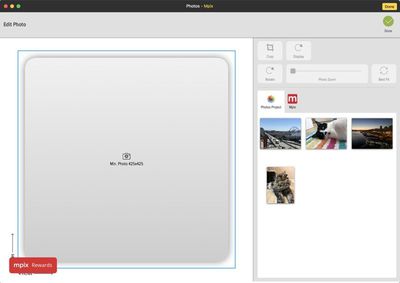
When you use one of these integrated third-party Photos apps, all of the project creation is done entirely in the Photos app.
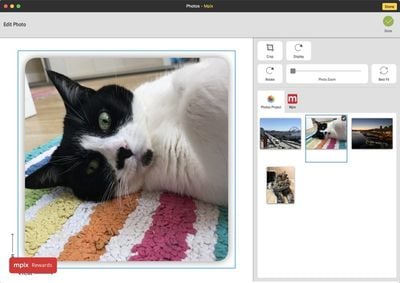
For example, with Mpix, I chose a Metal Print from the list of options, provided access to my Photo Library, added photos, chose a photo for the project, resized it, and proceeded to purchase options all without opening a different app.
These same simple project creation tools are available for all integrated apps, making it simple to do a lot more right in the Photos app without having to fuss too much with third-party services.