

How to Fake a Dropped Call on iPhone - MacRumorsOpen MenuShow RoundupsShow Forums menuVisit ForumsOpen Sidebar
Skip to Content

How to Fake a Dropped Call on iPhone

by

If you want to end a call on your iPhone without seeming rude, this handy little trick is for you. Keep reading to learn how to fake a dropped call.
iphone 11 pro hands on
Whenever you hang up a call on iPhone, the person on the other end sees a message on their phone saying "Call Ended." This indicates that you ended the call on purpose, because if the call had dropped due to poor cellular coverage, the message that the person would read would have been "Call Failed," which sounds a lot less intentional.

What if you want to end a call without it looking like you abruptly hung up? In fact, you can do this on iPhone using Airplane mode. When Airplane mode is enabled during a call, the call immediately ends and the person on the other end sees "Call Failed," as if the conversation ended through no fault of your own. Granted, it's sneaky, but it works.

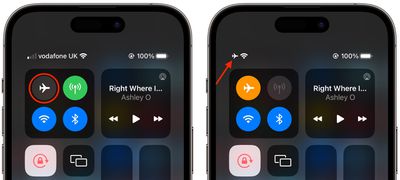
The quickest way to turn on Airplane Mode is via Control Center. Swipe down diagonally from the top-right corner of the screen (if your iPhone has a Home button, swipe up from the bottom of the screen). Then, tap the button that looks like an airplane so that it turns orange and the green cellular button next to it grays out. The cellular provider name in the top-left corner will also be replaced by a plane symbol.
control center
This should immediately end the call, and all that the person on the other end will see is that the call "failed." If you still appear to be on the call, chances are you have Wi-Fi calling enabled, in which case simply tap the blue Wi-Fi button in Control Center to end Wi-Fi calling.


Popular Stories

Aston Martin CarPlay Ultra Screen

Apple Says CarPlay Ultra is Coming to These Vehicle Brands

Thursday May 21, 2026 11:53 am PDT by
Last year, Apple launched CarPlay Ultra, the long-awaited next-generation version of its CarPlay software system for vehicles. Nearly a year later, CarPlay Ultra is still limited to Aston Martin's latest luxury vehicles, but that should change fairly soon. In May 2025, Apple said many other vehicle brands planned to offer CarPlay Ultra, including Hyundai, Kia, and Genesis. CarPlay Ultra...
iphone 18 pro blue%402x

iPhone 18 Pro: Dark Cherry, Light Blue, and Dark Gray Chassis Leaked [Update]

Thursday June 4, 2026 5:18 am PDT by
Update: Since publication, new information has come to light suggesting the images have been AI-manipulated and are not in fact iPhone 18 Pro chassis parts. The original article follows. The color options Apple is reportedly planning for the upcoming iPhone 18 Pro and ‌iPhone 18 Pro‌ Max have appeared online today in the form of images of chassis parts of unknown authenticity....
iOS 27 All the New App Features

iOS 27: All the Rumored App Features

Wednesday June 3, 2026 3:48 pm PDT by
Siri is getting a major overhaul in iOS 27, but Apple also has some big updates planned for apps like Camera, Photos, and Wallet. There are multiple new AI features in the works, plus some non-AI upgrades. Camera Apple is moving Visual Intelligence from the Camera Control button to the Camera app in iOS 27, according to Bloomberg. There will be a Siri mode that will be available alongside...













