Make Any File a Template Using This Hidden macOS Tool - MacRumorsOpen MenuShow RoundupsShow Forums menuVisit ForumsOpen Sidebar
Skip to Content

Make Any File a Template Using This Hidden macOS Tool

by

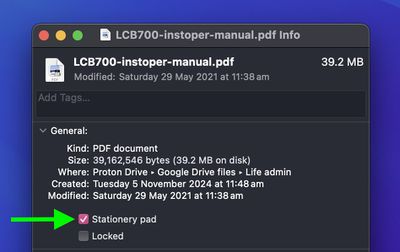
Stationery Pad is a handy way to nix a step in your workflow if you regularly use document templates on your Mac. The long-standing Finder feature essentially tells a file's parent application to open a copy of it by default, ensuring that the original file remains unedited.
stationery pad
Stationery Pad doesn't get much attention these days, but it's a neat alternative to repeatedly editing templates and using the "Save As..." command, which can lead to overwriting the original file if you're not too careful.

Almost any file type can be defined as a template with Stationery Pad – it could be used to streamline common Photoshop jobs, create skeleton HTML/CSS files, or help with Word document invoicing. To make use of Stationery Pad, create the file you want to use as a template, then follow the steps below.

Define a File as a Template Using Stationery Pad

  1. Find the file in Finder that you want to use as a template.

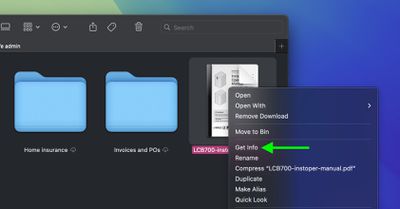
  2. Right-click (or Ctrl-click) the file and select Get Info in the contextual dropdown menu. Alternatively, click the file to select it and use the Command+I keyboard shortcut to launch Get Info.
    finder

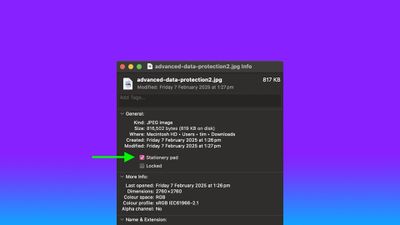
  3. Check the Stationery Pad checkbox under the General section.
    finder

  4. Click the red traffic light button to close the Get Info window.
Next time you double-click the template file, Finder will create and open a copy of it, leaving the original untouched. To reverse the behavior, simply uncheck the Stationery Pad checkbox in the template file's Get Info window.


Top Rated Comments

wanha Avatar
17 months ago
Apple is usually great at naming things, but "Stationary pad" is a terribly confusing name for this useful feature
Score: 20 Votes (Like | Disagree)
UltimateSyn Avatar
17 months ago
I’ve used Macs for ~25 years and never knew you could do this. Thank you!
Score: 20 Votes (Like | Disagree)
17 months ago
If Apple actually renamed this checkbox and call it "This file is a template" or whatever else they want to use as long as it has the word "template" on it, it would have more mainstream awareness. Who the hell uses the term "stationary pad" nowadays?
Score: 13 Votes (Like | Disagree)
AngerDanger Avatar
17 months ago
Not only did I not know what that checkbox did, I'd somehow never even noticed it 😅


Apple is usually great at naming things, but "Stationary pad" is a terribly confusing name for this useful feature
Seriously, "Make Template" would be so much less ambiguous.
Score: 9 Votes (Like | Disagree)
Willis Avatar
17 months ago
I remember looking this up around 10-15 years ago and thought oh cool, but had zero use for it. Naturally, I forgot this existed.

Probably the best Mac tip going right now
Score: 6 Votes (Like | Disagree)
Nermal Avatar
17 months ago

I’ve looked at thousands of Get Info dialogs and can’t recall ever seeing it. I have used Locked, so I must have seen it, but apparently I was never curious enough to research what it did.
I think I first noticed it in System 7 :)

Edit: After a little bit of playing around in an emulator, it looks like the feature was added in 7.
Score: 5 Votes (Like | Disagree)

Popular Stories

macOS 27 on MacBook Pro

Apple Says macOS 27 Won't Be Compatible With These Macs

Wednesday June 3, 2026 8:29 am PDT by
During WWDC 2025, Apple revealed that macOS 26 Tahoe would be the final major macOS version for Intel-based Macs. macOS 27 will be compatible with Apple silicon Macs only, meaning that you will need a Mac with an M-series chip or a MacBook Neo with an A18 Pro chip in order to install the software update. Apple will unveil macOS 27 during its WWDC 2026 keynote this Monday, June 8, and the...
MacBook Neo on Yellow Feature

MacBook Neo is So Popular That Apple Reportedly Doubled Production

Wednesday June 3, 2026 9:24 am PDT by
On an earnings call in late April, Apple's CEO Tim Cook said that customer response to the MacBook Neo was "off the charts," and the popularity of the laptop has reportedly led the company to significantly boost production. Apple supply chain analyst Ming-Chi Kuo this week said he believes that MacBook Neo shipments to Apple were doubled from an initial target of 5 million units to 10...
iphone 18 pro blue%402x

iPhone 18 Pro: Dark Cherry, Light Blue, and Dark Gray Chassis Leaked [Update]

Thursday June 4, 2026 5:18 am PDT by
Update: Since publication, new information has come to light suggesting the images have been AI-manipulated and are not in fact iPhone 18 Pro chassis parts. The original article follows. The color options Apple is reportedly planning for the upcoming iPhone 18 Pro and ‌iPhone 18 Pro‌ Max have appeared online today in the form of images of chassis parts of unknown authenticity....