

WhatsApp has introduced a custom sticker creation tool for iPhone users running iOS 17 or later. Keep reading to learn how to use it.

In the world of instant messaging, stickers offer a dynamic and playful way to express your emotions and thoughts. But instead of using standardized stickers from an existing stock, wouldn't it be better if you could create your own?
WhatsApp on iPhone has supported basic sticker creation for a while now by dragging and dropping images from your photos gallery, but the latest update introduces more advanced customization options.
The new tools offer a subtle yet significant enhancement, allowing for more detailed personalization. For example, now you can add artistic flair by drawing on stickers, incorporating text, or layering multiple stickers. The steps below show you how it's done.
Note that if your iPhone runs anything older than iOS 17 then you can only edit stickers, not make them in this way. And if you're on Android, you can only view and react to stickers. Be sure to update to the latest version of WhatsApp before you get going.
How to Create a WhatsApp Sticker
- Open a WhatsApp chat and tap the sticker tray icon in the text field.
- Tap the big + button to create a sticker.

- Choose an image from your gallery that you want to transform into a sticker.
- Customize your sticker by selecting a cutout shape, inserting text, emoji or other stickers, and using the drawing tools for personal touches.
- When you're done, tap the Send button in the bottom-right corner.
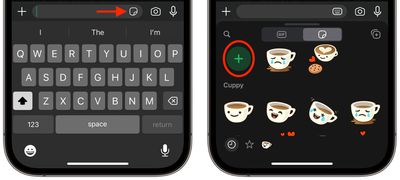
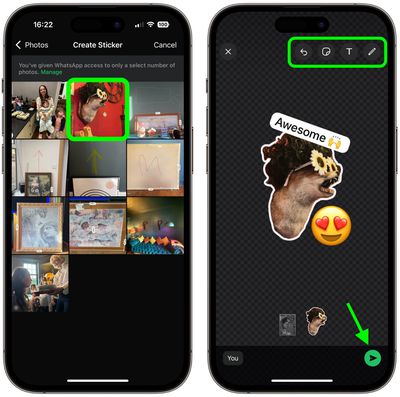
Note that any stickers you create are automatically saved in the sticker tray for later use.
How to Edit a WhatsApp Sticker
- To edit an existing sticker, go to the sticker tray.
- Find the sticker you wish to modify, then long-press on it.
- Finally, select the option to edit the sticker.
If you don't have your iPhone handy, you can always use WhatsApp for the web to create stickers. It's just a lot easier to do in the app, and the results usually look more slick.















