How to Make Your iPhone Screen Less Bright in Bed - MacRumorsOpen MenuShow RoundupsShow Forums menuVisit ForumsOpen Sidebar
Skip to Content

How to Make Your iPhone Screen Less Bright in Bed

by

Most of us stare at our iPhones for far too long, and this constant exposure to a bright screen can strain our eyes, especially in low-light conditions or during the twilight hours. That's where the ability to dim your iPhone screen beyond the standard brightness settings becomes a game-changer.
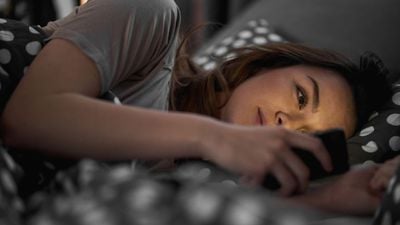
iphone in bed
If the screen of your iPhone or iPad is too bright for comfort, the usual solution is to go to Settings ➝ Display & Brightness and drag the Brightness slider to the left, or open Control Center and adjust the corresponding setting from there. However, if the lowest setting offered by the Brightness level just isn't dim enough for you, there's another way to make your screen even darker.

This feature is particularly useful if you find yourself needing to use your device in dark environments, such as in a bedroom where a partner is sleeping, or in a dimly lit theater. It's also a boon for anyone with light sensitivity, providing a more comfortable viewing experience that minimizes eye strain and fatigue. Let's look at how to set it up below.

Reduce White Point

  1. Open Settings on your iPhone.
  2. Select Accessibility from the list of options.
  3. Scroll down and select Accessibility Shortcut.
  4. Tap Reduce White Point, then drag it up near the top of the list using the three lines icon.
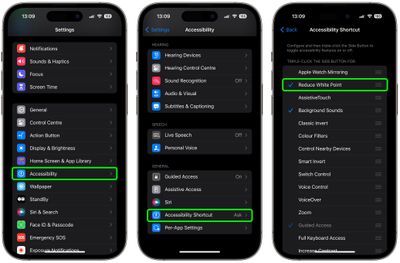
settings

Now that's set up, simply triple-click your iPhone's Side button to display the Accessibility Shortcut menu, then tap Reduce White Point.
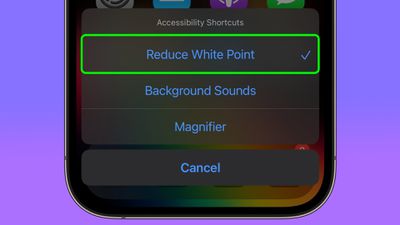
reduce white point
Your iPhone display will now be dimmer than the dimmest setting offered by the standard Brightness level.

Reset White Point

To return the white point to its normal level, simply triple-click the Side button again and tap Reduce White Point to uncheck it.

Adjust White Point

If the White Point is still too bright (or too dim), you can adjust it manually: In Settings, go to Accessibility ➝ Display & Text Size, then scroll down and turn on the switch next to Reduce White Point.
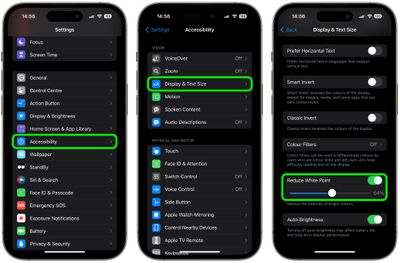
settings
This will reveal a slider that you can move left or right to change the brightness level.

Trigger Reduced White Point at Bedtime

It's possible to make the Reduced White Point setting come on when Bedtime starts, or when your Sleep focus is enabled. This offers an automated approach to minimizing screen brightness, which is particularly beneficial for winding down before bedtime.

Blue light is known for its potential to disrupt natural sleep patterns by inhibiting the production of melatonin, a hormone crucial for sleep regulation. That makes an automation especially useful if you have a habit of reading or browsing on your iPhone as part of your nighttime routine, allowing you to do so without significantly impacting your sleep quality. Here's how it's done.

  1. Open the Shortcuts app, then tap the + icon in the top-right corner of the screen.
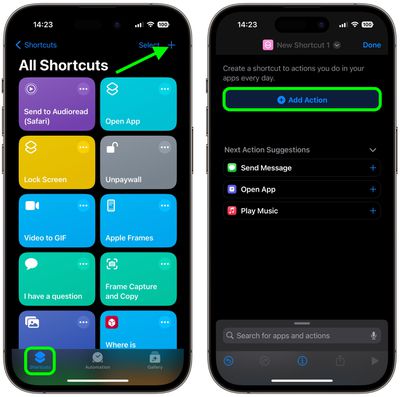
  2. Tap Add Action.
    shortcuts

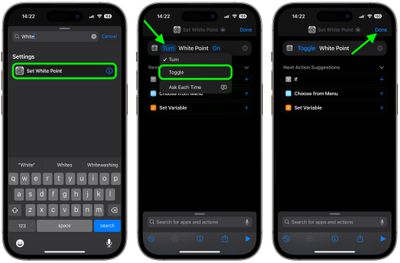
  3. Type "White Point" in the search field, then choose Set White Point when it appears below.
  4. Tap the blue "Turn" text, then choose Toggle from the dropdown menu.
  5. Tap Done in the top-right corner of the screen.
    shortcuts

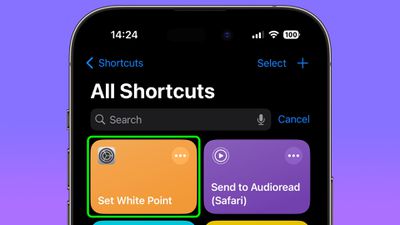
After following the above steps, you should see your new "Set White Point" shortcut in the Shortcuts menu.
shortcuts
The Shortcut is now ready to use in a new custom automation. It's easy to make, just follow these steps.

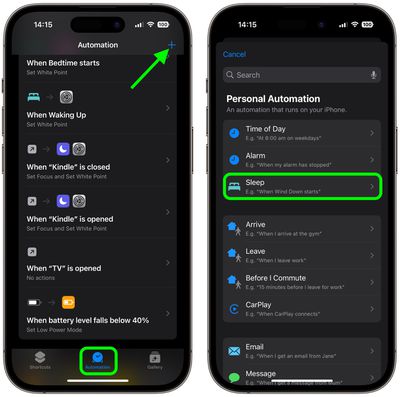
  1. In the Shortcuts app, select the Automation tab, then tap the + icon in the top-right corner of the screen.
  2. Under "Personal Automation," choose Sleep.
    shortcuts

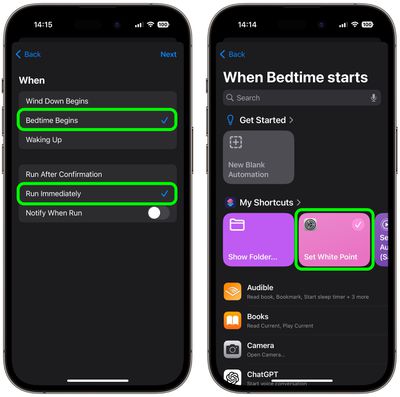
  3. On the "When" screen, choose Bedtime Begins and Run Immediately, then tap Next.
  4. On the "When Bedtime Starts" screen, choose your custom Set White Point shortcut.
    shortcuts

You're all done. In the future, when Bedtime starts or when you enable the Sleep focus, your screen's white point will be automatically reduced.

Trigger White Point When Bedtime Ends

To make sure the white point on your iPhone's display is reset when bedtime ends in the morning, you just have to create an additional automation. This basically involves the same steps you just used to create the first custom automation, except instead of choosing Bedtime Begins in step 3, select Waking Up. Here are those steps again for your convenience, but with a modified step 3.

  1. In the Shortcuts app, select the Automation tab, then tap the + icon in the top-right corner of the screen.
  2. Under "Personal Automation," choose Sleep.
  3. On the "When" screen, choose Waking Up and Run Immediately, then tap Next.
  4. On the "When Bedtime Starts" screen, choose your custom Set White Point shortcut.
That's it! The white point on your iPhone display will now return to normal when your bedtime ends.

Top Rated Comments

33 months ago
Or….hear me out…

Don’t use your phone in bed. It screws up your sleep. 🤷‍♂️
Score: 29 Votes (Like | Disagree)
33 months ago
Great feature - I had no idea this existed. However I take great exception to the phrase "or in a dimly lit theater"! No one should ever be getting their phone out there - it's just rude to everyone around you.
Score: 15 Votes (Like | Disagree)
antiprotest Avatar
33 months ago
Is this better than the zoom filter method?

Accessibility > Zoom > Zoom Filter > Low Light
Score: 9 Votes (Like | Disagree)
33 months ago
Or you can make it even more dim by actually disconnecting from your electronics while in bed and turn them off......
Score: 7 Votes (Like | Disagree)
TheGhostWalker Avatar
33 months ago
I've been using this for a long while now. Instead of using a shortcut, I have a triple press of the lock button to enable it. Super quick and easy to enable and disable

Accessibility → Accessibility Shortcut → Reduce White Point
Score: 4 Votes (Like | Disagree)
Le0M Avatar
33 months ago

Or….hear me out…

Don’t use your phone in bed. It screws up your sleep. 🤷‍♂️
Actually, I found out that reading an ebook while lying down puts me to sleep in no time.
Score: 3 Votes (Like | Disagree)

Popular Stories

iPhone Duo Hinge Feature 4

iPhone Duo Can Run Automations When You Open or Close It

Sunday October 25, 2026 3:26 pm PDT by
The iPhone Duo includes a new Shortcuts automation trigger that runs actions when the device is opened or closed. YouTuber Stephen Robles highlighted the trigger, which is called "Opened or Closed" and can be found under the Display automations category. It was first spotted in September by code sleuth pdfu in the iPhone Duo simulator. One possible use case is making the Duo switch to a...
duo aquarium

More Fun iPhone Duo Apps: 30 New Picks to Try

Friday November 6, 2026 3:27 pm PST by
When the iPhone Duo launched, we shared a list of some of the fun apps developers created for the new form factor. Two weeks out, developers are continuing to come up with fresh ideas, so we thought we'd share some of our favorites. Games Marbles Unhinged ($2.99) - Marbles Unhinged is a marble maze designed for the Duo. When you fold it, the floor turns into a ramp. If you stand the top...


apple pro tell logo

Apple Launching Five New Products Today

Thursday November 5, 2026 12:59 am PST by
Apple is launching five new products on Friday, November 6, following pre-orders that opened last week, including its first touchscreen MacBook Pro models. The following new products will be available from today: iPad mini with OLED display and A20 Pro chip iMac with M6 chip 14-inch MacBook Pro with M6 chip 14-inch MacBook Pro with OLED touchscreen 16-inch MacBook Pro with OLED...
Latest Stories
Siri AI Rumored to Become 'More Like an Agent' as Early as Next Year
7 hours ago
Apple Taking New Approach to Developing iOS 28 and macOS 28
9 hours ago
Early Apple Black Friday Deals on Apple Watch, MacBook Air, and More
1 day ago
'Backglow' Lets You Customize New MacBook Pro's Glowing Apple Logo
1 day ago
Top Stories: Apple Product Launches, iOS 27.3 Beta, and More
1 day ago
More Fun iPhone Duo Apps: 30 New Picks to Try
2 days ago
Hands-On With Apple's New OLED Touchscreen MacBook Pro
2 days ago
Apple Store With All-New Design Opening Soon in Southern California
2 days ago
Control the Glowing Apple Logo on Your New MacBook Pro
2 days ago
Apple Shares New 'Apple Card: Apply and Use in Minutes' Ad
2 days ago
Apple Says More Than 100,000 Apps Optimized for iPhone Duo, Here's What's Still Missing
2 days ago
Early Black Friday Deals Kickoff With Steep Discounts on Apple Watch Ultras and More
2 days ago
The MacRumors Show: iOS 27.3 Looks Like a Huge Update
2 days ago
Best Buy's Black Friday Event Begins With Sitewide Savings on Apple, TVs, More
2 days ago
Apple Releasing Yet Another Two New Products Next Week
2 days ago
MacBook Air Drops to Lowest Price in Months With Amazon's $250 Discount
2 days ago
Apple Rumored to Drop the iPhone's Action Button Next Year
2 days ago
Apple's Extended Return Policy Now in Effect for 2026 Holiday Season
2 days ago
Apple Music Classical Updated With New Icon and Refreshed Design
2 days ago
OLED iPad Mini, M6 iMac, and New MacBook Pros Available From Today
3 days ago
Apple Surveys iPhone Duo Buyers About Crease and Camera
3 days ago
Apple's First Touchscreen Mac is Now Arriving to Customers
3 days ago
Claude Gets Personal Finance Feature With Bank Account Linking
3 days ago
Apple Arcade Adds Crossy Road Rush and NBA 2K27
3 days ago
Apple's New HomeView Smart Home Hub: Here's How Much RAM It Has
3 days ago
iPad Mini vs. iPad Air Buyer's Guide: Now Just $50 Apart
3 days ago
First iOS 27.3 and macOS Golden Gate 27.3 Public Betas Now Available
3 days ago
Apple Announces a New Mac Sales Record
3 days ago
Paid $200 for Logic Pro? Apple Says You Won't Get This New Feature
3 days ago
Instagram's Edits Video Editor is Now Available on Mac
3 days ago








































