

macOS Monterey: What Does a Green or Orange Dot in the Menu Bar Mean? - MacRumorsOpen MenuShow RoundupsShow Forums menuVisit ForumsOpen Sidebar
Skip to Content

macOS Monterey: What Does a Green or Orange Dot in the Menu Bar Mean?

by

If you're wondering what the green and orange dots are that you sometimes see in your Mac's menu bar, just next to the Control Center icon, you've come to the right place. Apple has added these to macOS as a privacy feature in order to indicate when an app is using your Mac's microphone or camera.
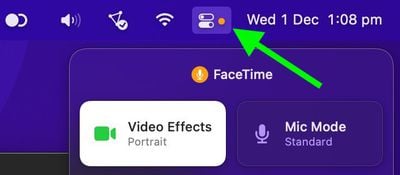
control center
The feature was first introduced on iPhone and iPad, after it emerged that some popular apps were accessing device cameras in the background, unbeknownst to users. To tighten Mac privacy and security, Apple has brought it over to macOS.

Green Dot

  • Green dot means an app is currently using the your Mac's camera.

Orange Dot

  • Orange dot means an iOS app is currently using the microphone.

If you open the Control Center when you see a colored dot, there will be a camera or microphone icon along with the name of the app that was recently using the feature.

In this way, recording indicators prevent the camera or microphone from being accessed by an app in the background without your knowledge, so you can be sure that apps aren't sneakily recording conversations or videos.
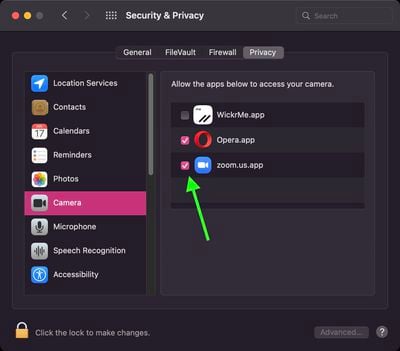
sysprefs
You can control the access that individual apps have to your Mac's camera and microphone. Launch System Preferences and select the Security & Privacy pane, then click Camera or Microphone in the sidebar. To remove an app's access to your mic or camera, simply uncheck the box next to it in the list.


Related Forum: macOS Monterey

Popular Stories

Apple Wallet

iOS 27 Will Add Two New Apple Wallet Features to Your iPhone

Monday June 1, 2026 12:15 pm PDT by
Apple is set to unveil iOS 27 during its WWDC 2026 keynote on Monday, June 8, and the update will reportedly include two new Apple Wallet features. First, iOS 27 will reportedly let users create their own digital passes by scanning items like movie tickets, concert passes, and gym membership cards. Many apps already offer Apple Wallet passes, but now users will be able to create a custom...
Dynamic Island iPhone 18 Pro Feature

iPhone 18 Pro Battery Capacities Allegedly Leaked

Tuesday June 2, 2026 1:54 am PDT by
Battery capacities for Apple's upcoming iPhone 18 Pro have allegedly surfaced, and the numbers suggest only a modest increase over the iPhone 17 Pro. According to prolific Weibo-based leaker Digital Chat Station, Apple is testing the iPhone 18 Pro with different battery capacities for the China and U.S. versions of the device, similar to last year's iPhone 17 Pro models. The Chinese model is ...
macOS 27 on MacBook Pro

Apple Says macOS 27 Won't Be Compatible With These Macs

Wednesday June 3, 2026 8:29 am PDT by
During WWDC 2025, Apple revealed that macOS 26 Tahoe would be the final major macOS version for Intel-based Macs. macOS 27 will be compatible with Apple silicon Macs only, meaning that you will need a Mac with an M-series chip or a MacBook Neo with an A18 Pro chip in order to install the software update. Apple will unveil macOS 27 during its WWDC 2026 keynote this Monday, June 8, and the...













