How to Merge and Remove Duplicate Contacts in macOS and iCloud - MacRumorsOpen MenuShow RoundupsShow Forums menuVisit ForumsOpen Sidebar
Skip to Content

How to Merge and Remove Duplicate Contacts in macOS and iCloud

by

contacts iconIf you've been maintaining and migrating the same Contacts list across Macs over the years then you've probably come across your fair share of duplicate contact cards. They can also appear seemingly out of nowhere after setting up iCloud Contacts on your Mac for the first time.

Unless you intentionally keep certain information for the same contact separated out for whatever reason, duplicate cards will add nothing but irritation to your day, so here we're going to show you how to merge and/or remove them, whether you're sat at your Mac or not.

How to Merge and Remove Duplicate Contacts on your Mac

As with any computer procedure that involves deleting data, make sure you have a backup of your system before following these steps.

  1. Launch the Contacts app on your Mac (found in Applications/Contacts).
    mac duplicates 1

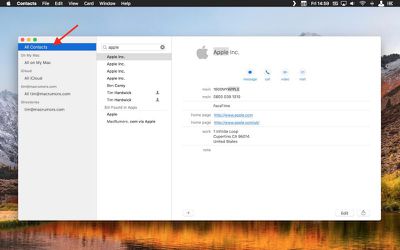
  2. In the Groups pane on the left, make sure All Contacts is selected at the top of the list. (If the Groups view is hidden, select the menu bar option View -> Show Groups to reveal it.)

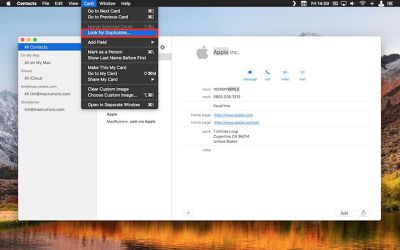
  3. From the menu bar, select Card -> Look for Duplicates....
    mac duplicates 2

  4. A dropdown dialog will appear telling you how many duplicate cards were found that either have the same name but contain different information, or have both the same name and the same information. To merge the duplicate cards and information, click the Merge button.
How to Remove Duplicate iCloud Contacts on PC and Mac

If you don't have access to your Mac you can remotely delete duplicate entries in your Contacts list in the following way. Oddly, there's no way to select multiple contacts on an iPhone or iPad running iOS 11, so this manual method is the best workaround, although bear in mind it only applies to contacts synced to ‌iCloud‌.

  1. Launch a web browser on your device or computer.

  2. Navigate to icloud.com.

  3. Sign in using your ‌iCloud‌ credentials.

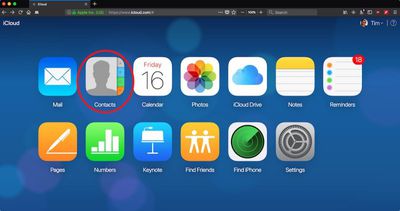
  4. Click Contacts.
    Screen Shot 2 1

  5. Select All Contacts in the upper left corner of the screen.

  6. Hold down the Command (⌘) key and manually click the duplicate cards you want to delete.
    icloud

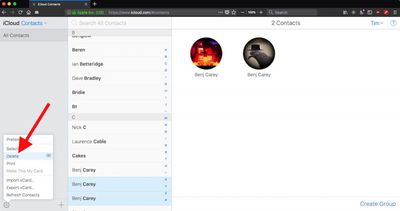
  7. Click the cog icon in the lower left corner and select Delete from the popup menu.

  8. Confirm you want to remove the selected contacts by clicking the Delete option in the dialog pane.
Tag: iCloud

Top Rated Comments

NightFox Avatar
112 months ago
So is there no way to check the duplicates before you allow them to be merged, or select which ones you want to be merged?
Score: 9 Votes (Like | Disagree)
garrick2007 Avatar
112 months ago
The last time I did that, I ended up losing some of my contacts permanently.
File>Export>Contacts Archive
Score: 6 Votes (Like | Disagree)
105 months ago
...back in the day I used to have 2 giant Rolodex's - and it was quite a job keeping those updated - or even figuring out where I put the contact info - company or contact name? - lol
:)

Back in the day, Apple used to allow us to connect and manually sync...accurately. Nowadays, their "support" can't even do anything other than tell you they are a "senior advisor" over and over. :rolleyes::mad:
Score: 4 Votes (Like | Disagree)
Kaaarl Avatar
112 months ago
FullContact ('http://FullContact') is a nice service to get rid of duplicates and get all your address books in sync. I use it daily and don't have any duplicates in my contacts anymore.
Score: 3 Votes (Like | Disagree)
Abazigal Avatar
112 months ago
The last time I did that, I ended up losing some of my contacts permanently.
Score: 3 Votes (Like | Disagree)
112 months ago
This should be automatic. It’s a bug.
Score: 3 Votes (Like | Disagree)

Popular Stories

iCloud General Feature Redux

Apple Won't Change Hide My Email Domain After Backlash

Monday August 24, 2026 1:17 pm PDT by
Apple today said it is reversing its decision and will not change the email domain used for the iCloud+ Hide My Email feature. Emails sent using Hide My Email will continue to use the same icloud.com domain that Apple uses for standard iCloud emails. In June, Apple said it would unify the email domains used by Sign in with Apple and Hide My Email under a single private.icloud.com domain....
Apple iCloud Plus expansion hero

iCloud+ Now Includes Apple TV, Apple Arcade, and Curated Apple Music Stations in Over 100 Countries

Tuesday September 15, 2026 1:43 am PDT by
Apple today announced a new subscription initiative that turns paid iCloud+ subscriptions into a broader services bundle in more than 100 countries. In select countries, Apple says every paid iCloud+ plan, including the cheapest 50GB tier, now includes Apple TV and Apple Arcade "at no additional cost," while family sharing extends the storage, TV and Arcade access to up to five people....
iOS 27 Next to iPhone

Here's When iOS 27 Rolls Out Today in Every Time Zone [Update: It's Out]

Sunday September 13, 2026 3:00 am PDT by
Update 10:04 a.m.: iOS 27 is rolling out now, though it may take a bit for all users to see it, so keep checking! Apple is about to release iOS 27, which will finally deliver more advanced Siri AI capabilities as well as a variety of other refinements, improvements, and new features to iPhones. It's Apple's biggest software update of the year, and Apple announced at Wednesday's iPhone event...