iOS 17: How to Name Your Pets in Photos With Pet Recognition - MacRumorsOpen MenuShow RoundupsShow Forums menuVisit ForumsOpen Sidebar
Skip to Content

iOS 17: How to Name Your Pets in Photos With Pet Recognition

by

With iOS 17 and iPadOS 17, Apple has added pet recognition to its stock Photos app for iPhone and iPad. Keep reading to learn how to set it up.

photos
Regular users of Apple's Photos app will be undoubtedly familiar with the People album, which tries to identify faces in your pictures so that you can label people with their proper names and use that label as an organizing element in your library or as a discoverable tag.

In addition to people, the ‌Photos‌ app in iOS 17 can recognize specific animals so you can have your pets automatically sorted into albums. Accordingly, the People album has been renamed the "People & Pets" album.

The pet recognition feature works on cats and dogs. If you have pictures of such animals in your photo library, here's how to name them for easier discovery and organization.

  1. Open the Photos app on your device.
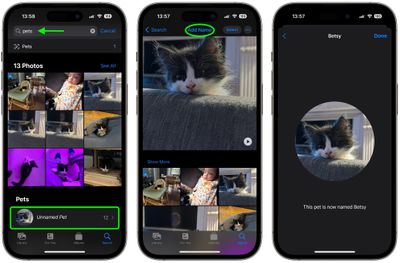
  2. Tap the Search tab, input "pets" into the search field at the top of the screen, then tap Search.
  3. Under "Pets" (located below the selection of photos identified as featuring pets) tap any Unnamed Pet.
  4. Tap Add Name at the top of the screen.
  5. Enter the pet's name, then tap Next.
  6. Tap Done to finish.

photos

That's all there is to it. Once your pet is named and recognized in photos, you can use the typical photo management options to organize and manage your tags.
photos
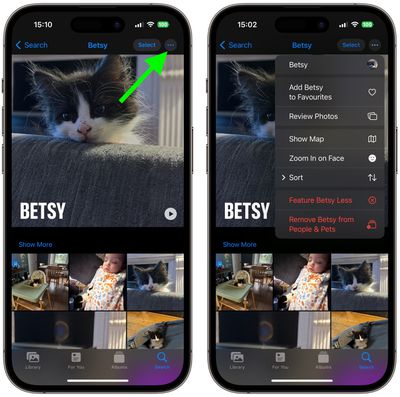
Simply select the pet in question, then tap the three encircled dots in the top-right corner of the screen, and you'll be able to favorite the pet, sort and review the pet's photos, and more.


Popular Stories

meta instants

Meta Launches 'Instants' App for Sharing Disappearing Photos on Instagram

Wednesday May 13, 2026 11:32 am PDT by
Meta today announced the launch of Instants, a new image sharing option on the Instagram social network. Instants are ephemeral photos that disappear from Instagram after they're viewed by a user's friends or after a 24-hour period. Reactions and replies to Instants images show up in DMs instead of on the post. Instants photos are only displayed for a short period, but they are saved to a...
sweeping AI driven upgrades feature

First Look at AI Camera and Photos Features in iOS 27 Revealed

Thursday May 28, 2026 6:32 am PDT by
Apple is planning sweeping AI-driven upgrades to its Camera and Photos apps in iOS 27, Bloomberg's Mark Gurman reports. Image via Bloomberg. The report offers a first look at the appearance of several major iOS 27 features that Apple plans to announce at its Worldwide Developers Conference on June 8. The images are based on information viewed by Bloomberg and people said to be familiar with ...
macOS 27 on MacBook Pro

Apple Says macOS 27 Won't Be Compatible With These Macs

Wednesday June 3, 2026 8:29 am PDT by
During WWDC 2025, Apple revealed that macOS 26 Tahoe would be the final major macOS version for Intel-based Macs. macOS 27 will be compatible with Apple silicon Macs only, meaning that you will need a Mac with an M-series chip or a MacBook Neo with an A18 Pro chip in order to install the software update. Apple will unveil macOS 27 during its WWDC 2026 keynote this Monday, June 8, and the...