Complete Guide to Using AirPods Pro's Newest Features - MacRumorsOpen MenuShow RoundupsShow Forums menuVisit ForumsOpen Sidebar
Skip to Content

Complete Guide to Using AirPods Pro's Newest Features

by

With last year's release of iOS 17, Apple introduced new features for second-generation AirPods Pro, such as Adaptive Audio, the ability mute/unmute yourself when on a phone call, and more.
airpods pro 2 thumbnail
Keep reading to learn what use cases the new noise control features are designed for, and how you can control them in iOS 17 when your iPhone is connected to AirPods Pro 2 with updated firmware. To skip to a specific feature, hit one of the links below.

The new features are available on iPhones running iOS 17 when paired with second-generation AirPods Pro updated with the latest firmware. That includes second-generation AirPods Pro with the new USB-C MagSafe Charging Case, as well as second-generation AirPods Pro with the Lightning ‌MagSafe‌ Charging Case.

Check Your AirPods Pro Firmware

Apple does not offer instructions on how to upgrade AirPods software, but firmware is generally installed over-the-air while the ‌‌AirPods‌‌ are connected to an iOS device. Putting the ‌‌‌‌‌AirPods‌‌‌‌‌ in the case, connecting the ‌‌‌‌‌AirPods‌‌‌‌‌ to a power source, and then pairing the ‌‌‌‌‌AirPods‌‌‌‌‌ to an iOS device or Mac should force the update.

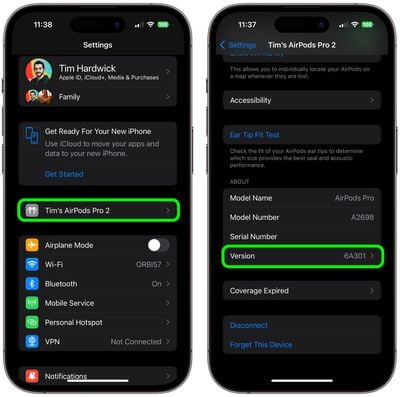
You can check your‌ ‌‌‌‌‌‌‌AirPods Pro‌‌‌‌‌‌‌‌ firmware by connecting them to your iPhone and following these steps:

  1. Open the Settings app.
  2. Tap [your name]'s AirPods Pro.
  3. Scroll down to the "About" section.
  4. Look for the Version number.

settings

If your AirPods Pro are updated with the latest version number (6E188 as of March 2024) you're ready to enjoy the new features in iOS 17.

Adaptive Audio

When the second-generation ‌AirPods Pro‌ were introduced, their Adaptive Transparency feature offered a new way to reduce loud environmental noise for more comfortable everyday listening.

Adaptive Audio, or Adaptive Noise Control, takes that approach to the next level by dynamically blending the existing Transparency and Active Noise Cancellation modes together to deliver the best audio experience in the moment. Adaptive Audio tailors the noise control as you move between different environments and interactions.

airpods pro adaptive audio
This way, loud or distracting noises surrounding, such as the sound of a leaf blower, are automatically reduced, while other noises, like the sudden beep of a car horn, will still be audible.

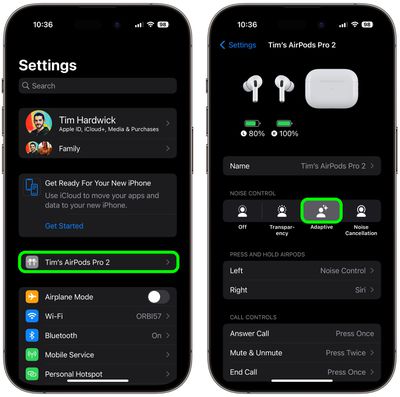
To enable or disable Adaptive Audio on AirPods Pro, connect them to your iPhone and follow one of these series of steps.

Method 1:

  1. Open Settings.
  2. Tap [your name]'s AirPods Pro.
  3. Under "Noise Control," tap Adaptive.

settings

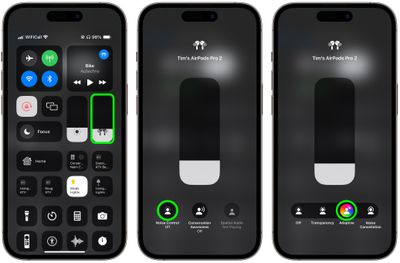
Method 2:

  1. Bring up the Control Center from your iPhone by swiping down from the upper right corner of the screen (on an ‌iPhone‌ with a Home button, swipe up from the bottom of the screen).
  2. Long press on the AirPods Pro volume slider.
  3. Tap the Noise Control button.
  4. Select Adaptive.

settings

Button Control

You can also switch to Adaptive Audio with a long button press, but first you need to assign it to your AirPods Pro 2 controls, like so:

  1. Open Settings.
  2. Tap [your name]'s AirPods Pro.
  3. Under "Press and Hold AirPods," tap Left or Right.
  4. Select Noise Control, then check Adaptive. You can also check Noise Cancellation and/or Transparency to switch between these modes using the same button, or check Off to turn off Noise Control using another long press.
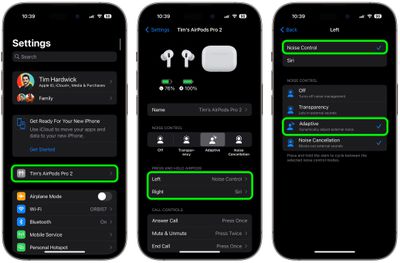
settings

Conversation Awareness

Conversation Awareness is able to detect when someone starts talking to you, and will lower the volume of the audio you're listening to and cut down on background noise accordingly.

airpods pro conversation boost
Conversation Awareness also helps when you're on a call, by reducing noise around you while you speak. As a sub-component of Adaptive Audio, this feature also enhances the voices in front of you so you can hear what's going on.

To enable or disable Conversation Awareness, connect your AirPods Pro 2 to your iPhone and follow these steps.

  1. Open Settings.
  2. Tap [your name]'s AirPods Pro.
  3. Scroll down to the "Audio" section and toggle on/off the switch next to Conversation Awareness.
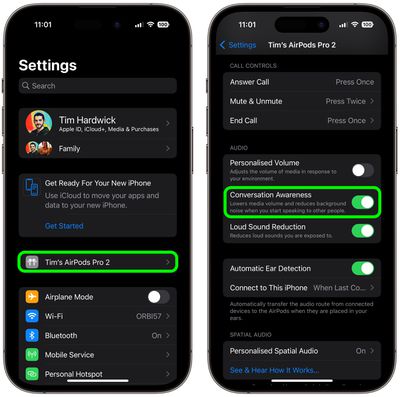
settings

Personalized Volume

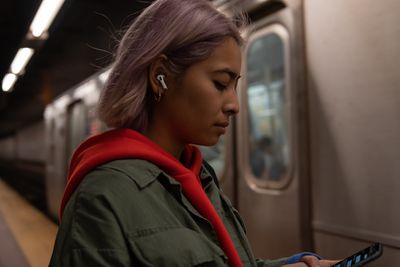
Similar to Adaptive Audio, Personalized Volume uses machine learning to fine-tune your listening experience by understanding environmental conditions and listening preferences.
airpods pro person
Thanks to this feature, your ‌‌iPhone‌‌ is able to learn more about the volume that you prefer over time, and will tweak it as necessary to match your desired sound level.
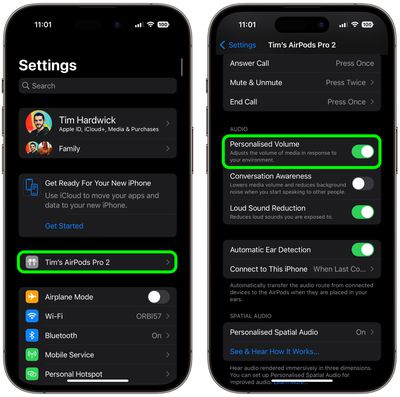
To enable or disable Personalized Volume, connect your AirPods Pro 2 to your iPhone and follow these steps.

  1. Open Settings.
  2. Tap [your name]'s AirPods Pro.
  3. Scroll down to "Audio" and toggle on/off the switch next to Personalized Volume.
settings

Mute Controls

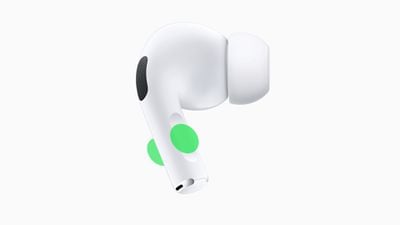
Prior to the release of iOS 17, ‌AirPods Pro‌ did not include an assignable on-board mute function. Thankfully, that's no longer the case. If you press the stem of your ‌‌AirPods Pro‌‌ earbuds, you will be able to mute and unmute yourself while you're on a call.
airpods pro 2 mute
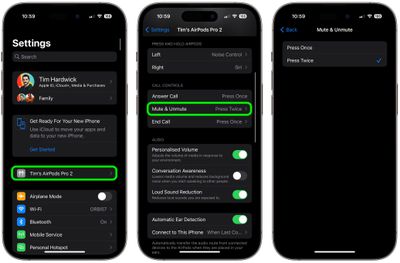
You can assign mute and unmute call controls to activate with a single press or a double press of the button on your AiPods Pro 2. Connect your AirPods Pro 2 to your iPhone and follow these steps to set your preference.

  1. Open Settings.
  2. Tap [your name]'s AirPods Pro.
  3. Scroll down to "Call Controls", then tap Mute & Unmute.
  4. Select either Press Once or Press Twice.
settings

Other AirPods Changes

AirPods have been criticized in the past for sluggish performance when attempting to automatically switch between Apple devices. Fortunately, ‌‌AirPods Pro‌‌ 2 automatically switch between Apple devices much quicker in ‌‌iOS 17 and later‌‌.

Hey Siri vs Siri
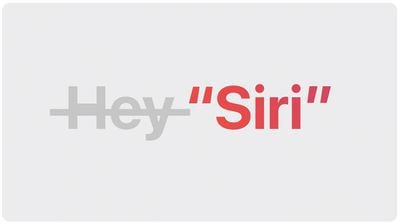
And don't forget, Apple has simplified the voice command to invoke Siri on iPhones running iOS 17 and this also works with second-generation ‌AirPods Pro‌. Instead of "Hey ‌‌Siri‌‌," you can simply say "‌‌Siri‌‌" to activate the voice assistant when wearing your AirPods. You can also issue multiple queries and commands in succession without having to say "‌‌Siri‌‌" again.

Related Roundup: AirPods Pro 3
Buyer's Guide: AirPods Pro (Neutral)
Related Forum: AirPods

Top Rated Comments

41 months ago
I used Conversation Awareness for about 10 minutes before turning it off.

It takes about 4-5 seconds to start the audio back up after it has paused it. If it was quicker maybe it would better but I find it too slow.
Score: 9 Votes (Like | Disagree)
abatabia Avatar
41 months ago
Which feature will keep my AirPods Pro 2 case from draining to nothing once a day now, while Apple support telling me that’s normal behavior. This happened, mind you, with them sitting on my shelf, not being used. Never happened with any previous AirPods I ever owned. Can’t say I’m thrilled with this, or the decline in Apple support.
Score: 7 Votes (Like | Disagree)
fwmireault Avatar
41 months ago

Basically all of those features create unpredictable behavior and negatively affect hearing experience, rather than an easy “on” or “off”. Apple has no way to know what matters the most at any given moment regardless. Trying to outsmart the complexity of the real world is just pointless.
Transparency mode and Active noise cancellation are still an option. If Adaptative audio doesn't work for you, just don't use it. I tried it over the weekend and I quite like it. I'm all for providing options and letting customers making their own choices.


Score: 6 Votes (Like | Disagree)
Shirasaki Avatar
41 months ago
Basically all of those features create unpredictable behavior and negatively affect hearing experience, rather than an easy “on” or “off”. Apple has no way to know what matters the most at any given moment regardless. Trying to outsmart the complexity of the real world is just pointless.
Score: 5 Votes (Like | Disagree)
41 months ago
Does the mute feature work if on a web call, such as Skype or even in a chat such as Discord? It’s not as useful if it’s only for phone calls.
Score: 4 Votes (Like | Disagree)
41 months ago
I don't want my music to get quieter if I have a conversation; I want my music to stop playing. Until they allow that, I don't have any interest in conversation awareness.
Score: 3 Votes (Like | Disagree)

Popular Stories

airpods pro 2 hearing aids

AirPods Pro Hearing Aid Feature Launching in These Canadian Provinces

Monday October 26, 2026 9:25 am PDT by
iOS 27.2 and iPadOS 27.2 enable Apple's clinical-grade Hearing Aid feature on the AirPods Pro 2 and AirPods Pro 3 in five Canadian provinces: Alberta, British Columbia, New Brunswick, Prince Edward Island, and Saskatchewan. The feature is still not available in any other provinces, but Ontario is reportedly set to hold a meeting to change a law that will pave the way for it to launch there,...
duo aquarium

More Fun iPhone Duo Apps: 30 New Picks to Try

Friday November 6, 2026 3:27 pm PST by
When the iPhone Duo launched, we shared a list of some of the fun apps developers created for the new form factor. Two weeks out, developers are continuing to come up with fresh ideas, so we thought we'd share some of our favorites. Games Marbles Unhinged ($2.99) - Marbles Unhinged is a marble maze designed for the Duo. When you fold it, the floor turns into a ramp. If you stand the top...
apple pro tell logo

Apple Launching Five New Products Today

Thursday November 5, 2026 12:59 am PST by
Apple is launching five new products on Friday, November 6, following pre-orders that opened last week, including its first touchscreen MacBook Pro models. The following new products will be available from today: iPad mini with OLED display and A20 Pro chip iMac with M6 chip 14-inch MacBook Pro with M6 chip 14-inch MacBook Pro with OLED touchscreen 16-inch MacBook Pro with OLED...
Latest Stories
Apple Store Subscription Sign-Up Controversy Exposed
6 hours ago
Siri AI Rumored to Become 'More Like an Agent' as Early as Next Year
16 hours ago
Apple Taking New Approach to Developing iOS 28 and macOS 28
18 hours ago
Early Apple Black Friday Deals on Apple Watch, MacBook Air, and More
2 days ago
'Backglow' Lets You Customize New MacBook Pro's Glowing Apple Logo
2 days ago
Top Stories: Apple Product Launches, iOS 27.3 Beta, and More
2 days ago
More Fun iPhone Duo Apps: 30 New Picks to Try
2 days ago
Hands-On With Apple's New OLED Touchscreen MacBook Pro
2 days ago
Apple Store With All-New Design Opening Soon in Southern California
3 days ago
Control the Glowing Apple Logo on Your New MacBook Pro
3 days ago
Apple Shares New 'Apple Card: Apply and Use in Minutes' Ad
3 days ago
Apple Says More Than 100,000 Apps Optimized for iPhone Duo, Here's What's Still Missing
3 days ago
Early Black Friday Deals Kickoff With Steep Discounts on Apple Watch Ultras and More
3 days ago
The MacRumors Show: iOS 27.3 Looks Like a Huge Update
3 days ago
Best Buy's Black Friday Event Begins With Sitewide Savings on Apple, TVs, More
3 days ago
Apple Releasing Yet Another Two New Products Next Week
3 days ago
MacBook Air Drops to Lowest Price in Months With Amazon's $250 Discount
3 days ago
Apple Rumored to Drop the iPhone's Action Button Next Year
3 days ago
Apple's Extended Return Policy Now in Effect for 2026 Holiday Season
3 days ago
Apple Music Classical Updated With New Icon and Refreshed Design
3 days ago
OLED iPad Mini, M6 iMac, and New MacBook Pros Available From Today
3 days ago
Apple Surveys iPhone Duo Buyers About Crease and Camera
3 days ago
Apple's First Touchscreen Mac is Now Arriving to Customers
3 days ago
Claude Gets Personal Finance Feature With Bank Account Linking
3 days ago
Apple Arcade Adds Crossy Road Rush and NBA 2K27
3 days ago
Apple's New HomeView Smart Home Hub: Here's How Much RAM It Has
4 days ago
iPad Mini vs. iPad Air Buyer's Guide: Now Just $50 Apart
4 days ago
First iOS 27.3 and macOS Golden Gate 27.3 Public Betas Now Available
4 days ago
Apple Announces a New Mac Sales Record
4 days ago
Paid $200 for Logic Pro? Apple Says You Won't Get This New Feature
4 days ago