How to Use Night Shift in macOS Sierra 10.12.4 - MacRumorsOpen MenuShow RoundupsShow Forums menuVisit ForumsOpen Sidebar
Skip to Content

How to Use Night Shift in macOS Sierra 10.12.4

by

Night Shift, the feature first introduced in iOS devices with iOS 9.3, has expanded to the Mac with the release of 10.12.4. Night Shift is compatible with 2012 and newer Macs, so it won't work on older machines.

For those unfamiliar with Night Shift, it's designed to cut down on the amount of blue light you're exposed to during the evening by shifting the display of a Mac to a more yellow tone. Blue light is said to have a harmful effect on your circadian rhythm, making it harder to fall asleep and stay asleep.

Studies suggest that eliminating blue light exposure at night might help you sleep just a bit better, but it does significantly change the look of your display. Many Mac users have been using blue light reduction software f.lux for years now, but with Night Shift, there's no need to install an additional app because it's an operating system feature.

Turning On Night Shift

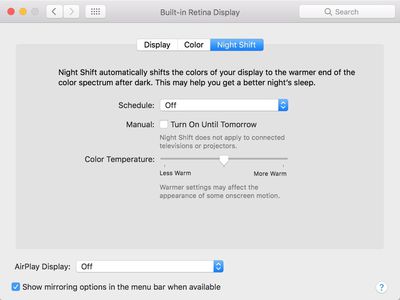
Night Shift's controls can be a little bit difficult to find when you go to use the feature for the first time. The Night Shift options are located in the display section of System Preferences.
nightshiftoptions

  1. Click on the Apple icon in the menu bar and select System Preferences.
  2. Choose the "Displays" icon.
  3. There are three tabs in this menu: Display, Color, and Night Shift. Choose Night Shift.
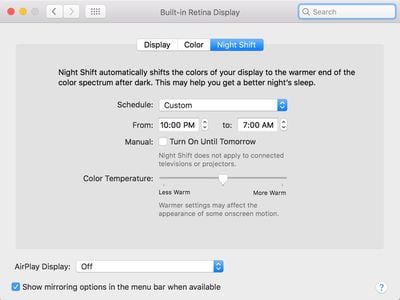
  4. From the "Schedule" option, choose either "Sunset to Sunrise" or "Custom."

As the name suggests, the "Sunset to Sunrise" option causes Night Shift to turn on automatically each night when the sun sets and turn off when the sun rises. It's based on your local sunset and sunrise times. This option requires your location to be enabled in Security & Privacy Preferences so your Mac knows where you are in the world.

The "Custom" option lets you choose a specific start and end time for Night Shift to turn on. With a custom setting, it will turn on and off at the same time each night based on the time that you choose.
nightshiftcustom

Adjusting Color Temperature

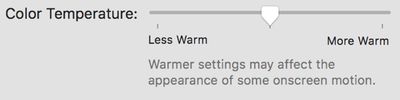
In the same section System Preferences that's used to turn Night Shift on, there's also an option to adjust the color temperature of the feature to your liking.
nightshiftcolortemperature
By default, the temperature is set to the middle, but if you drag the slider to the left, you'll get more blue light, and if you drag it to the right, you'll get a deeper yellow shade with less blue light.

Apple warns that using the warmer end of the spectrum could affect the appearance of some onscreen motion.

Night Shift Quick Toggle

If you want to manually enable or disable Night Shift, there are two ways to do it. You can use the "Manual" setting in System Preferences to force Night Shift to turn on, or you can use the Notification Center, which is quicker. For the Notification Center:

  1. Click on the Notification Center menu bar icon, which is denoted by three lines. It'll open to the Today view. nightshiftnotificationcenter
  2. Scroll up to the top of the Notification Center.
  3. Click on the "Night Shift" toggle to turn the feature on or turn it off.
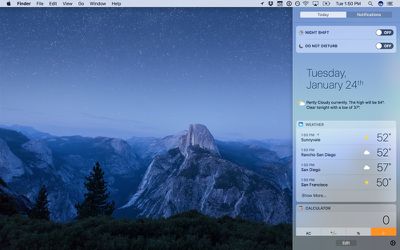
Choosing one of the manual toggle options when Night Shift is off will toggle it on until sunrise (or a custom set time) no matter what time it is. Toggling it off will turn it off completely.

Siri

Siri, introduced in macOS Sierra, can be used to turn Night Shift on or off. Click the Siri button in the menu bar or the dock and say "Turn on Night Shift" or "Turn off Night Shift" to control the Night Shift feature.
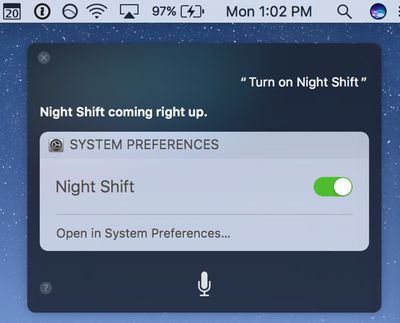
nightshiftsiri

External Monitors

Night Shift extends to external displays that are connected to your Mac, shifting the temperature to a warmer tone to match the Mac's display. It is not an individual option that can be applied to a display, but rather mirrors the Mac setting.

Night Shift does not extend to connected televisions or projectors, however, nor does it always work reliably with an external display.

Compatibility

Night Shift works with Macs manufactured in 2012 and later and it is not available on older machines. A full list of devices that support Night Shift is below:

  • MacBook (Early 2015 or newer)
  • MacBook Air (Mid 2012 or newer)
  • MacBook Pro (Mid 2012 or newer)
  • Mac mini (Late 2012 or newer)
  • iMac (Late 2012 or newer)
  • Mac Pro (Late 2013 or newer)
  • Apple LED Cinema Display
  • Apple Thunderbolt Display
  • LG UltraFine 5K Display
  • LG UltraFine 4K Display

Limitations

There is no option to toggle Night Shift on and off for specific apps, so if you wanted to be able to do something like turn Night Shift off when you use Photoshop or watch videos, there's no way to do it. It's all or nothing.


Related Forum: macOS Sierra

Top Rated Comments

126 months ago
Correct me if I'm wrong but it doesn't seem to work on older MacBook Pros, I can't find the Night Shift tab on my late 2011 13" MacBook Pro.

Not wrong ... Apple are intentionally devaluing older hardware ... no actual reason for this missing feature ... flux has been working fine on my 2010 MBP a long time ... the hardware can handle it ... unless Apple are saying that their engineers cannot do what flux clearly can!!!

It used to be that hardware was not intentionally made obsolete in terms of features ... unless there was no choice.
Score: 11 Votes (Like | Disagree)
ryanmcv Avatar
126 months ago
I was able to turn on Night Shift on my late 2010 Air using instructions I found on https://pikeralpha.wordpress.com/2017/01/30/4398/

So far it works.
Thanks for the link! Used the instructions to enable Night Shift on my 15" MacBook Pro (Early 2011). It works perfectly! I created a step-by-step guide to make things a bit clearer.

View the steps here:

https://pikeralpha.wordpress.com/2017/01/30/4398/#comment-9146
Score: 6 Votes (Like | Disagree)
graycrow Avatar
126 months ago
I was able to turn on Night Shift on my late 2010 Air using instructions I found on https://pikeralpha.wordpress.com/2017/01/30/4398/

So far it works.
Score: 4 Votes (Like | Disagree)
126 months ago
It's a little odd that the headline feature replicates the actions of a free app that's been around for years
This always happens. I usually prefer Apple's own implantation of said new features though.
Score: 4 Votes (Like | Disagree)
faded_glory Avatar
126 months ago
I can understand features that require more up to date versions of bluetooth, etc, not working on older Macs, but this is about people's sleep and therefore their health. So to disable it on on older Macs is grotesquely cynical.
Seriously disappointed with Apple over this.
Score: 3 Votes (Like | Disagree)
graycrow Avatar
126 months ago

I see an opportunity for an app. You could cobble this up for pre-2012 Macs. You could do it in Applescript... if the time is x or later then change the hue of the monitor so that it's the same pink as nightshift. SURELY somebody has already done this?
It's called f.lux.
Score: 3 Votes (Like | Disagree)

Popular Stories

duo aquarium

More Fun iPhone Duo Apps: 30 New Picks to Try

Friday November 6, 2026 3:27 pm PST by
When the iPhone Duo launched, we shared a list of some of the fun apps developers created for the new form factor. Two weeks out, developers are continuing to come up with fresh ideas, so we thought we'd share some of our favorites. Games Marbles Unhinged ($2.99) - Marbles Unhinged is a marble maze designed for the Duo. When you fold it, the floor turns into a ramp. If you stand the top...
apple pro tell logo

Apple Launching Five New Products Today

Thursday November 5, 2026 12:59 am PST by
Apple is launching five new products on Friday, November 6, following pre-orders that opened last week, including its first touchscreen MacBook Pro models. The following new products will be available from today: iPad mini with OLED display and A20 Pro chip iMac with M6 chip 14-inch MacBook Pro with M6 chip 14-inch MacBook Pro with OLED touchscreen 16-inch MacBook Pro with OLED...
iOS 28 AI

Apple Taking New Approach to Developing iOS 28 and macOS 28

Sunday November 8, 2026 7:42 am PST by
Apple has made a change to its development process for iOS 28, macOS 28, and corresponding software updates, according to Bloomberg's Mark Gurman. In his Power On newsletter today, he said Apple separates development of each year's new operating systems into three major stages. Typically, he said each stage consists of four weeks of coding followed by a four-week "convergence" period where...
Latest Stories
Apple Store Subscription Sign-Up Controversy Exposed
5 hours ago
Siri AI Rumored to Become 'More Like an Agent' as Early as Next Year
15 hours ago
Apple Taking New Approach to Developing iOS 28 and macOS 28
17 hours ago
Early Apple Black Friday Deals on Apple Watch, MacBook Air, and More
2 days ago
'Backglow' Lets You Customize New MacBook Pro's Glowing Apple Logo
2 days ago
Top Stories: Apple Product Launches, iOS 27.3 Beta, and More
2 days ago
More Fun iPhone Duo Apps: 30 New Picks to Try
2 days ago
Hands-On With Apple's New OLED Touchscreen MacBook Pro
2 days ago
Apple Store With All-New Design Opening Soon in Southern California
2 days ago
Control the Glowing Apple Logo on Your New MacBook Pro
3 days ago
Apple Shares New 'Apple Card: Apply and Use in Minutes' Ad
3 days ago
Apple Says More Than 100,000 Apps Optimized for iPhone Duo, Here's What's Still Missing
3 days ago
Early Black Friday Deals Kickoff With Steep Discounts on Apple Watch Ultras and More
3 days ago
The MacRumors Show: iOS 27.3 Looks Like a Huge Update
3 days ago
Best Buy's Black Friday Event Begins With Sitewide Savings on Apple, TVs, More
3 days ago
Apple Releasing Yet Another Two New Products Next Week
3 days ago
MacBook Air Drops to Lowest Price in Months With Amazon's $250 Discount
3 days ago
Apple Rumored to Drop the iPhone's Action Button Next Year
3 days ago
Apple's Extended Return Policy Now in Effect for 2026 Holiday Season
3 days ago
Apple Music Classical Updated With New Icon and Refreshed Design
3 days ago
OLED iPad Mini, M6 iMac, and New MacBook Pros Available From Today
3 days ago
Apple Surveys iPhone Duo Buyers About Crease and Camera
3 days ago
Apple's First Touchscreen Mac is Now Arriving to Customers
3 days ago
Claude Gets Personal Finance Feature With Bank Account Linking
3 days ago
Apple Arcade Adds Crossy Road Rush and NBA 2K27
3 days ago
Apple's New HomeView Smart Home Hub: Here's How Much RAM It Has
3 days ago
iPad Mini vs. iPad Air Buyer's Guide: Now Just $50 Apart
4 days ago
First iOS 27.3 and macOS Golden Gate 27.3 Public Betas Now Available
4 days ago
Apple Announces a New Mac Sales Record
4 days ago
Paid $200 for Logic Pro? Apple Says You Won't Get This New Feature
4 days ago









































