

How to Use the New One-Handed Keyboard in iOS 11 - MacRumorsOpen MenuShow RoundupsShow Forums menuVisit ForumsOpen Sidebar
Skip to Content

How to Use the New One-Handed Keyboard in iOS 11

by

There are a lot of little small tweaks and feature changes buried in iOS 11, and an option for a one-handed keyboard is one of them. With the one-handed keyboard, the entire on-screen keyboard can be shifted to either the left or the right so you can type more comfortably with a single hand even with a phone as large as the iPhone 7 Plus.

The feature is compatible with 4.7-inch and 5.5-inch iPhones, although it appears it may not work on 4.7-inch iPhones if display zoom has been turned on.
ios11onehandedkeyboard
Once you know the feature is available it's easy to get to and activate, as long as you have multiple keyboards turned on in Settings. Here's how:

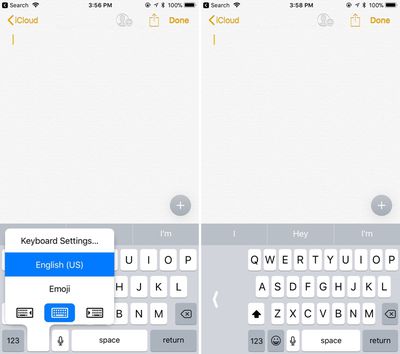
  1. With the keyboard open, long press on the globe or the emoji symbol if you have the emoji keyboard activated. A simple tap won't work because this brings up emoji or other keyboard options.
  2. At the bottom of the display, there are three keyboard options: shifted left, centered, and shifted right. Choose right or left to pick one of the one-handed keyboards.

With the one-handed keyboard enabled, the keys are shifted to the left or right by about an inch on the iPhone 7 Plus. The keys remain off-center for as long as you're using the keyboard, unless you tap the large white arrow.

Tapping on that arrow returns the keyboard to its standard center position, and you'll need to repeat the above steps to get it to shift over again.
one hand keyboard settings
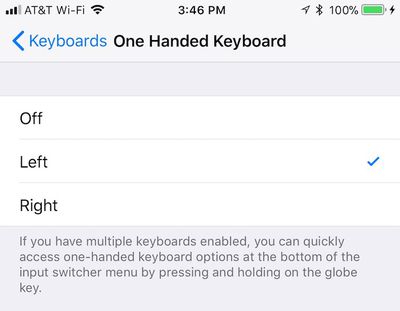
If you don't have multiple keyboards set up, you'll need to either turn on another keyboard by navigating to the Keyboards option within the General section of your Settings app or manually turn on one-handed keyboard to the left or right on that same page.


Related Forum: iOS 11

Top Rated Comments

drzen Avatar
115 months ago
Microsoft's implementation was much better with the curved arc one handed keyboard mode.

MacRumors content image
Score: 5 Votes (Like | Disagree)
Heebeejeebies Avatar
115 months ago
Thanks, folks...we added a clarification on the models it works with.

Seeing some reports from 6s owners that it doesn't work even with zoom turned off. (Like the post above this one. :))

I don't think we have a 6s among our staff members to test on, so would appreciate any other reports.
I've got a 6s. Works fine for me.
Score: 2 Votes (Like | Disagree)
115 months ago
not available on SE but probably not necessary
Yes the whole phone is one-handed :cool:
Score: 1 Votes (Like | Disagree)
dtb200 Avatar
115 months ago
care to explain what are you sharing here?
Yes - it's a screen recording of what happens on my 6s when I look for the one-handed typing option
Score: 1 Votes (Like | Disagree)
needfx Avatar
115 months ago
https://www.icloud.com/sharedalbum/#B0Q5aVbMKMisEi
care to explain what are you sharing here?
Score: 1 Votes (Like | Disagree)
WildCowboy Avatar
115 months ago
Thanks, folks...we added a clarification on the models it works with.

Seeing some reports from 6s owners that it doesn't work even with zoom turned off. (Like the post above this one. :))

I don't think we have a 6s among our staff members to test on, so would appreciate any other reports.
Score: 1 Votes (Like | Disagree)

Popular Stories

iCloud iPhone 17 Pro

iPhone Users Who Pay for iCloud Storage Get Two New Perks on iOS 27

Thursday July 2, 2026 6:10 am PDT by
If you pay for certain iCloud+ storage plans beyond the 5GB that Apple offers for free, you will receive two more perks on iOS 27 at no additional cost. A summary of the two new iCloud+ perks on iOS 27:Increased daily usage limits for some new Apple Intelligence features, including image generation in the revamped Image Playground app. HomeKit Secure Video cameras receive generated video...
iPhone 4 on Black Feature

Apple Facing One of Its Worst Leaks Since the iPhone 4

Thursday July 2, 2026 9:53 am PDT by
Apple supplier Tata Electronics recently suffered a cyberattack that resulted in thousands of confidential files being published on the dark web, and this reportedly included some photos and documents related to the upcoming iPhone 18 Pro. We have elected not to share any of the leaked photos in this story due to the illegal nature in which they were obtained, but they can easily be found...
American Express Gold Apple Pay Feature

American Express Announces New Apple Pay Feature

Tuesday June 30, 2026 10:27 am PDT by
American Express today announced that you can now redeem Membership Rewards points when checking out with Apple Pay on the web and in apps on the iPhone and iPad. When checking out with Apple Pay on iOS 18 or iPadOS 18 or later, tap on your eligible American Express card (Platinum, Gold, Green, and others) and select the Membership Rewards points option. You can use points to cover all or...













