Make Your Photos Take Up Less iPhone Storage Space - MacRumorsOpen MenuShow RoundupsShow Forums menuVisit ForumsOpen Sidebar
Skip to Content

Make Your Photos Take Up Less iPhone Storage Space

by

The photos that you keep on your iPhone or iPad naturally take up storage space on your device, which can fill up quickly depending on the available storage capacity and how much content you have.
icloud photos
If you see a message that your device's storage is full, it's worth checking out a system option called Optimize Storage, which is designed to work with iCloud Photos. This feature replaces full-resolution photos on your iOS device with smaller, device-sized versions that take up a lot less storage space, and it's a great option to use with Apple's built-in storage options.

Apple offers the following iCloud storage tiers:

  • 50 GB Plan: $0.99 per month
  • 200 GB Plan: $2.99 per month
  • 2 TB Plan: $9.99 per month
  • 6 TB Plan: $29.99 per month
  • 12 TB Plan: $59.99 per month

Each plan includes additional features such as iCloud Private Relay, Hide My Email, custom email domains, and varying levels of HomeKit Secure Video support. The lower tier fees in particular may be well worth it to clear up device storage space if you have a lot of photos. The following steps show you how to do just that.

Optimize Storage on your iPhone or iPad

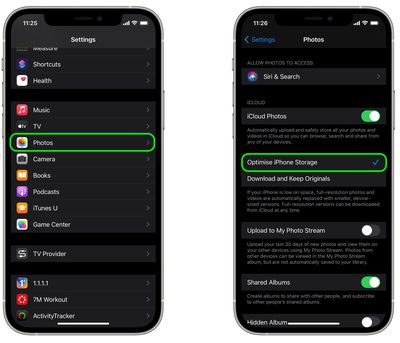
  1. Launch Settings on your iPhone or iPad.
  2. Scroll down to the bottom and tap Apps.
  3. Choose Photos in the apps list.
  4. Make Sure iCloud Photos is toggled on.
  5. Tap Optimize iPhone/iPad Storage.
    settings

Once that's selected, your full-resolution photos will be automatically replaced with smaller versions that take up a lot less storage space on your device, while the full-resolution images remain off-device in iCloud.

To learn how to manage and delete videos on your iPhone or iPad, check out our dedicated how-to on the topic.


Popular Stories

google photos wardrobe

Google Photos to Get AI 'Wardrobe' Feature

Wednesday April 29, 2026 3:50 pm PDT by
Google Photos is getting a new wardrobe planning feature that will help you decide what to wear. AI will pull in images of clothing from the Google Photos library, organizing clothing items into a digital closet. You will be able to put items together to create outfits, and even virtually try them with a digital avatar on to see how they'll look. The Google Photos app will show all items of...
meta instants

Meta Launches 'Instants' App for Sharing Disappearing Photos on Instagram

Wednesday May 13, 2026 11:32 am PDT by
Meta today announced the launch of Instants, a new image sharing option on the Instagram social network. Instants are ephemeral photos that disappear from Instagram after they're viewed by a user's friends or after a 24-hour period. Reactions and replies to Instants images show up in DMs instead of on the post. Instants photos are only displayed for a short period, but they are saved to a...
Apple Card iPhone 16 Pro Feature

Apple Card Promo to Offer Free AirPods Pro 3

Friday May 15, 2026 8:59 am PDT by
Starting as early as next week, customers who sign up for an Apple Card at Apple's retail stores in the U.S. will receive $249 cash back when they purchase AirPods Pro 3, according to Bloomberg's Mark Gurman. The promotion has yet to be officially announced by Apple, so exact terms and conditions are not available at this time. AirPods Pro 3 are priced at $249 in the U.S., so customers who...