How to Use Split View in OS X El Capitan - MacRumorsOpen MenuShow RoundupsShow Forums menuVisit ForumsOpen Sidebar
Skip to Content

How to Use Split View in OS X El Capitan

by

With the recent release of OS X El Capitan, Mac users can now take advantage of full-screen apps in a split screen view. That is, a compatible app will zoom to take up an entire half of the screen and you can do the same with a second one, giving you two apps side-by-side in full-screen mode.

While the basics of Split View are simple, there are a few aspects you might want to get familiar with to make the most productive use of the feature.
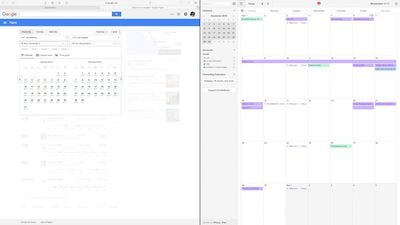
How to Split Screen Main
To activate Split View, click and hold on the green expand button in the upper left corner of a compatible app's window.
How to Split Screen 001
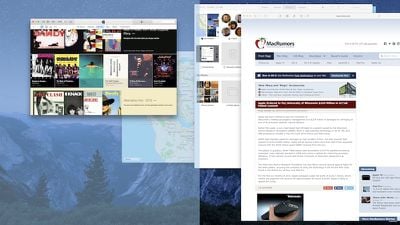
While you are holding down the button, one side of the screen will be shaded in blue. Release the button and the app will automatically format to fit half of the screen.

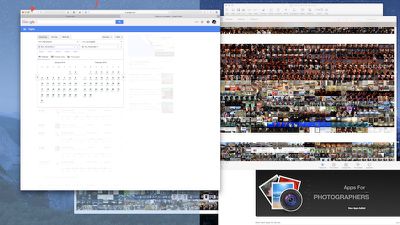
At the same time, any compatible apps that are open will automatically shift to the opposite side of the screen. Any apps that are not compatible will shrink down into the lower right corner of the screen. If you try to access them, you will receive a notification that the app isn't available in Split View mode.

How can you tell which apps are compatible with Split Screen and which aren't?
How to Split Screen Green Button
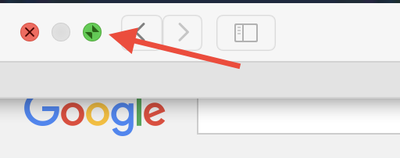
That green button in the upper left corner of every app window is the indicator. If the app is compatible, you'll see two opposing arrows when you hover over the button. If not, you'll see the familiar plus (+) symbol instead.

If Split View doesn't work for you, you may need to enable it in System Preferences. Click on the Apple icon in the upper left corner of the screen and select System Preferences. Click on Mission Control and then select "Displays have separate Spaces." You may have to restart your computer to update the changes.
How to Split Screen Mission Control 1
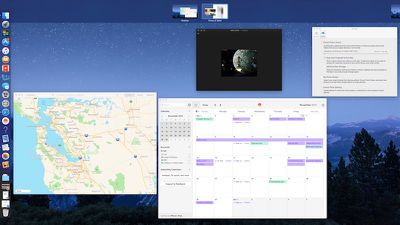
You can also enable Split View using Mission Control. When one app is in Full Screen, activate Mission Control by pressing F3 on a MacBook or Apple keyboard or swiping up with four fingers on a trackpad that has gestures enabled. When all open apps appear on the screen, select the one you wish to add to Split View and drag it to the multitasking tray at the top of the screen next to app that was previously full screen. Mission Control also works for replacing one app with another in the same way.

You can switch focus from one app to the other without using a mouse by pressing command + tab on your keyboard.

Split View doesn't mean that you have to have both apps taking up 50% of the screen. You can adjust the width by dragging the vertical line between the windows to the left or right. You can also swap apps. If you prefer working in Pages on the left side of the screen with Safari open on the right, simply drag one app to the other side and the two will switch automatically.

To find the menu bar for each app while in Split View mode, select a side and then hover the pointer over the top of the screen. The menu bar will drop down.
How to Split Screen 1
When you are ready to leave Split Screen mode, click on the green button again and the app you closed will reduce to its previous size and the remaining app will increase to full screen. You can also press the ESC key.

With Split View mode in El Capitan, you may discover your productivity will increase while you make better use of the screen space on your Mac.


Related Forum: OS X El Capitan

Top Rated Comments

144 months ago
As much as I hate saying this, its so much easier in Windows where you drag the window to the side of the screen and it snaps into place or you press windows and the arrow key where you want to go.
Its so much easier and I don't actually use this features as its a little longer to do
Score: 12 Votes (Like | Disagree)
Spink10 Avatar
144 months ago
Better Snap Tool - completely destroys this lame El Capitan feature.
Score: 5 Votes (Like | Disagree)
btrach144 Avatar
144 months ago
Microsoft did a better job of implementing this. Still a neat feature to have/use though.
Score: 5 Votes (Like | Disagree)
nezr Avatar
144 months ago
I'd rather slide through multiple desktop screens than to do split screen.
Score: 4 Votes (Like | Disagree)
4ndrw Avatar
144 months ago
BetterSnapTool. Have been using that for years (well before El Capitan was released). Way better then split view as I have the benefit of expanding any app to half the screen and still having multiple apps in the other half. I can also expand windows to just a quarter of the screen and it can all be done by dragging to the edge.
Yup. I've been using BetterSnapTool for years also.

It's fantastic.

Score: 2 Votes (Like | Disagree)
shareef777 Avatar
144 months ago
As much as I hate saying this, its so much easier in Windows where you drag the window to the side of the screen and it snaps into place or you press windows and the arrow key where you want to go.

Its so much easier and I don't actually use this features as its a little longer to do
BetterSnapTool. Have been using that for years (well before El Capitan was released). Way better then split view as I have the benefit of expanding any app to half the screen and still having multiple apps in the other half. I can also expand windows to just a quarter of the screen and it can all be done by dragging to the edge.
Score: 2 Votes (Like | Disagree)

Popular Stories

duo aquarium

More Fun iPhone Duo Apps: 30 New Picks to Try

Friday November 6, 2026 3:27 pm PST by
When the iPhone Duo launched, we shared a list of some of the fun apps developers created for the new form factor. Two weeks out, developers are continuing to come up with fresh ideas, so we thought we'd share some of our favorites. Games Marbles Unhinged ($2.99) - Marbles Unhinged is a marble maze designed for the Duo. When you fold it, the floor turns into a ramp. If you stand the top...
apple pro tell logo

Apple Launching Five New Products Today

Thursday November 5, 2026 12:59 am PST by
Apple is launching five new products on Friday, November 6, following pre-orders that opened last week, including its first touchscreen MacBook Pro models. The following new products will be available from today: iPad mini with OLED display and A20 Pro chip iMac with M6 chip 14-inch MacBook Pro with M6 chip 14-inch MacBook Pro with OLED touchscreen 16-inch MacBook Pro with OLED...
silver iphone 18 pro

Apple Rumored to Drop the iPhone's Action Button Next Year

Friday November 6, 2026 6:07 am PST by
Apple plans to merge the iPhone's Action button with the Camera Control starting next year, according to the leaker known as "Instant Digital." In a new post on Weibo, the leaker claimed that a single press of the combined button would open the camera, while a long press would trigger the function assigned to the Action button. They explicitly clarified that the dedicated Action button would ...
Latest Stories
Siri AI Rumored to Become 'More Like an Agent' as Early as Next Year
7 hours ago
Apple Taking New Approach to Developing iOS 28 and macOS 28
9 hours ago
Early Apple Black Friday Deals on Apple Watch, MacBook Air, and More
1 day ago
'Backglow' Lets You Customize New MacBook Pro's Glowing Apple Logo
1 day ago
Top Stories: Apple Product Launches, iOS 27.3 Beta, and More
1 day ago
More Fun iPhone Duo Apps: 30 New Picks to Try
2 days ago
Hands-On With Apple's New OLED Touchscreen MacBook Pro
2 days ago
Apple Store With All-New Design Opening Soon in Southern California
2 days ago
Control the Glowing Apple Logo on Your New MacBook Pro
2 days ago
Apple Shares New 'Apple Card: Apply and Use in Minutes' Ad
2 days ago
Apple Says More Than 100,000 Apps Optimized for iPhone Duo, Here's What's Still Missing
2 days ago
Early Black Friday Deals Kickoff With Steep Discounts on Apple Watch Ultras and More
2 days ago
The MacRumors Show: iOS 27.3 Looks Like a Huge Update
2 days ago
Best Buy's Black Friday Event Begins With Sitewide Savings on Apple, TVs, More
2 days ago
Apple Releasing Yet Another Two New Products Next Week
2 days ago
MacBook Air Drops to Lowest Price in Months With Amazon's $250 Discount
2 days ago
Apple Rumored to Drop the iPhone's Action Button Next Year
2 days ago
Apple's Extended Return Policy Now in Effect for 2026 Holiday Season
2 days ago
Apple Music Classical Updated With New Icon and Refreshed Design
2 days ago
OLED iPad Mini, M6 iMac, and New MacBook Pros Available From Today
3 days ago
Apple Surveys iPhone Duo Buyers About Crease and Camera
3 days ago
Apple's First Touchscreen Mac is Now Arriving to Customers
3 days ago
Claude Gets Personal Finance Feature With Bank Account Linking
3 days ago
Apple Arcade Adds Crossy Road Rush and NBA 2K27
3 days ago
Apple's New HomeView Smart Home Hub: Here's How Much RAM It Has
3 days ago
iPad Mini vs. iPad Air Buyer's Guide: Now Just $50 Apart
3 days ago
First iOS 27.3 and macOS Golden Gate 27.3 Public Betas Now Available
3 days ago
Apple Announces a New Mac Sales Record
3 days ago
Paid $200 for Logic Pro? Apple Says You Won't Get This New Feature
3 days ago
Instagram's Edits Video Editor is Now Available on Mac
3 days ago








































