

Apple Watch includes storage space for adding content like apps, photos, and music, with up to some of that space dedicated to storing songs. When you add a playlist, you can listen to music on it, even when your iPhone is not in range. While the process is fairly self-explanatory, there are a few steps you don't want to forget in order to play music from Apple Watch to your Bluetooth connected headphones
Adding Music to Apple Watch
In order to listen to music on Apple Watch without an iPhone in range, you must sync a playlist to it first.
- Open the Apple Watch app on your iPhone and tap My Watch.
- Select Music from the list.
- Tap "Synced Playlist" to access your iPhone's playlist.
- Select a playlist from the list (if there is no playlist visible in this list, you will need to create one on your iPhone).
- Place your Apple Watch on its charger to initiate the sync. This step is important. Apple Watch will not sync a playlist if it has not been connected to the charger.
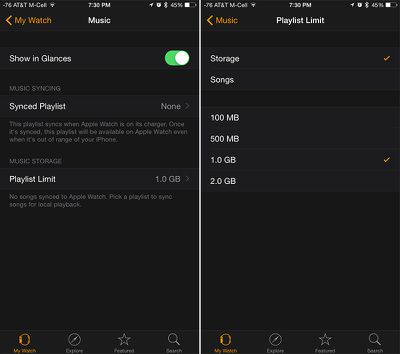
You can customize your playlist limit here. Switch between the amount of storage or number of songs to change the view. Select 100 MB, 500 MB, 1.0 GB, or 2.0 GB of storage (or 15, 50, 125 or 250 songs). When you reach your maximum playlist limit, you won't be able to add more music.
To remove all playlists from Apple Watch, select "None" at the bottom of the Playlist screen.
Pairing Bluetooth Headphones
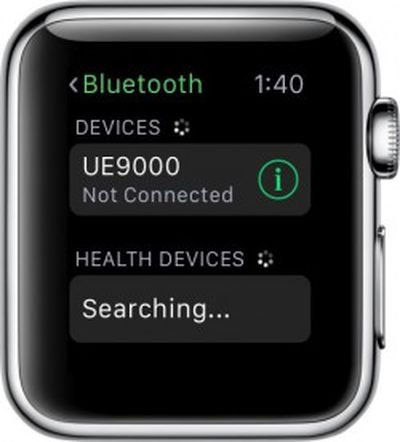 You may be able to listen to music directly from Apple Watch, but only through Bluetooth headphones. Without them, music will only play through the iPhone.
- Put your headphones in Discovery mode.
- Open the Settings app on Apple Watch.
- Tap Bluetooth.
- Select the headphones you wish to pair.
Listening to Music on Apple Watch
There's one more important first step to listening to music directly on Apple Watch using Bluetooth headphones, and that involves changing the source for the music.
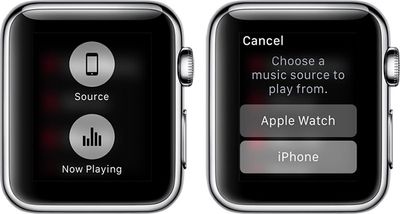
- Open the Music app on Apple Watch.
- Force press the display screen.
- Select "Source" from the options that appear.
- Choose Apple Watch as the music source to play from.
- Select a playlist and tap the Play button to begin listening to music.
You can also see how many songs are stored on your Apple Watch under the About section of the Settings app on the device.
















Top Rated Comments
I would like to suggest a how to article on how to remove how to articles from my newsfeed.
Too advanced. How to unlock your car door.
Thanks! I love being called "super rich"!
My colleague just bought a car that cost a hundred times more than my Apple Watch, and he has to pay quite a lot of money each month to fill it up with the rather expensive remains of unreplaceable million-year-old biomass. Not to mention the fact that the moment he left the dealership with the car, it lost the eqivalent of five Apple Watches in value, and it continues to lose value quickly.
If I, as an Apple Watch owner, am considered "super rich", then what do people call someone who can urinate that much money down the drain within the blink of an eye?