How to Passcode Lock an App on iPhone - MacRumorsOpen MenuShow RoundupsShow Forums menuVisit ForumsOpen Sidebar
Skip to Content

How to Passcode Lock an App on iPhone

by

Apple doesn't have an official method for individually locking sensitive apps like Photos with a passcode, but there is a workaround that was introduced with the Screen Time feature that first came out in iOS 12. This article explains how it's done, but if your device is running iOS 16.4 or later, you can use a new Lock Screen action to lock specific apps behind FaceTime or your iPhone's passcode, which is arguably the more secure method.

If you want to make sure one of your apps is inaccessible, you can use Apple's Screen Time App Limits feature to do so. Here's how:

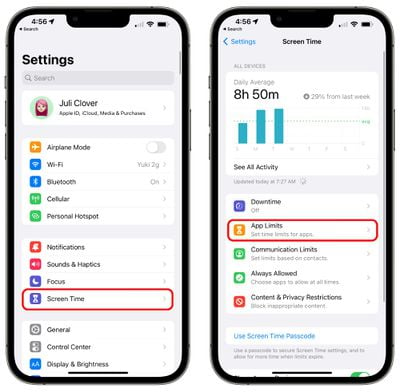
  1. Open up the Settings app.
  2. Choose "Screen Time." app limits 1
  3. Make sure Screen Time is enabled and a Screen Time passcode is set by choosing the "Use Screen Time Passcode" option
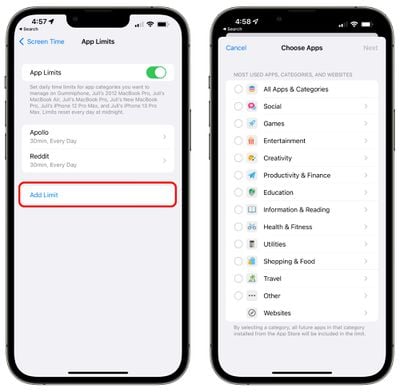
  4. Tap on App Limits and Tap on the Add Limit option. app limits 2
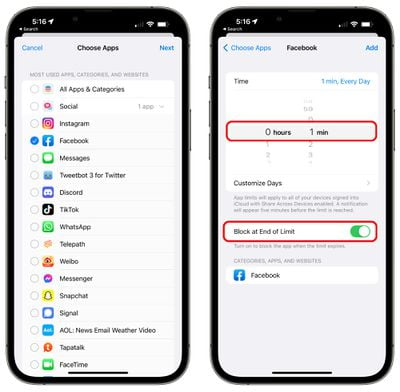
  5. Choose the category that you want. If you want to lock the ‌Photos‌ app, it's in the "Creativity" category.
  6. Tap on the app that you've picked and then tap Next.
  7. At the slider where you select the time, choose 1 minute. app limits 3
  8. Tap on Add.
  9. Toggle on "Block at End of Limit."
  10. If you want to add additional apps, go through the "Add Limit" steps again. Otherwise, exit the Screen Time interface.
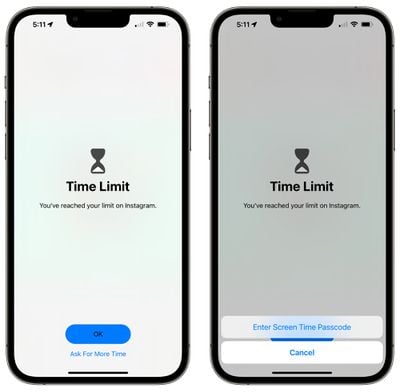
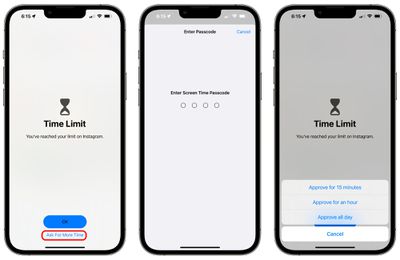
  11. When the time limit that you've set expires, you'll be told you've run out of time. You can continue to use the app for one minute, but after that, you'll need to enter your Screen Time passcode to continue to use the app.

    There is no way around the passcode, which prevents anyone who has access to your iPhone from opening up and using the app that's been passcode blocked.
    app limits 4

    How to Use a Locked App

    Once you have App Limits in place to lock apps you want to be inaccessible, you can tap on "Ask for More Time" to access the app. You'll need to put in your passcode, and then once you do, you can unlock it for 15 minutes, an hour, or the rest of the day. There's no way to immediately lock it again after approving it for 15 minutes without redoing the entire App Limit setup, so keep that in mind.
    app limits 5

    Limitations

    You can passcode lock any app on your phone except for the Phone app. There is no option to turn off access to the Phone app at all. For apps like Messages or FaceTime, you need to edit the "Always Allowed" section of Screen Time to remove them for the limit to be enabled.

    You can disable access to Messages and ‌FaceTime‌, but you might not want to. When access to Messages is disabled via App Limits, devices using iCloud for Screen Time are not able to send or receive messages during downtime. You're also not able to see notifications for apps that are locked, so keep that in mind when locking down social networking apps.


Top Rated Comments

drinkingtea Avatar
102 months ago
Nice. But Apple can simplify this process by giving us the ability to officially lock our apps.
Score: 18 Votes (Like | Disagree)
Doctor Q Avatar
102 months ago
Don't forget your Screen Time passcode, which is not the same as your Lock Screen passcode.

It's pretty hard to recover from a lost Screen Time passcode, so add it to your password manager. You DO have a password manager, right?
Score: 6 Votes (Like | Disagree)
sterlingindigo Avatar
102 months ago
Good, I’ll use this next time I go to apple store and the employees ask me to unlock my device before working on my phone.
Score: 4 Votes (Like | Disagree)
jsmith189 Avatar
102 months ago
I mean that makes sense, but we can play the what if game all day long with 58385 scenarios. Other than photos, I don't see why you would need apps protected?
Photos aside... not wanting people to be able to access your Messages. Not wanting people to have access to your dating apps. Not wanting people to be able to post from your social media pages. Not wanting people to mess with HomeKit stuff (lights, locks, alarms, garage doors etc). Not wanting people to go through your browsing history. Extra protection for banking apps (most/all of which already have a layer of security, but another layer would be more comforting). Having extra security on private things if your phone was stolen unlocked. There are countless ways this would be useful for people.



I understand a phone lock would solve a lot of these, but that's not always possible - especially in the case of children using their parents' phone/s throughout the day. This seems like such a simple task for them, I don't understand why they wouldn't just make it an option.
Score: 3 Votes (Like | Disagree)
Gudi Avatar
102 months ago
Doesn’t work for me. You still have to use every time limited app for at least one minute every day before it is locked for the rest of the day. After three days this gets super annoying.
Score: 2 Votes (Like | Disagree)
MadeTheSwitch Avatar
102 months ago
Just a heads up: if you lock the Photos app without locking the camera app, that is still a way to reach your photos.
Well that blows this whole workaround then. Having to go through all those steps and put in a passcode each time you wanted to take a photo would not only be annoying, but in a lot of cases would cause you to miss whatever you were trying to take a photo of. Memories lost forever because Apple couldn’t do things right and a stupid workaround had to be used.

I really don’t understand Apple sometimes. You would think many of the problems and issues we experience here would be also experienced internally by staff within Apple, but yet these issues never get addressed. I don’t understand that.

I mean that makes sense, but we can play the what if game all day long with 58385 scenarios. Other than photos, I don't see why you would need apps protected?
Message apps, like kik for instance, would be another use case scenario.
Score: 1 Votes (Like | Disagree)

Popular Stories

duo aquarium

More Fun iPhone Duo Apps: 30 New Picks to Try

Friday November 6, 2026 3:27 pm PST by
When the iPhone Duo launched, we shared a list of some of the fun apps developers created for the new form factor. Two weeks out, developers are continuing to come up with fresh ideas, so we thought we'd share some of our favorites. Games Marbles Unhinged ($2.99) - Marbles Unhinged is a marble maze designed for the Duo. When you fold it, the floor turns into a ramp. If you stand the top...
apple pro tell logo

Apple Launching Five New Products Today

Thursday November 5, 2026 12:59 am PST by
Apple is launching five new products on Friday, November 6, following pre-orders that opened last week, including its first touchscreen MacBook Pro models. The following new products will be available from today: iPad mini with OLED display and A20 Pro chip iMac with M6 chip 14-inch MacBook Pro with M6 chip 14-inch MacBook Pro with OLED touchscreen 16-inch MacBook Pro with OLED...
silver iphone 18 pro

Apple Rumored to Drop the iPhone's Action Button Next Year

Friday November 6, 2026 6:07 am PST by
Apple plans to merge the iPhone's Action button with the Camera Control starting next year, according to the leaker known as "Instant Digital." In a new post on Weibo, the leaker claimed that a single press of the combined button would open the camera, while a long press would trigger the function assigned to the Action button. They explicitly clarified that the dedicated Action button would ...
Latest Stories
Siri AI Rumored to Become 'More Like an Agent' as Early as Next Year
7 hours ago
Apple Taking New Approach to Developing iOS 28 and macOS 28
9 hours ago
Early Apple Black Friday Deals on Apple Watch, MacBook Air, and More
1 day ago
'Backglow' Lets You Customize New MacBook Pro's Glowing Apple Logo
1 day ago
Top Stories: Apple Product Launches, iOS 27.3 Beta, and More
1 day ago
More Fun iPhone Duo Apps: 30 New Picks to Try
2 days ago
Hands-On With Apple's New OLED Touchscreen MacBook Pro
2 days ago
Apple Store With All-New Design Opening Soon in Southern California
2 days ago
Control the Glowing Apple Logo on Your New MacBook Pro
2 days ago
Apple Shares New 'Apple Card: Apply and Use in Minutes' Ad
2 days ago
Apple Says More Than 100,000 Apps Optimized for iPhone Duo, Here's What's Still Missing
2 days ago
Early Black Friday Deals Kickoff With Steep Discounts on Apple Watch Ultras and More
2 days ago
The MacRumors Show: iOS 27.3 Looks Like a Huge Update
2 days ago
Best Buy's Black Friday Event Begins With Sitewide Savings on Apple, TVs, More
2 days ago
Apple Releasing Yet Another Two New Products Next Week
2 days ago
MacBook Air Drops to Lowest Price in Months With Amazon's $250 Discount
2 days ago
Apple Rumored to Drop the iPhone's Action Button Next Year
2 days ago
Apple's Extended Return Policy Now in Effect for 2026 Holiday Season
2 days ago
Apple Music Classical Updated With New Icon and Refreshed Design
2 days ago
OLED iPad Mini, M6 iMac, and New MacBook Pros Available From Today
3 days ago
Apple Surveys iPhone Duo Buyers About Crease and Camera
3 days ago
Apple's First Touchscreen Mac is Now Arriving to Customers
3 days ago
Claude Gets Personal Finance Feature With Bank Account Linking
3 days ago
Apple Arcade Adds Crossy Road Rush and NBA 2K27
3 days ago
Apple's New HomeView Smart Home Hub: Here's How Much RAM It Has
3 days ago
iPad Mini vs. iPad Air Buyer's Guide: Now Just $50 Apart
3 days ago
First iOS 27.3 and macOS Golden Gate 27.3 Public Betas Now Available
3 days ago
Apple Announces a New Mac Sales Record
3 days ago
Paid $200 for Logic Pro? Apple Says You Won't Get This New Feature
3 days ago
Instagram's Edits Video Editor is Now Available on Mac
3 days ago