How to View Photos on Apple Watch - MacRumorsOpen MenuShow RoundupsShow Forums menuVisit ForumsOpen Sidebar
Skip to Content

How to View Photos on Apple Watch

by

The Apple Watch may have a small screen, but it's still large enough to show off those pictures of your little one's dance recital to the grandparents. As long as you've got an album synced from your iPhone, you can even view pictures while your smartphone is out of range.
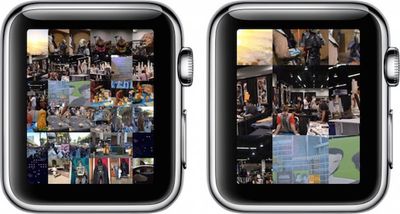
apple_watch_photos
To help you get the most out of your photo viewing experience, we've put together this tutorial to explain how to set up and customize the Photos app on Apple Watch

Create an Album in Photos on iPhone

The first step to getting the most important pictures on your Apple Watch is to create an album for it in your Photos app on iPhone.

  1. Open the Photos app on the iPhone and select "Albums." Then tap the add icon (+) to create a new one.
  2. Name the new album. For simplicity, I named mine Apple Watch Photos.
  3. Select the photos you wish to add to the album and select done.
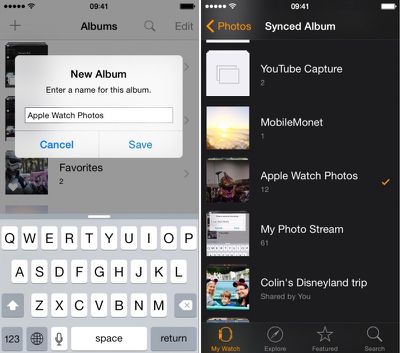
apple_watch_photos_setup

Sync an Album to Apple Watch

  1. Open the Apple Watch app on your iPhone and navigate to My Watch.
  2. Scroll down and select the Photos app from the list.
  3. Tap Synced Album. Then select your newly created Apple Watch album.
  4. Photos will automatically sync with your Apple Watch and be available to view, even when your iPhone is out of range.

You can also select a preexisting album instead. You might prefer the immediacy of syncing with your Camera Roll or Photo Stream for currently added pictures instead. The Apple Watch Photos app is defaulted to your Favorites album.

Manage Photo Storage

You can customize how many photos you want synced to your Apple Watch for more control over how much room they take up. Select from 25 to 500 photos or five to 75 MB of storage space.
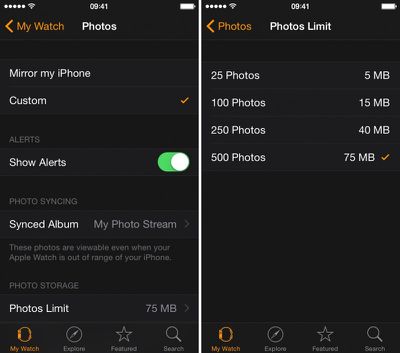
Apple Watch Photos App 4

Use Photos App to View a Synced Album

Apple Watch Photos 1Once you've synced an album to Apple Watch, view the pictures on your wrist via the Photos app. When you open it, the first screen will be a collage of all pictures in your album. Rotate the Digital Crown to zoom in.

Tap a picture to view it full screen. Use the Digital Crown to zoom in closer. Drag your finger on the screen to pan. Double Tap to fill the screen. Double-tap again to see the full picture. You can browse your album by swiping to the left or right to switch between photos.

Now that you know how to set up and customize your Photos app on Apple Watch, showing off important moments in your life will be simple.

When Apple updates watchOS to version 2 later this year, we will also be able to view videos from within the Photos app and use single photos or photo albums as backgrounds for watch faces.


Related Roundup: Apple Watch 12
Buyer's Guide: Apple Watch (Buy Now)
Related Forum: Apple Watch

Top Rated Comments

149 months ago
Can I make a request? I would really like to see a tutorial on how to view the time on the Apple Watch. I've had this thing for over a month and I still can't figure out how to make it show me the date and time. Is there some hidden setting?
Score: 12 Votes (Like | Disagree)
149 months ago
Or just pull your phone out to show people on a screen that they can actually see your face on...
Score: 10 Votes (Like | Disagree)
149 months ago
Please...do not use your Watch to show some pictures when you can just use your iPhone or iPad.

Its so damn small. And it's common knowledge that as you grow older, your eyesight gets worse. They probably can't even see it. Showing it on the iPad...now that's a magical and beautiful experience.
Score: 4 Votes (Like | Disagree)
UnfetteredMind Avatar
149 months ago
I have to agree with captain cadet, unless you don't have your phone with you, why wouldn't you just take out the iPhone to which the :apple:Watch is tethered to show the pics? Maybe for very brief encounters where you don't even want to bother pulling out the phone (but then maybe it's not even worth trying to show the pic in the first place).
Score: 4 Votes (Like | Disagree)
BMcCoy Avatar
149 months ago
These how-to's are starting to feel like deliberate threads to incite comments about how pointless the watch is...

They're working!
Score: 3 Votes (Like | Disagree)
pubwvj Avatar
149 months ago
A more useful guide to these things:

https://www.apple.com/watch/built-in-apps/

https://manuals.info.apple.com/MANUALS/1000/MA1708/en_US/apple_watch_user_guide.pdf

Perhaps this is where MacRumors Bot is skimming from...

How about skipping the fake how-to click-bait and stick to real rumors that we care about...

And if you don't like complaints about bad articles just skip the comments complaining about them.
Score: 3 Votes (Like | Disagree)

Popular Stories

apple watch series 3 design

Apple Offers Steps to Fix Daylight Saving Time Bug on Apple Watch

Sunday November 1, 2026 3:34 am PST by
Apple has published a support document describing what to do if your Apple Watch continues to show time that's off by one hour after daylight savings time changes. "This incorrect time appears only on the Always On display when your wrist is down," says Apple. "When you activate the display by tapping it or raising your wrist, the time changes to the correct hour." To fix the issue, Apple says ...

iphone duo facetime

iPhone Duo's Hidden FaceTime Camera Takes 'Trash' Photos

Wednesday October 21, 2026 11:36 am PDT by
The iPhone Duo's inner screen has an under-display front camera that's largely hidden from view. It's the first time we've seen an under-display camera on an iPhone, and it turns out there's a reason Apple hasn't used the technology before. Apple said the camera offers 1080p video recording, but didn't mention photo quality. Gizmodo said it's a 4-megapixel camera and described the photos as...
siri recap live rewind

watchOS 27.3 Brings Live Rewind and Siri Recap to Apple Watch

Tuesday November 3, 2026 10:35 am PST by
With the first beta of watchOS 27.3, Apple is introducing new Audio Intelligence features it previewed for the Apple Watch Series 12 and Ultra 4 earlier this year. Powered by the S11 chip, Audio Intelligence includes Live Rewind, Siri Recap, Sound Recognition, and Shazam Music Recognition. Sound Recognition and Shazam are already on the watch, but Live Rewind and Siri Recap are now available ...
Latest Stories
Apple Store Subscription Sign-Up Controversy Exposed
7 hours ago
Siri AI Rumored to Become 'More Like an Agent' as Early as Next Year
17 hours ago
Apple Taking New Approach to Developing iOS 28 and macOS 28
19 hours ago
Early Apple Black Friday Deals on Apple Watch, MacBook Air, and More
2 days ago
'Backglow' Lets You Customize New MacBook Pro's Glowing Apple Logo
2 days ago
Top Stories: Apple Product Launches, iOS 27.3 Beta, and More
2 days ago
More Fun iPhone Duo Apps: 30 New Picks to Try
2 days ago
Hands-On With Apple's New OLED Touchscreen MacBook Pro
3 days ago
Apple Store With All-New Design Opening Soon in Southern California
3 days ago
Control the Glowing Apple Logo on Your New MacBook Pro
3 days ago
Apple Shares New 'Apple Card: Apply and Use in Minutes' Ad
3 days ago
Apple Says More Than 100,000 Apps Optimized for iPhone Duo, Here's What's Still Missing
3 days ago
Early Black Friday Deals Kickoff With Steep Discounts on Apple Watch Ultras and More
3 days ago
The MacRumors Show: iOS 27.3 Looks Like a Huge Update
3 days ago
Best Buy's Black Friday Event Begins With Sitewide Savings on Apple, TVs, More
3 days ago
Apple Releasing Yet Another Two New Products Next Week
3 days ago
MacBook Air Drops to Lowest Price in Months With Amazon's $250 Discount
3 days ago
Apple Rumored to Drop the iPhone's Action Button Next Year
3 days ago
Apple's Extended Return Policy Now in Effect for 2026 Holiday Season
3 days ago
Apple Music Classical Updated With New Icon and Refreshed Design
3 days ago
OLED iPad Mini, M6 iMac, and New MacBook Pros Available From Today
3 days ago
Apple Surveys iPhone Duo Buyers About Crease and Camera
3 days ago
Apple's First Touchscreen Mac is Now Arriving to Customers
3 days ago
Claude Gets Personal Finance Feature With Bank Account Linking
3 days ago
Apple Arcade Adds Crossy Road Rush and NBA 2K27
4 days ago
Apple's New HomeView Smart Home Hub: Here's How Much RAM It Has
4 days ago
iPad Mini vs. iPad Air Buyer's Guide: Now Just $50 Apart


4 days ago
First iOS 27.3 and macOS Golden Gate 27.3 Public Betas Now Available
4 days ago
Apple Announces a New Mac Sales Record
4 days ago
Paid $200 for Logic Pro? Apple Says You Won't Get This New Feature
4 days ago







































