Shuffle a Specific Photo Album on iPhone Home Screen - MacRumorsOpen MenuShow RoundupsShow Forums menuVisit ForumsOpen Sidebar
Skip to Content

Shuffle a Specific Photo Album on iPhone Home Screen

by

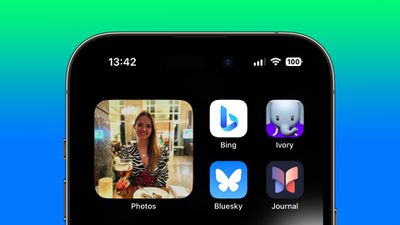
In iOS 17, Apple added a new feature to the Photos widget that enables you to view pictures from a specific album in your photo library right on your iPhone's Home Screen. Here's how it works.
Home Screen
Previously in iOS, the ‌Photos‌ widget was limited to showing featured pictures selected for you by the ‌Photos‌ algorithm, meaning there was no way to choose a custom album in your library for the widget to draw from.

Thankfully in iOS 17, Apple added a new Album option to the available ‌Photos‌ widgets, finally allowing users to choose the album of photos to shuffle through periodically. So now, if you have a particular collection of holiday snaps or shots from some other specific event collected in an album of your own making, your iPhone can pick from this album exclusively.

The following steps show you how it's done on iPhones running iOS 17 and later.

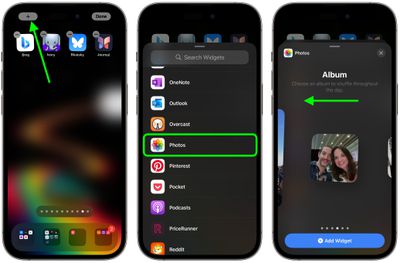
  1. Press and hold on a space in your iPhone's ‌Home Screen‌ until the icons start to jiggle.
  2. Tap the + button in the top-left corner of the screen.
  3. Select Photos in the widgets gallery, either by typing it into the search field or scrolling down to ‌Photos‌ in the list.
  4. Swipe left to the Album widgets – there are three sizes you can choose from. Select the desired widget size by tapping Add Widget.
    widgets

  5. Drag the widget to the desired place on your ‌Home Screen‌, then tap Done in the top-right corner.
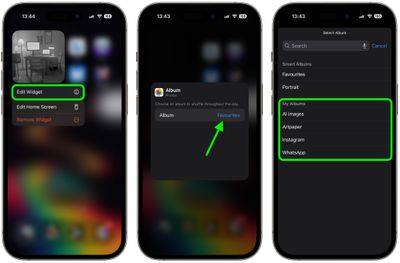
  6. Next, press and hold on the widget, then select Edit Widget in the dropdown menu.
  7. Tap the default Favorites selection (in blue text).
  8. Now select one of your custom albums under "My Albums."
  9. Finally, tap the blurred area of the screen to return to the ‌Home Screen‌.
    widgets

That's all there is to it. Your widget will now automatically shuffle through the photos in the selected album hourly throughout the day.

Popular Stories

meta ai

Meta's New AI Image Tool Can Use Your Public Instagram Photos by Default

Wednesday July 8, 2026 1:52 pm PDT by
Meta is rolling out a new feature that lets people use public Instagram posts and reels to generate AI content, and it's turned on by default. If you have an Instagram account that's not set to private, there is a setting allowing anyone to generate content on Meta AI using your images and videos. The option was added to support Meta's new image generation model, Muse Image. Muse Image is...
iPhone 18 Pro and Pro Max Feature

'Apple Upgrade' Program Reportedly Launching Next Week

Tuesday July 21, 2026 8:30 am PDT by
Apple and Klarna are partnering on a new "Apple Upgrade" leasing program set to launch in the U.S. on Tuesday, July 28, according to Bloomberg's Mark Gurman. The program will allow you to finance most iPhone, iPad, Mac, and Apple Watch models, with a 24-month term for iPhones and Apple Watches and a 36-month term for iPads and Macs. Customers will be able to pay off the device early during...
iPhone 18 Pro Deep Red Feature

iPhone 18 Pro Launching in Two Months With These 12 New Features

Tuesday July 21, 2026 6:22 am PDT by
It is now mid-July, and that means the iPhone 18 Pro and iPhone 18 Pro Max are now just two months away. The devices are expected to look similar to the iPhone 17 Pro and iPhone 17 Pro Max, but there will still be many year-over-year changes, with rumored features including a smaller Dynamic Island, 5G via satellite, and more. Apple is expected to unveil the iPhone 18 Pro, iPhone 18 Pro Max, ...