

In macOS, Picture in Picture (PiP) allows you to play video in a resizable floating window that isn't blocked by other windows, so you can watch video while doing other things.
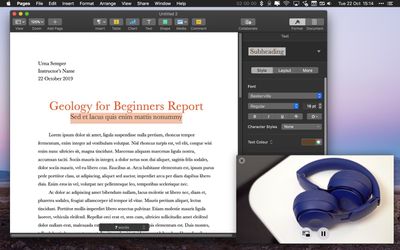
PiP is a handy feature supported by apps like Safari and iTunes that allows you to watch your favorite show while you browse the web in another tab or catch up on email. Keep reading to learn how to use it.
How to Use Picture in Picture on macOS
- In Safari or another app that supports Picture in Picture, open a window containing video or a web page that uses HTML5 for video playback (YouTube or Vimeo, for example).
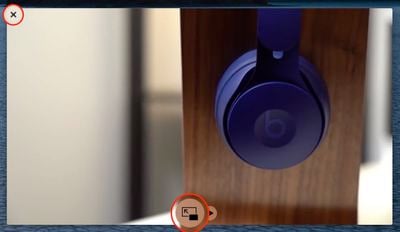
- In the video's playback controls, click the PiP button (it looks like a small opaque square, and an arrow within a larger transparent square behind it).

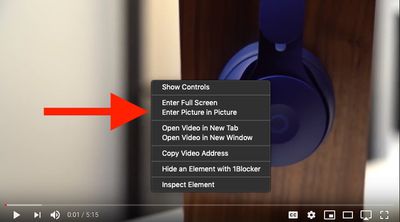
- If you don't see a PiP button, right-click (or Ctrl-click) inside the video to open a pop-up menu. Then choose Enter Picture-in-Picture, if available.
- To move the window to a different corner of the screen, simply drag it to that corner. If you hold down the Command key when you drag it, you can move the window to any position on the screen. You should also be able to drag the edge or corner of the window to make it bigger or smaller.
- When you're finished using a PiP session, click the circled X icon in the corner of the floating window or the PiP button at the bottom to close it. Alternatively, close the browser tab or window that the video originated from.

How to Use the Picture in Picture Shortcut in Safari 13
PiP has been available in Safari since macOS Sierra, but in Safari 13, which ships with macOS Catalina, Apple has added a handy PiP shortcut to the address bar.

The next time you're viewing a web page with a playing video, right-click the sound volume icon in the far right of the address bar and click Enter Picture in Picture in the pop-up menu.
Tag: Safari
Related Forum: macOS Catalina















