

iOS 14: How to Prevent Apps From Tracking You Across Sites and Apps - MacRumorsOpen MenuShow RoundupsShow Forums menuVisit ForumsOpen Sidebar
Skip to Content

iOS 14: How to Prevent Apps From Tracking You Across Sites and Apps

by

Some third-party iOS apps that you install on iPhone and iPad try to use tracking mechanisms that track your behavior across various apps and websites. Happily, in iOS 14 and later, Apple forces such apps to ask for your permission first.
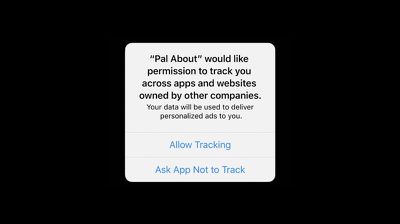
app tracking pop up ios 14
Apps that use these tracking mechanisms will show a popup asking you to enable tracking features, which are used for targeted advertising, data collection, and similar purposes.

According to Apple, apps granted permission to track you can collect data that includes device ID, name, email address, and more, which is then combined with data collected by third parties. The combined data is often used for ad targeting or shared with data brokers, linking that data to publicly available and other information about you and your device.

It's unlikely you're going to want to tap "Accept" on these kinds of requests, and declining tracking prevents an app from accessing your device's advertising identifier. But you can also disable cross-app and cross-site tracking for apps entirely. Just follow these simple steps.

  1. Launch the Settings app on your iPhone or ‌iPad‌.
  2. Scroll down and tap Privacy.
  3. Tap Tracking.
  4. Toggle the switch next to Allow Apps to Request to Track to the grey OFF position.
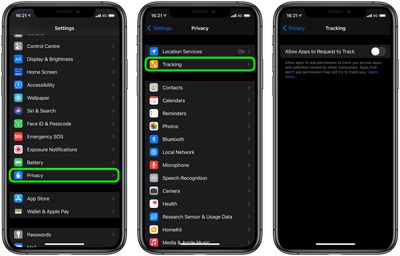
settings
Note there are some situations where a developer is not required by Apple to ask the user's permission to implement tracking, but this is only when information is combined on-device and not sent off in a way that is personally identifiable or when used for fraud detection or prevention.


Popular Stories

iCloud iPhone 17 Pro

iPhone Users Who Pay for iCloud Storage Get Two New Perks on iOS 27

Thursday July 2, 2026 6:10 am PDT by
If you pay for certain iCloud+ storage plans beyond the 5GB that Apple offers for free, you will receive two more perks on iOS 27 at no additional cost. A summary of the two new iCloud+ perks on iOS 27:Increased daily usage limits for some new Apple Intelligence features, including image generation in the revamped Image Playground app. HomeKit Secure Video cameras receive generated video...
iPhone 4 on Black Feature

Apple Facing One of Its Worst Leaks Since the iPhone 4

Thursday July 2, 2026 9:53 am PDT by
Apple supplier Tata Electronics recently suffered a cyberattack that resulted in thousands of confidential files being published on the dark web, and this reportedly included some photos and documents related to the upcoming iPhone 18 Pro. We have elected not to share any of the leaked photos in this story due to the illegal nature in which they were obtained, but they can easily be found...
American Express Gold Apple Pay Feature

American Express Announces New Apple Pay Feature

Tuesday June 30, 2026 10:27 am PDT by
American Express today announced that you can now redeem Membership Rewards points when checking out with Apple Pay on the web and in apps on the iPhone and iPad. When checking out with Apple Pay on iOS 18 or iPadOS 18 or later, tap on your eligible American Express card (Platinum, Gold, Green, and others) and select the Membership Rewards points option. You can use points to cover all or...













