How to Protect Your Netflix Profile With a PIN Code - MacRumorsOpen MenuShow RoundupsShow Forums menuVisit ForumsOpen Sidebar
Skip to Content

How to Protect Your Netflix Profile With a PIN Code

by

As part of its updated parental controls, Netflix now includes an option that lets account holders PIN protect individual profiles to help prevent kids from using them.
netflixpin
Even if you're not a parent or guardian, so long as you're the account holder you can still use the PIN feature to prevent other people in the same household from watching stuff on your Netflix profile and messing up your recommendations.

The easiest way to set up a PIN for your profile is on the Netflix website. The steps below show you how it's done.

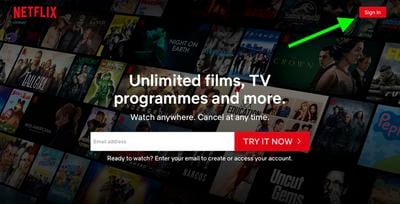
  1. Launch a browser and go to www.netflix.com.
  2. Sign into Netflix using your account credentials, then select your profile.
    Netflix

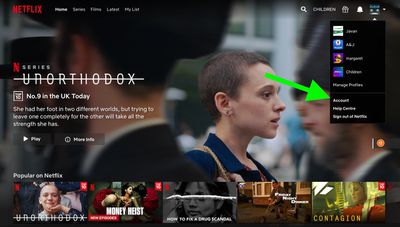
  3. On the main Netflix screen, select your profile avatar and choose the Account option in the menu.
    netflix

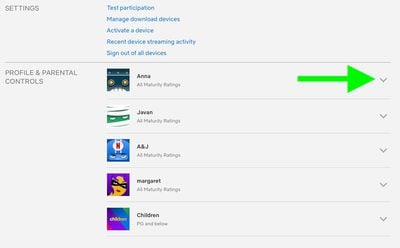
  4. Under the Profile & Parental Controls section, use the chevron against your profile to reveal further options.
    netflix

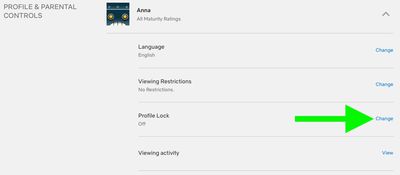
  5. Click Change next to the Profile Lock option.
    netflix

  6. Enter your account password if prompted.
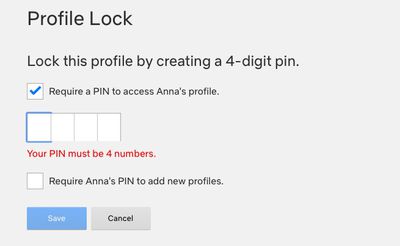
  7. Click the checkbox next to Require a PIN to access [yourname] profile, then enter the four-digit pin that you want to use.
    netflix

  8. Click the second checkbox to require the same pin to add new profiles.
  9. Click Save.

When your PIN is set, Netflix will ask for it whenever your profile is selected at the welcome screen. This will happen on all devices, including smart TVs. Note that you won't be asked for a PIN if your profile is the only one that exists on the account.

In addition to PIN protection for profiles, Netflix has added filters for children's accounts that are based on country ratings, as well as options to remove individual series or films by title, and a feature for reviewing each profile's setting using the Profile and Parental Controls hub in the settings menu.


Tag: Netflix

Top Rated Comments

mw360 Avatar
84 months ago

You might as well let your kids see the F bombs and get them prepared to live in a cruel world. I never understood why parents continue to pretend their kids don't know how to swear even long after they admit Santa doesn't exist.
Thanks. I've filed this in the same place all the other anonymous parenting advice goes.
Score: 4 Votes (Like | Disagree)
ryanwarsaw Avatar
84 months ago

Thanks. I've filed this in the same place all the other anonymous parenting advice goes.
May your children grow up to be as gentle and mild mannered as you are.
Score: 3 Votes (Like | Disagree)
ryanwarsaw Avatar
84 months ago

I don't know why these companies move like their development team is one person working part time. This feature is handy I guess if you're embarrassed about your viewing history, but useless for parenting. The kids profile is way too restrictive for kids of 5+, so ours will pester a parent to use theirs, but since the adult profile now features f-bombs and whatever else in the autoplaying trailers, the parent has to navigate to the show carefully. Thankfully, the developer called in a couple of months back to allow us to disable the autoplaying trailers, but now you can't play the trailers at all, which is a pain when the kids are in bed, and you're trying to browse.
You might as well let your kids see the F bombs and get them prepared to live in a cruel world. I never understood why parents continue to pretend their kids don't know how to swear even long after they admit Santa doesn't exist.
Score: 3 Votes (Like | Disagree)
Sethal Avatar
84 months ago
Disney+ needs this feature!
Score: 2 Votes (Like | Disagree)
gsmornot Avatar
84 months ago

How do you remove a PIN in case you forget it?
Use your account password and uncheck the option or type a new one.It does not replace the account password, just adds the PIN option to stop others in the house. Meh
Score: 2 Votes (Like | Disagree)
Sethal Avatar
84 months ago

You might as well let your kids see the F bombs and get them prepared to live in a cruel world. I never understood why parents continue to pretend their kids don't know how to swear even long after they admit Santa doesn't exist.
Whoa! Spoiler alert, bro.
Score: 1 Votes (Like | Disagree)

Popular Stories

Apple iCloud Plus expansion hero

iCloud+ Now Includes Apple TV, Apple Arcade, and Curated Apple Music Stations in Over 100 Countries

Tuesday September 15, 2026 1:43 am PDT by
Apple today announced a new subscription initiative that turns paid iCloud+ subscriptions into a broader services bundle in more than 100 countries. In select countries, Apple says every paid iCloud+ plan, including the cheapest 50GB tier, now includes Apple TV and Apple Arcade "at no additional cost," while family sharing extends the storage, TV and Arcade access to up to five people....
Everything New Your iPhone Can Do on iOS 27 Feature 1

50 New Things Your iPhone Can Do in iOS 27 - Out Now!

Monday September 14, 2026 10:48 pm PDT by
Apple released iOS 27 this week, and despite the company's focus this year on refining its flagship operating system and nixing bugs, there are still many additional features to explore, not least of which is Apple's new context-aware Siri, re-tooled for the generative AI era. Which iPhones Support Every iOS 27 Feature? This year's major iPhone software update isn't all about AI, though,...
iOS 27 Icon iPhone

iOS 27 Available Now With These 8 New Features

Monday September 14, 2026 9:00 am PDT by
Update — 10 a.m. Pacific Time: Apple has released iOS 27. During its iPhone 18 Pro and iPhone Duo event last week, Apple announced that iOS 27 will be released widely on Monday, September 14. iOS 27 should be available around 10 a.m. Pacific Time / 1 p.m. Eastern Time today via the Settings app, under General → Software Update. Below, we have highlighted eight new features and...