How to Purchase an iPhone 6s or 6s Plus From an Apple Store on September 25 - MacRumorsOpen MenuShow RoundupsShow Forums menuVisit ForumsOpen Sidebar
Skip to Content

How to Purchase an iPhone 6s or 6s Plus From an Apple Store on September 25

by

iPhone 6s and iPhone 6s pre-orders began on September 12 at 12:01 AM Pacific, with two options to receive your new smartphone: home delivery or in-store pickup. Customers that do not place a pre-order or reservation for in-store pickup can also try their luck by standing in line at an Apple Store on September 25, but expect long lines. Most retail locations will open early at 8:00 AM local time.

Reserve and Pick Up

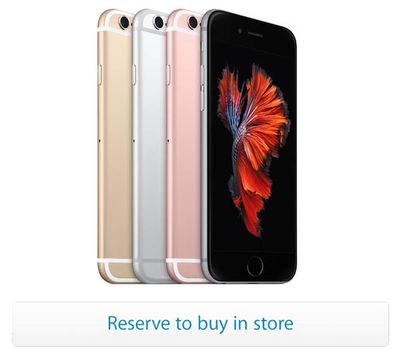
The easiest and most convenient way to purchase an iPhone 6s or iPhone 6s Plus from an Apple Store on launch day is to make a reservation for in-store pickup by September 25. Simply choose an iPhone model, color, storage size and carrier on Apple's website and click on the "Reserve to buy in store" button.
iPhone6s-Reserve
Next, sign in with your Apple ID and select an Apple Store near you. You will then be required to text a code to an Apple number to receive a unique registration code to enter on Apple's website. Then, select how many iPhones you would like, choose a 30-minute time block for pickup, verify your contact information and confirm your reservation.

When you arrive at the Apple Store during your specified check-in window, most locations should have a special line for customers with reservations. An employee will then help you with purchasing and setting up your new iPhone. Only the person named on the reservation can pick up the iPhone -- bring a government-issued photo ID.

Wait in Line

For customers that choose not to or are unable to place a pre-order for the iPhone 6s and iPhone 6s Plus prior to September 25, but still want a chance at purchasing a specific model on launch day, the only option at an Apple Store is to stand in line among others without reservations.

While the size of crowds will fluctuate depending on the location, expect most Apple Stores to have significant wait times for those without a reservation. iPhone launch days can result in lineups of hundreds or, in some densely populated areas, thousands of people waiting to purchase a new device or two.

iPhone-6-Eaton-Centre

iPhone 6 and iPhone 6 Plus launch day at Eaton Centre in Toronto, Canada (Hannah Yoon / The Canadian Press)

If you plan on waiting it out at an Apple Store, it is highly recommended that you reschedule any important plans that day, as it can take up to 10 hours, and in some cases longer, before you reach the front of the queue. In some cases, in-store stock of new iPhones may run out completely before you get your own.

Apple employees will walk up and down the lineup to answer questions and accommodate customers during the day, and most locations are likely to have a rolling cart with free food or drinks. Bringing your own tote bag with a few snacks is also recommended, since you could lose your spot in line if you leave to purchase food.

As you get towards the front of the line, an Apple employee is likely to approach you with a small card that details which iPhone model you are interested in purchasing. Keep in mind that, as the day progresses, the iPhone 6s Plus, larger storage capacities and newer colors such as Rose Gold or Gold are likely to run out of stock first.

Each customer is limited to purchasing two new iPhones.

iPhone Upgrade Program

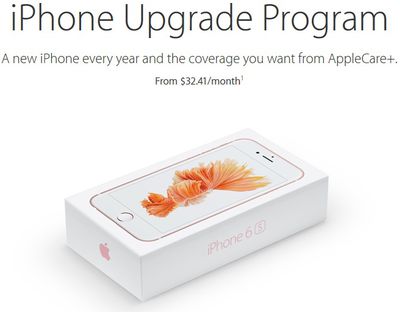
Apple launched a new iPhone Upgrade Program in the United States last week that enables customers to purchase a new iPhone every year with AppleCare+ warranty coverage included. Eligible customers who sign up for the program will have the full cost of their new iPhone broken down into 24 equal payments of around $30 to $45 per month depending on the model, plus a premium for AppleCare+.
apple iphone upgrade program
Apple will provide customers enrolled in the iPhone Upgrade Program with an unlocked iPhone each year, allowing them to choose from one of the four major U.S. carriers: AT&T, Verizon, Sprint or T-Mobile. After the first 12 monthly payments, the customer gains the option to trade in their iPhone for a new one and enter into a new 24 month installment plan to pay it off.

iPhone 6s

  • 16GB: $32.41/month

  • 64GB: $36.58/month

  • 128GB: $40.75/month

iPhone 6s Plus

  • 16GB: $36.58/month

  • 64GB: $40.75/month

  • 128GB: $44.91/month

After being enrolled in the iPhone Upgrade Program for at least six months, customers gain the option to make an early upgrade by paying off up to the six remaining monthly payments to reach 12 payments. At that point, the customer can upgrade to a new iPhone and be placed on a new 24 month installment plan for payments.

The final cost of an entry-level 16GB iPhone 6s with AppleCare+ purchased through the iPhone Upgrade Program is $777.84, which is just cents cheaper than the $778 it would cost to purchase a 16GB iPhone 6s ($649) and AppleCare+ ($129) outright. The advantage to the program, however, is not having to pay so much upfront.

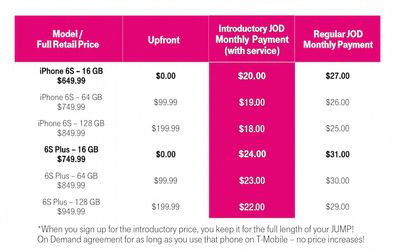
AT&T, Verizon, Sprint and T-Mobile all offer their own carrier financing plans, each breaking down the full price of iPhones into equal monthly payments without AppleCare+ added. With the 16GB iPhone 6s, for example, all four carriers ultimately charge within a few cents of the device's full $649 retail price.
NewNewiPhonePricingTable
T-Mobile does have an introductory JUMP! On Demand promotion that offers the 16GB iPhone 6s for just $20 per month for 18 months with zero dollars paid upfront, totaling $360 under the agreement the device is returned in good condition. To keep the iPhone, you must pay an additional $164, bringing the total cost to $524 -- a savings of $125 and the best deal for those wishing to join T-Mobile.

You can enroll in the iPhone Upgrade Program by visiting an Apple Store. You must be at least 18 years old and bring your current iPhone, a valid personal credit card, your personal information and two forms of identification and your carrier information, such as your wireless account password. See Terms & Conditions.


Related Forum: iPhone

Top Rated Comments

OriginalMacRat Avatar
146 months ago
Or just order online and have it shipped to your home.
Score: 10 Votes (Like | Disagree)
146 months ago
Good tips for people without life.
Score: 8 Votes (Like | Disagree)
Vulkan Avatar
146 months ago

Only Rosegold looking gay,
That's a pretty derogatory comment to be honest. There are so many ways you can say Rosegold is not for you... but calling it "gay" is not one of them.
Score: 3 Votes (Like | Disagree)
mscriv Avatar
146 months ago
Yeah, thats it though, while I can afford it, I'm too cheap, see my comment on the next quoted reply as to exactly how cheap I am.


I did a contract on my iPhone 6 but the actual upgrade went on our iPad line so my line has no contract and then Verizon is discounting my line $25/month because it is not under contract, lol. iPad line stayed the same $10 per month. At some point they will figure this out and stop letting people do this. Here is what I typically do, add insurance about 3 months prior to new phone coming out, next year, iPhone 7. Since iPhone 6S will be the "cheap" phone then they most likely will not have any 6's with 64gb in stock meaning that when I do an insurance claim on my 6, I will most likely get a 6S 64gb. Sell said 6S by one of many possible options, then order an iPhone 7 at contract (or subsidy, whichever is the best deal, usually contract) price. Pocket the cash, cancel insurance 3 months later. I've been doing this since the first iPhone in 2007. Back then they did not discount the phone at all, that is the only iPhone I've actually paid for (100% net) out of pocket. So 8 years later I've still only paid for 1 iPhone. When I got my 6 it turned out that the ESN on my 4 was still good even though it was reported at lost, Verizon gave me $200 for it, lmao, so I actually made money on my iPhone 6. I did a claim on my 32gb 5, got a 32gb 5S, sold the 5S, ordered the 6 and sent in my 4 for a rebate. Same when I went from 4 to 5 but no rebate on my 3gS, it was actually damaged anyway.


I am cheap, very cheap.
Wait, are you saying you file an insurance claim for your current phone whether it's actually damaged/stolen or not? I hope I'm reading your post wrong, but it sounds like your upgrade program is to commit insurance fraud.
Score: 3 Votes (Like | Disagree)
146 months ago
I will never wait in line for an apple product. And I'm one of the biggest apple heads there is. Been buying Apple before it was "cool". Back before there were any Apple stores, and i-anything. Back when you had to go to stores like Comp USA to buy anything apple...and they kept the macs in the back of the store under the leaky ceiling. When the staff used to smirk condescendedly if you asked where the "Apple" section was and try to persuade you to buy a PC instead. No thanks I'd say. Lol. Ah, those were the days.

Seriously tho. As big of a fan as I am, I'd never wait on one of those lines just to be the first to have the new iPhone. That's something you do if you're a teenager or an Asian tourist who plans to buy a bunch and bring them back home to resell. Lol. I'd rather wait or just order from my computer after the first hands on reviews came out.
Score: 3 Votes (Like | Disagree)
146 months ago
Has anyone else noticed how Apple's monthly iPhone Upgrade Program effectively has you paying $129 of AppleCare+ every year, WTH?!
No one has "noticed" it because it's not true. AppleCare is built into Apple's Installment Plan of 24 months, so when you trade it in after 12 months and get a new one, the remaining balance (that includes AppleCare) is completed by Apple/Bank and you begin again. If you choose to not trade it in and keep it for 24 months, you continue paying the remaining AppleCare and iPhone balance until it's yours to keep. You really end up paying ~ $65 for AppleCare per year if you trade the iPhone in every year.
Score: 3 Votes (Like | Disagree)

Popular Stories

duo aquarium

More Fun iPhone Duo Apps: 30 New Picks to Try

Friday November 6, 2026 3:27 pm PST by
When the iPhone Duo launched, we shared a list of some of the fun apps developers created for the new form factor. Two weeks out, developers are continuing to come up with fresh ideas, so we thought we'd share some of our favorites. Games Marbles Unhinged ($2.99) - Marbles Unhinged is a marble maze designed for the Duo. When you fold it, the floor turns into a ramp. If you stand the top...
apple pro tell logo

Apple Launching Five New Products Today

Thursday November 5, 2026 12:59 am PST by
Apple is launching five new products on Friday, November 6, following pre-orders that opened last week, including its first touchscreen MacBook Pro models. The following new products will be available from today: iPad mini with OLED display and A20 Pro chip iMac with M6 chip 14-inch MacBook Pro with M6 chip 14-inch MacBook Pro with OLED touchscreen 16-inch MacBook Pro with OLED...
iOS 28 AI

Apple Taking New Approach to Developing iOS 28 and macOS 28

Sunday November 8, 2026 7:42 am PST by
Apple has made a change to its development process for iOS 28, macOS 28, and corresponding software updates, according to Bloomberg's Mark Gurman. In his Power On newsletter today, he said Apple separates development of each year's new operating systems into three major stages. Typically, he said each stage consists of four weeks of coding followed by a four-week "convergence" period where...
Latest Stories
Apple Store Subscription Sign-Up Controversy Exposed
2 hours ago
Siri AI Rumored to Become 'More Like an Agent' as Early as Next Year
12 hours ago
Apple Taking New Approach to Developing iOS 28 and macOS 28
13 hours ago
Early Apple Black Friday Deals on Apple Watch, MacBook Air, and More
1 day ago
'Backglow' Lets You Customize New MacBook Pro's Glowing Apple Logo
1 day ago
Top Stories: Apple Product Launches, iOS 27.3 Beta, and More
2 days ago
More Fun iPhone Duo Apps: 30 New Picks to Try
2 days ago
Hands-On With Apple's New OLED Touchscreen MacBook Pro
2 days ago
Apple Store With All-New Design Opening Soon in Southern California
2 days ago
Control the Glowing Apple Logo on Your New MacBook Pro
2 days ago
Apple Shares New 'Apple Card: Apply and Use in Minutes' Ad
3 days ago
Apple Says More Than 100,000 Apps Optimized for iPhone Duo, Here's What's Still Missing
3 days ago
Early Black Friday Deals Kickoff With Steep Discounts on Apple Watch Ultras and More
3 days ago
The MacRumors Show: iOS 27.3 Looks Like a Huge Update
3 days ago
Best Buy's Black Friday Event Begins With Sitewide Savings on Apple, TVs, More
3 days ago
Apple Releasing Yet Another Two New Products Next Week
3 days ago
MacBook Air Drops to Lowest Price in Months With Amazon's $250 Discount
3 days ago
Apple Rumored to Drop the iPhone's Action Button Next Year
3 days ago
Apple's Extended Return Policy Now in Effect for 2026 Holiday Season
3 days ago
Apple Music Classical Updated With New Icon and Refreshed Design
3 days ago
OLED iPad Mini, M6 iMac, and New MacBook Pros Available From Today
3 days ago
Apple Surveys iPhone Duo Buyers About Crease and Camera
3 days ago
Apple's First Touchscreen Mac is Now Arriving to Customers
3 days ago
Claude Gets Personal Finance Feature With Bank Account Linking
3 days ago
Apple Arcade Adds Crossy Road Rush and NBA 2K27
3 days ago
Apple's New HomeView Smart Home Hub: Here's How Much RAM It Has
3 days ago
iPad Mini vs. iPad Air Buyer's Guide: Now Just $50 Apart
3 days ago
First iOS 27.3 and macOS Golden Gate 27.3 Public Betas Now Available
3 days ago
Apple Announces a New Mac Sales Record
3 days ago
Paid $200 for Logic Pro? Apple Says You Won't Get This New Feature
3 days ago








































