How to Re-Enable the Classic Page Turning Animation in Apple Books - MacRumorsOpen MenuShow RoundupsShow Forums menuVisit ForumsOpen Sidebar
Skip to Content

How to Re-Enable the Classic Page Turning Animation in Apple Books

by

In iOS 16, Apple made a change to its stock Books app that removed the traditional page turning animation that had been used since the early days of the iPhone app.
books
The move upset some Apple Books users, but thankfully Apple listened, and the company reintroduced the page turning animation as an option in iOS 16.4.

This was a welcome change for Apple Books users who missed the page turning experience, but the old animation is no longer the default, so it has to be turned on.

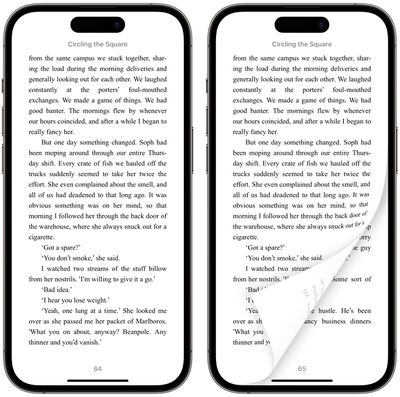
There are now three options for page turning: Curl, Slide, and None. Slide is the default option, but you can change this to the traditional Curl animation by following the steps below.

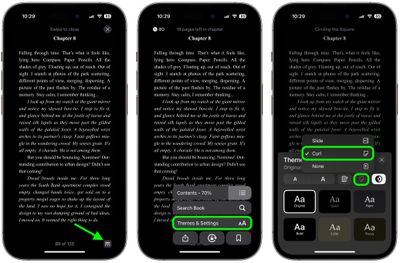
  1. Open the Apple Books app on your iPhone.
  2. Open an ebook, then tap the menu button (the icon made up of two lines and three dots) in the bottom-right corner of the screen.
  3. Tap Theme & Settings in the pop-up menu.
  4. Tap the Page Turning button in the top row of options.
  5. Select Curl from the pop-up pane.

books

That's all there is to it. The curling page turn animation is now enabled. Note that these features are also available in iPadOS 16.4 for those who read on the ‌iPad‌.

Popular Stories

iCloud iPhone 17 Pro

iPhone Users Who Pay for iCloud Storage Get Two New Perks on iOS 27

Thursday July 2, 2026 6:10 am PDT by
If you pay for certain iCloud+ storage plans beyond the 5GB that Apple offers for free, you will receive two more perks on iOS 27 at no additional cost. A summary of the two new iCloud+ perks on iOS 27:Increased daily usage limits for some new Apple Intelligence features, including image generation in the revamped Image Playground app. HomeKit Secure Video cameras receive generated video...
iPhone 4 on Black Feature

Apple Facing One of Its Worst Leaks Since the iPhone 4

Thursday July 2, 2026 9:53 am PDT by
Apple supplier Tata Electronics recently suffered a cyberattack that resulted in thousands of confidential files being published on the dark web, and this reportedly included some photos and documents related to the upcoming iPhone 18 Pro. We have elected not to share any of the leaked photos in this story due to the illegal nature in which they were obtained, but they can easily be found...
American Express Gold Apple Pay Feature

American Express Announces New Apple Pay Feature

Tuesday June 30, 2026 10:27 am PDT by
American Express today announced that you can now redeem Membership Rewards points when checking out with Apple Pay on the web and in apps on the iPhone and iPad. When checking out with Apple Pay on iOS 18 or iPadOS 18 or later, tap on your eligible American Express card (Platinum, Gold, Green, and others) and select the Membership Rewards points option. You can use points to cover all or...