

How to Rearrange, Disable, and Delete iPhone Home Screen Pages - MacRumorsOpen MenuShow RoundupsShow Forums menuVisit ForumsOpen Sidebar
Skip to Content

How to Rearrange, Disable, and Delete iPhone Home Screen Pages

by

In iOS, Apple lets you disable individual Home Screen pages on your iPhone. It's also possible to rearrange the order of your ‌‌Home Screen‌‌ pages, and delete pages outright rather than merely disable them. Here's how it works.
ios 15 home screen icons yellow

How to Rearrange Home Screen Pages

  1. Touch and hold a space on the ‌Home Screen‌ to enter jiggle mode.
  2. Tap the row of dots representing your ‌Home Screen‌ pages.
  3. In the ‌Home Screen‌ grid that appears, touch and drag a page to rearrange it in relation to your other pages. The others will move to make way in response to your drag action.
  4. Tap Done in the top-right corner of the screen when you're happy with the new arrangement, then tap Done again to exit jiggle mode.
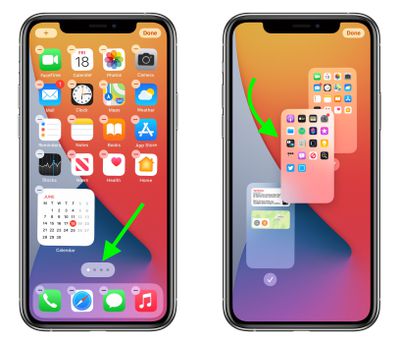
Home Screen

How to Disable or Delete Home Screen Pages

  1. Touch and hold a space on the ‌Home Screen‌ to enter jiggle mode.
  2. Tap the row of dots representing your ‌Home Screen‌ pages.
  3. In the ‌Home Screen‌ grid that appears, tap the checkmark next to a page to uncheck/disable it, or tap the minus (-) icon in the top-left corner of a page to delete it, then tap Delete in the prompt to confirm.
  4. Tap Done in the top-right corner of the screen when you're finished.
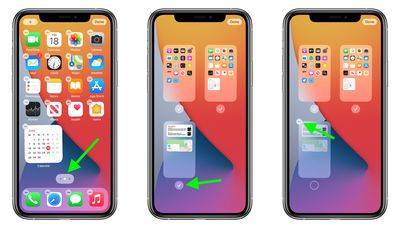
home screen
If you disable a ‌Home Screen‌ page, you can re-enable it by tapping the checkmark icon next to it again so that the checkmark reappears. When you delete a ‌Home Screen‌ page, the apps that were on the page are not deleted and remain in the App Library. You will have to drag them out of the App Library if you want to re-add them to the ‌Home Screen‌.

Top Rated Comments

adammusic Avatar
66 months ago
Just let us hide the App Library page that i will Never use ever.
Score: 11 Votes (Like | Disagree)
66 months ago
All I want to know is, can we get rid of the app library, I hate that thing so much. So many times scrolling to right when I don't use it.
Score: 10 Votes (Like | Disagree)
iDento Avatar
66 months ago
I wish I can set a different wallpaper for each page.
Score: 10 Votes (Like | Disagree)
TheDailyApple Avatar
66 months ago
I didn’t like the App Library at first. However I then tried making do with just one Home Screen that contained some widgets and my most used apps and using the App Library for everything else. Once I started using the App Library it grew on me. All my most used apps are on top, and I can search for those I use more rarely.
Score: 8 Votes (Like | Disagree)
4jasontv Avatar
66 months ago

All I want to know is, can we get rid of the app library, I hate that thing so much. So many times scrolling to right when I don't use it.

Just let us hide the App Library page then i will Never use ever.
The App Library is born from good intentions, it's just poorly implemented. Apple has no idea how to categorize apps, and the developers can't be trusted to label them either. As a result, Todoist, FedEx, and Venmo get grouped together.

All they need is smart folders based on user-created tags.
Score: 8 Votes (Like | Disagree)
contacos Avatar
66 months ago
15 Gens and still no way to just place those icons anywhere on the screen. Really boggles my mind. Is there a patent they don’t want to pay for or something? One thing Android has over iOS, is proper and easy Lock & Home Screen customization
Score: 3 Votes (Like | Disagree)

Popular Stories

iCloud iPhone 17 Pro

iPhone Users Who Pay for iCloud Storage Get Two New Perks on iOS 27

Thursday July 2, 2026 6:10 am PDT by
If you pay for certain iCloud+ storage plans beyond the 5GB that Apple offers for free, you will receive two more perks on iOS 27 at no additional cost. A summary of the two new iCloud+ perks on iOS 27:Increased daily usage limits for some new Apple Intelligence features, including image generation in the revamped Image Playground app. HomeKit Secure Video cameras receive generated video...
iPhone 4 on Black Feature

Apple Facing One of Its Worst Leaks Since the iPhone 4

Thursday July 2, 2026 9:53 am PDT by
Apple supplier Tata Electronics recently suffered a cyberattack that resulted in thousands of confidential files being published on the dark web, and this reportedly included some photos and documents related to the upcoming iPhone 18 Pro. We have elected not to share any of the leaked photos in this story due to the illegal nature in which they were obtained, but they can easily be found...
American Express Gold Apple Pay Feature

American Express Announces New Apple Pay Feature

Tuesday June 30, 2026 10:27 am PDT by
American Express today announced that you can now redeem Membership Rewards points when checking out with Apple Pay on the web and in apps on the iPhone and iPad. When checking out with Apple Pay on iOS 18 or iPadOS 18 or later, tap on your eligible American Express card (Platinum, Gold, Green, and others) and select the Membership Rewards points option. You can use points to cover all or...















