Remotely Control Your iPhone Camera – No Apple Watch Needed - MacRumorsOpen MenuShow RoundupsShow Forums menuVisit ForumsOpen Sidebar
Skip to Content

Remotely Control Your iPhone Camera – No Apple Watch Needed

by

Remotely controlling the shutter on your iPhone's camera lets you include yourself in the photo while avoiding the limitations of a selfie. For example, it allows you to take a picture of a wider scene with you included in the frame, which is ideal for landscape shots or group photos. If your iPhone is on a tripod, taking the shot remotely also reduces the risk of camera shake. Here's how to do it – and you don't need an Apple Watch.
iphone12protriplelenscamera
There are more ways than one to take a picture on your iPhone remotely. If you have an Apple Watch, you can open the Camera Remote app that comes included in watchOS (see the second set of steps below). If you don't have an Apple Watch, here's how to use Voice Control.

Use Voice Control to Take a Photo

If you don't have an Apple Watch, don't worry. You can also use Voice Control to remotely control the camera on your iPhone. That's because you can trigger the camera shutter with the volume buttons, which can also be controlled with your voice. Here's how it works.

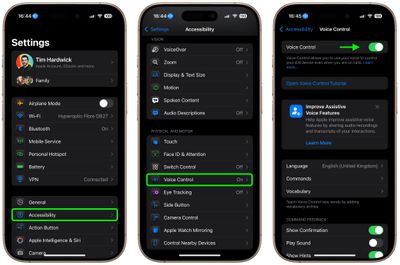
  1. Launch the Settings app and tap Accessibility.
  2. Tap Voice Control.
  3. Turn on the switch next to Voice Control so it's in the green ON position. (You should see a Voice Control active symbol and a little orange dot icon at the top of the screen indicating that Voice Control is using the microphone.)
  4. Next, launch the Camera app and line up your shot.
  5. When you're ready, say "Turn up the volume," to activate the camera's shutter and take the picture.
  6. When you're finished, you can disable Voice Control by toggling the switch again in Settings.
settings

Control Your iPhone's Camera With Apple Watch

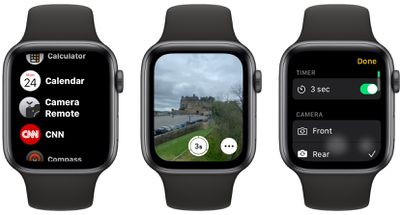
  1. Launch the Camera Remote app on your wrist.
  2. Position your iPhone to frame the shot you want to take.
  3. Tap the Shutter button on your Apple Watch screen.
camera remote
By default, the shot is taken after three seconds to give you time to move into position, but you can disable the time and control other settings including flash, and Live Photo by tapping the ellipsis (three dots) button. The menu that this calls up also lets you switch between the front and rear iPhone camera.

Final tip: If you're familiar with the Shortcuts app, you can find a shortcut in the Gallery called "Say Cheese" that lets you use Siri to control your iPhone's camera remotely. Once you've added it to your active shortcuts and given it permission to access your camera and microphone, you'll be able to take photos remotely by saying "Hey Siri, say cheese."


Top Rated Comments

Veinticinco Avatar
20 months ago
[LIST=1]
* [I]When you're ready, say "Turn up the volume," to activate the camera's shutter and take the picture.[/I]


Well, isn't that just super-intuitive...
Score: 25 Votes (Like | Disagree)
MacUserFella Avatar
20 months ago
“No Apple Watch Needed”

*proceeds to list Apple Watch camera method*
Score: 17 Votes (Like | Disagree)
diego.c Avatar
20 months ago
Me: "Hey Siri, say cheese."

Siri: Cheddar, Mozzarella, Brie...
Score: 12 Votes (Like | Disagree)
20 months ago
It should be easy as “hey Siri take a photo” after launching camera app. “Turn the volume up” doesn’t seem very nice to do it.
Score: 8 Votes (Like | Disagree)
mrgraff Avatar
20 months ago

Can’t I use AirPods to take photos remotely?
Sure, and you can also use a bluetooth shutter remote. The tip in this post isn't the only way.
Score: 8 Votes (Like | Disagree)
20 months ago


[LIST=1]
* When you're ready, say "Turn up the volume," to activate the camera's shutter and take the picture.


Well, isn't that just super-intuitive...
It may not be "super-intuitive" but it is awesome. Instead of knee-jerk dissing on some feature, consider embracing it instead.

Many thanks to MR for providing this excellent tip. I capture many images where for safety or for good image capture reasons manual shutter release is challenging, even with the very helpful Camera Control button.

Hint:
Using voice control means one's hands need not be adding movement to the process of releasing the shutter, which [if one can manage to keep the iPhone really still] means the camera app will not need to apply as much computational photography to the image capture, which means less of the "over processing" unskilled users like to unfairly blame on the iPhone. The other technique to minimize how much computational photography is required is to always keep the camera set to RAW capture. And to realize that less available light always means compromises to image capture.
Score: 6 Votes (Like | Disagree)

Popular Stories

apple pro tell logo

Apple Launching Five New Products Today

Thursday November 5, 2026 12:59 am PST by
Apple is launching five new products on Friday, November 6, following pre-orders that opened last week, including its first touchscreen MacBook Pro models. The following new products will be available from today: iPad mini with OLED display and A20 Pro chip iMac with M6 chip 14-inch MacBook Pro with M6 chip 14-inch MacBook Pro with OLED touchscreen 16-inch MacBook Pro with OLED...
duo aquarium

More Fun iPhone Duo Apps: 30 New Picks to Try

Friday November 6, 2026 3:27 pm PST by
When the iPhone Duo launched, we shared a list of some of the fun apps developers created for the new form factor. Two weeks out, developers are continuing to come up with fresh ideas, so we thought we'd share some of our favorites. Games Marbles Unhinged ($2.99) - Marbles Unhinged is a marble maze designed for the Duo. When you fold it, the floor turns into a ramp. If you stand the top...
silver iphone 18 pro

Apple Rumored to Drop the iPhone's Action Button Next Year

Friday November 6, 2026 6:07 am PST by
Apple plans to merge the iPhone's Action button with the Camera Control starting next year, according to the leaker known as "Instant Digital." In a new post on Weibo, the leaker claimed that a single press of the combined button would open the camera, while a long press would trigger the function assigned to the Action button. They explicitly clarified that the dedicated Action button would ...

Latest Stories
Siri AI Rumored to Become 'More Like an Agent' as Early as Next Year
3 hours ago
Apple Taking New Approach to Developing iOS 28 and macOS 28
5 hours ago
Early Apple Black Friday Deals on Apple Watch, MacBook Air, and More
1 day ago
'Backglow' Lets You Customize New MacBook Pro's Glowing Apple Logo
1 day ago
Top Stories: Apple Product Launches, iOS 27.3 Beta, and More
1 day ago
More Fun iPhone Duo Apps: 30 New Picks to Try
2 days ago
Hands-On With Apple's New OLED Touchscreen MacBook Pro
2 days ago
Apple Store With All-New Design Opening Soon in Southern California
2 days ago
Control the Glowing Apple Logo on Your New MacBook Pro
2 days ago
Apple Shares New 'Apple Card: Apply and Use in Minutes' Ad
2 days ago
Apple Says More Than 100,000 Apps Optimized for iPhone Duo, Here's What's Still Missing
2 days ago
Early Black Friday Deals Kickoff With Steep Discounts on Apple Watch Ultras and More
2 days ago
The MacRumors Show: iOS 27.3 Looks Like a Huge Update
2 days ago
Best Buy's Black Friday Event Begins With Sitewide Savings on Apple, TVs, More
2 days ago
Apple Releasing Yet Another Two New Products Next Week
2 days ago
MacBook Air Drops to Lowest Price in Months With Amazon's $250 Discount
2 days ago
Apple Rumored to Drop the iPhone's Action Button Next Year
2 days ago
Apple's Extended Return Policy Now in Effect for 2026 Holiday Season
2 days ago
Apple Music Classical Updated With New Icon and Refreshed Design
2 days ago
OLED iPad Mini, M6 iMac, and New MacBook Pros Available From Today
2 days ago
Apple Surveys iPhone Duo Buyers About Crease and Camera
3 days ago
Apple's First Touchscreen Mac is Now Arriving to Customers
3 days ago
Claude Gets Personal Finance Feature With Bank Account Linking
3 days ago
Apple Arcade Adds Crossy Road Rush and NBA 2K27
3 days ago
Apple's New HomeView Smart Home Hub: Here's How Much RAM It Has
3 days ago
iPad Mini vs. iPad Air Buyer's Guide: Now Just $50 Apart
3 days ago
First iOS 27.3 and macOS Golden Gate 27.3 Public Betas Now Available
3 days ago
Apple Announces a New Mac Sales Record
3 days ago
Paid $200 for Logic Pro? Apple Says You Won't Get This New Feature
3 days ago
Instagram's Edits Video Editor is Now Available on Mac
3 days ago








































