

When you go to share something on your iPhone, iOS tries to be helpful by displaying a row of suggested contacts at the top of the Share menu. Keep reading to learn how to get rid of them.
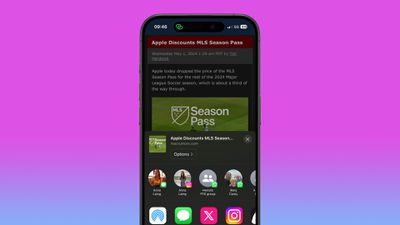
Whenever you go to share something on your iPhone or iPad using the Share button, iOS brings up a Share menu – often called the Share Sheet – at the top of which is a row of suggested contacts with whom you've interacted recently. Swiping along this row reveals more contacts, and the icon in the corner of each profile picture indicates the app that you often use to communicate with that person.
These suggested contacts are useful if you share a lot of things with the same people, but there may be times when you'd prefer not to see specific contacts there. For example you might keep seeing a duplicate suggestion over multiple apps, or a WhatsApp group that you don't typically share things with. Whatever the reason, you can actually steer these sharing suggestions to appear less often, or not at all. Here's how.
Make Contacts Appear Less Often in the Share Menu
- Tap the Share button (the box with an arrow pointing out) in any app to bring up the Share Sheet.
- Long press on the suggested contact that you want to see less often in the Share menu.
- Tap Suggest Less in the popover menu.
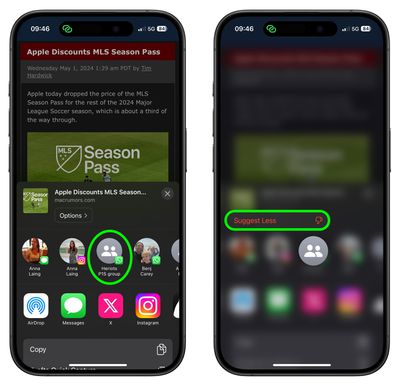
Bear in mind, doing this won't guarantee that the contact doesn't appear in the Share Sheet again in future, but if you keep repeating it whenever they do show up, iOS will eventually get the message.
Remove All Contacts From iPhone Share Menu
Short of deleting their contact in the Contacts app, the only way to guarantee that someone doesn't keep turning up on your Share Sheet is to disable the contact suggestions row completely.
- Open the Settings app.
- Scroll down and tap Apple Intelligence & Siri (or Siri & Search if you're on an older iPhone).
- Under the "Suggestions" section, toggle off the switch next to Show When Sharing.
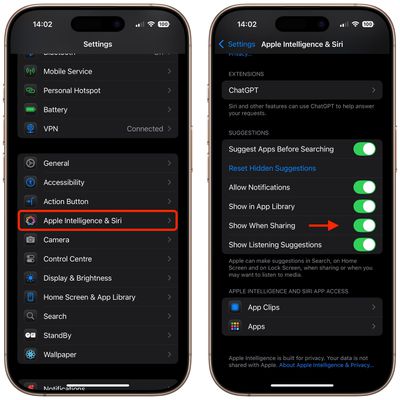
That's all there is to it. Now the next time you invoke the Share Sheet, you won't see any contact profiles at the top. You can reverse the change just as easily by switching on the Show When Sharing toggle again.















