How to Turn Off Tab Bar Coloring / Tinting in Safari - MacRumorsOpen MenuShow RoundupsShow Forums menuVisit ForumsOpen Sidebar
Skip to Content

How to Turn Off Tab Bar Coloring / Tinting in Safari

by

In iOS 15 as well as Safari 15 for macOS Big Sur and macOS Catalina, Apple introduced some Safari interface design changes that haven't been universally welcomed. Fortunately, Apple has made some of these changes optional, such as the ability to disable tab bar coloring.

safari 15 tinting

Tab bar coloring on (left) versus coloring off (right) in dark mode

Tab bar coloring, or website tinting, happens when the color of Safari's interface changes around the tabs, bookmark, and navigation button areas to match the color of the website you're viewing.

The idea behind tinting is that it allows the browser interface to fade into the background and create a more immersive experience. However, the effect doesn't always look great, especially if you have several windows arranged on your desktop. Happily, Apple chose to include an option to turn it off.

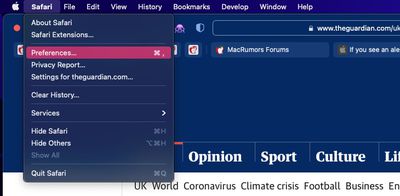
  1. Launch Safari, then select Safari -> Preferences... from the menu bar.
    safari preferences

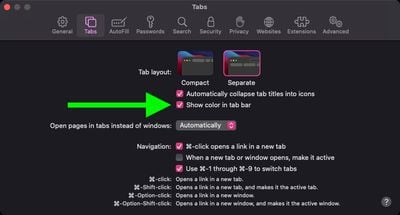
  2. Select the Tabs panel.
  3. Uncheck the box next to Show color in tab bar.
    safari

If you're using Safari in iOS 15, you can find the same option in Settings -> Safari. Under the "Tabs" section, turn off the switch next to Allow Website Tinting. On iPadOS 15, this option is called Show Color in Tab Bar, just like in Safari 15 for macOS.
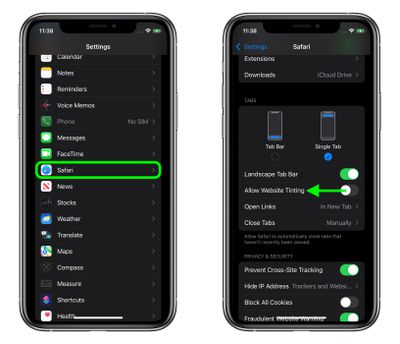
settings
In previous versions of iOS, Apple included a "Show Color in Tab Bar" accessibility setting, which basically had the same effect as the new "Allow Website Tinting" toggle. The fact that Apple made the option more prominent suggests user aversion to tinting is more common than previously thought.


Tag: Safari

Top Rated Comments

007 Junior Avatar
61 months ago
I'm constantly confused whether a dark grey tab is active or not active. This is bad UI design.
Score: 37 Votes (Like | Disagree)
61 months ago
Both look terrible. I can't decide turning it on or off.

Why did Apple ruin a once great user interface on Mac? I want the Safari 14 Taskbar und Tabbar back.
Score: 16 Votes (Like | Disagree)
61 months ago
Those were the times when widgets looked like widgets and not like artwork or content. Btw. for the newcomers: Apple was once great in user interface design.
Score: 16 Votes (Like | Disagree)
Apple Knowledge Navigator Avatar
61 months ago
Disabling this was one of the first things that I did. Entirely form over function.
Score: 12 Votes (Like | Disagree)
61 months ago
The logic of colouring the current tab dark is so wrong!

Look at the following. Which tab is current?

Previously, and as per all good UI design, the lighter tab looks on top and current. Not the darker one.

Yet Apple made this idiotic change with apparently no consultation or input from design professionals. Bonkers.


By comparison look at Firefox. It is blooming clear which tab is the current one.


How does one revert / fix this Apple Safari behaviour?

Attachment Image

Attachment Image
Score: 11 Votes (Like | Disagree)
61 months ago
I think it looks good on iOS but awful on macOS.
Score: 10 Votes (Like | Disagree)

Popular Stories

MacBook Pro Low Angle Wide Lens

macOS 27: Two More Changes Leaked Ahead of WWDC Next Month

Sunday May 10, 2026 9:45 am PDT by
macOS 27 will have a "slight redesign" compared to macOS Tahoe, according to the latest word from Bloomberg's Mark Gurman. In his Power On newsletter today, Gurman said the design changes will help to improve the readability of macOS Tahoe's Liquid Glass interface:If you've used Tahoe, you're likely familiar with some of the quirks — particularly the transparency effects and shadows that...
Apple Card iPhone 16 Pro Feature

Apple Card Promo to Offer Free AirPods Pro 3

Friday May 15, 2026 8:59 am PDT by
Starting as early as next week, customers who sign up for an Apple Card at Apple's retail stores in the U.S. will receive $249 cash back when they purchase AirPods Pro 3, according to Bloomberg's Mark Gurman. The promotion has yet to be officially announced by Apple, so exact terms and conditions are not available at this time. AirPods Pro 3 are priced at $249 in the U.S., so customers who...
Apple WWDC25 iOS 26 CarPlay Light mode 250609

Six Popular iPhone Apps Now Available on CarPlay

Thursday May 14, 2026 9:10 am PDT by
Apple's CarPlay system for accessing iPhone apps on a vehicle's dashboard screen has received six popular apps in recent weeks: ChatGPT, Perplexity, Grok, Google Meet, WhatsApp, and the indie artist streaming platform Audiomack. Make sure you have the latest version of each app and they will automatically appear on CarPlay. ChatGPT Starting with iOS 26.4, CarPlay supports voice-based...