Safari's Compact Tab Bar Is Back on Mac and iPad - MacRumorsOpen MenuShow RoundupsShow Forums menuVisit ForumsOpen Sidebar
Skip to Content

Safari's Compact Tab Bar Is Back on Mac and iPad

by

When ‌macOS Tahoe‌ and iPadOS 26 launched last September, Apple quietly removed Safari's Compact tab layout – the option that merged the address bar and the tab bar into a single, space-saving row. If you were a fan of it, you will have been out of luck for months.

safari
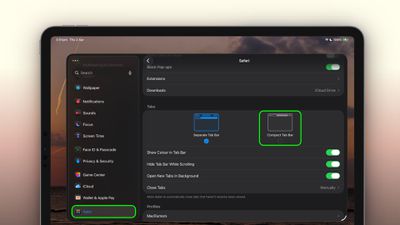
The good news is that Apple has brought it back. In macOS 26.4 and iPadOS 26.4, the Compact tab bar is once again available as an alternative to the default Separate layout. Here's how to enable it on both platforms.

On Mac

  1. Open Safari.
  2. In the menu bar, click SafariSettings....
  3. Click the Tabs pane.
  4. Next to "Tabs Layout," select Compact.
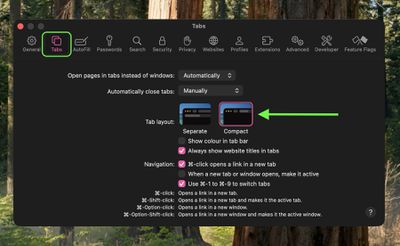
safari settings

The address bar and tab bar will immediately merge into a single row, freeing up vertical screen space.

On iPad

  1. Open the Settings app.
  2. Scroll down and tap through to Apps ➝ Safari.
  3. Under "Tabs," tap Compact Tab Bar.

settings

That's all there is to it. If you decide you prefer the standard layout, simply retrace your steps and select Separate (on Mac) or Separate Tab Bar (on ‌iPad‌).

The Compact layout can be handy on the smaller screens of the MacBook Air or iPad mini, where every pixel of vertical space counts. It's worth trying if you've never used it, just be aware that tab titles are truncated more aggressively in this view, so when switching between many open tabs you'll have to rely more on favicons than on page names.


Tag: Safari

Top Rated Comments

13 weeks ago
No thanks. And its worse.
Score: 5 Votes (Like | Disagree)
JonneyGee Avatar
13 weeks ago
As long as it’s only an option, that’s great. Just don’t force me to use it and I’ll forget it’s there like last time.
Score: 5 Votes (Like | Disagree)
13 weeks ago
What's interesting is while the feature was gone for months, the user profile setting with its flag set to compact tabs was apparently still on disk. So when I updated to 26.4, the compact tabs feature was on without me having to do anything in settings.
Score: 5 Votes (Like | Disagree)
mikeack Avatar
13 weeks ago
I'm honestly really happy these are back.
Score: 3 Votes (Like | Disagree)
Black_Mage Avatar
13 weeks ago
I suppose this is good for the people who use Safari. I switched to Firefox awhile ago mainly because it plays nice with addons.
Score: 3 Votes (Like | Disagree)
WarmWinterHat Avatar
13 weeks ago

Honestly, I think it looks even more ridiculous with Liquid Glass. But to each their own.
It sure does.. and everything being in it's own little floating platform/button just looks stupid.
Score: 3 Votes (Like | Disagree)

Popular Stories

safari notify macos 27

New Safari Can Monitor a Webpage and Notify You of Updates

Monday June 8, 2026 11:04 am PDT by
Apple's new version of Safari browser in macOS 27 and iOS 27 can be tasked to monitor a webpage and notify you of any changes, thanks to a new built-in feature. With "Notify Me," Safari can keep checking a website on your behalf – such as a product you've been watching for when it comes back in stock – and alert you when a change occurs. In other upcoming feature additions, using the ...
safari tab groups apple intelligence

Apple Brings AI Tab Organization and AI-Generated Extensions to Safari

Monday June 8, 2026 1:18 pm PDT by
Apple today unveiled a raft of Safari upgrades powered by Apple Intelligence, including automatic tab organization, AI-generated custom extensions, and new privacy-first browsing tools. The centerpiece feature is automatic tab organization, which uses Apple Intelligence to group a user's open tabs into relevant topics without any manual intervention. If someone is planning a weekend trip,...
iCloud iPhone 17 Pro

iPhone Users Who Pay for iCloud Storage Get Two New Perks on iOS 27

Thursday July 2, 2026 6:10 am PDT by
If you pay for certain iCloud+ storage plans beyond the 5GB that Apple offers for free, you will receive two more perks on iOS 27 at no additional cost. A summary of the two new iCloud+ perks on iOS 27:Increased daily usage limits for some new Apple Intelligence features, including image generation in the revamped Image Playground app. HomeKit Secure Video cameras receive generated video...