

How to Save a Full Page or 'Scrolling Screenshot' as a PDF on iPhone and iPad - MacRumorsOpen MenuShow RoundupsShow Forums menuVisit ForumsOpen Sidebar
Skip to Content

How to Save a Full Page or 'Scrolling Screenshot' as a PDF on iPhone and iPad

by

In iOS, Apple has extended the system's built-in screenshot feature to include the ability to save a full web page or "scrolling screenshot" as a multi-page PDF.
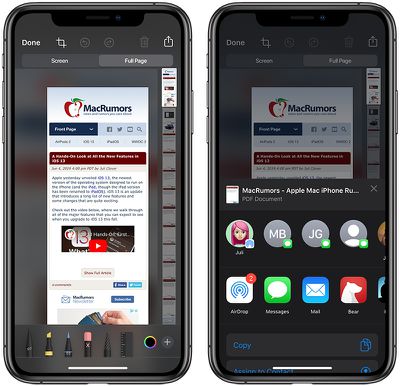
ios13safarisavefullpage
Don't expect this option to appear when using a third-party apps, as it's only available in Apple apps including Safari, Notes, and Maps. With that said, here's how it works, using Safari as an example.

  1. Launch the Safari app on your iPhone or iPad.
  2. Navigate to the web page that you wish to save as a multi-page PDF.
  3. Press the Home button and the Sleep/Wake button simultaneously to capture a screenshot. If your device doesn't have a Home button – if it's a 2018 iPad Pro, for example – press the power button located at the top of the device and the volume up button located on the right of the device at the same time.
    how to save web page as a pdf

  4. A preview of the screenshot will pop up in the lower left of the display. Tap it to open up the Instant Markup interface. You'll have about five seconds before it disappears.
  5. Tap the Full Page tab in the upper right corner of the Markup interface.
  6. To save the PDF, tap Done and then tap Save PDF to Files. To share the PDF, tap the Share button (the square with an arrow pointing out) and select how or who to share it with from the Share screen.
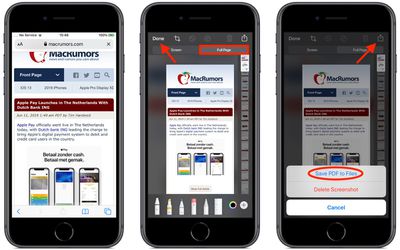
Note that you can also use Markup to edit your PDF before saving or sending it.


Top Rated Comments

90 months ago
okay so let me give you a nice advice how "Creating a PDF" works in almost every situation:

Webpage for example: tap on the share-button and tap on "print". Now pinch out with two fingers the preview... tadaaaa there is your PDF and you can do whatever you want.
If you do it from a clean webpage links will be adopted. If you do it from the PDF Reader mode, links will disappear...

This works everywhere where you can print... enjoy

bernds.blog :)
Score: 7 Votes (Like | Disagree)
e-coli Avatar
90 months ago
I will never, ever understand why PDFs continue to be based on outdated notions of printing and outputting. I do not want a multi-page PDF of a web page. I want a single PDF page. I’m not going to print the thing, and I want it to crop it at my choosing.
Score: 4 Votes (Like | Disagree)
90 months ago
Seems a bit long winded when there’s a Create PDF button on the share menu in Safari


Attachment Image
Score: 4 Votes (Like | Disagree)
Robert.Walter Avatar
90 months ago
I tell you what...we needed iOS 13 a long time ago...nice features we should have had back in iOS 11 but Apple rested on its laurels for far too long.
Dude, IIRC, this feature has been around for more than 2 years, since iOS 11 or so.
Score: 4 Votes (Like | Disagree)
Robert.Walter Avatar
90 months ago
I used this feature more than once since it debuted in iOS 12 (or 11?), and more than once I was disappointed when it cut off the ends of longer articles (and for those was useless.). I don’t know if this was a limitation in the s/w or memory on my iPhone 6S.

Hope this shortcoming (pun not intended) has been overcome in 13 as it’s a useful feature.

I didn’t read article but if it is missing my pro-tip, here it is: to get a cleaner article w/o the embedded ads, put Safari in reader mode (that’s the 3+1/2) horizontal lines at the left of the address window) before you make that pdf.
Score: 3 Votes (Like | Disagree)
furbzv1 Avatar
90 months ago
really like this feature ...l just don't like having the contact row there
Score: 2 Votes (Like | Disagree)

Popular Stories

Apple Card iPhone 16 Pro Feature

Apple Card Promo to Offer Free AirPods Pro 3

Friday May 15, 2026 8:59 am PDT by
Starting as early as next week, customers who sign up for an Apple Card at Apple's retail stores in the U.S. will receive $249 cash back when they purchase AirPods Pro 3, according to Bloomberg's Mark Gurman. The promotion has yet to be officially announced by Apple, so exact terms and conditions are not available at this time. AirPods Pro 3 are priced at $249 in the U.S., so customers who...
Apple WWDC25 iOS 26 CarPlay Light mode 250609

Six Popular iPhone Apps Now Available on CarPlay

Thursday May 14, 2026 9:10 am PDT by
Apple's CarPlay system for accessing iPhone apps on a vehicle's dashboard screen has received six popular apps in recent weeks: ChatGPT, Perplexity, Grok, Google Meet, WhatsApp, and the indie artist streaming platform Audiomack. Make sure you have the latest version of each app and they will automatically appear on CarPlay. ChatGPT Starting with iOS 26.4, CarPlay supports voice-based...
ipad mini 7 blue

OLED iPad Mini: Release Date, Pricing, and What to Expect

Thursday May 14, 2026 5:08 am PDT by
According to the latest rumors, Apple is close to launching its next-generation iPad mini. So what should we expect from the successor to the iPad mini 7 that Apple released over a year ago? Read on to find out. Processor and Performance Apple is working on a next-generation version of the iPad mini (codename J510/J511) that features the A19 Pro chip, according to information found in code...















