How to Save Space Using Built-In iOS Storage Features - MacRumorsOpen MenuShow RoundupsShow Forums menuVisit ForumsOpen Sidebar
Skip to Content

How to Save Space Using Built-In iOS Storage Features

by

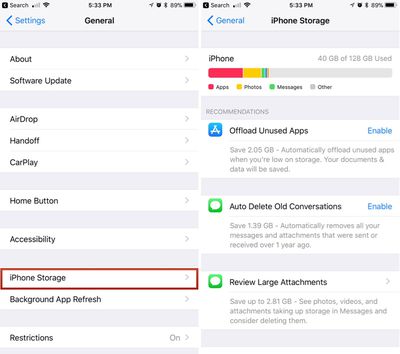
Starting with iOS 11, Apple began offering a new feature that provides suggestions on how you can save space on your iOS device. These built-in space-saving suggestions, which can be found in the Settings app, can help you free up space on your iPhone when storage space is running low.

Toggling on Space Saving Suggestions

  1. Open the Settings app.
  2. Scroll down and tap on "General."
  3. Choose "iPhone Storage."ios11iphonestorage
  4. Tap "Enable" on any of the suggestions Apple provides to turn them on.

Offload Unused Apps

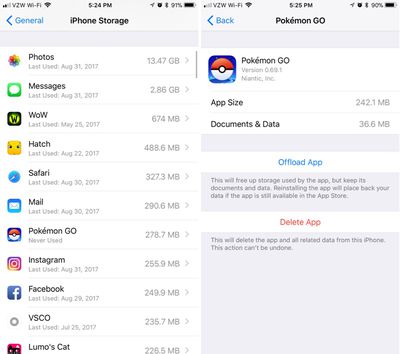
One of Apple's suggestions is to automatically delete unused apps when the storage space on your device is low. If you enable this feature, Apple will delete apps you don't use often, while saving the documents and data so you can download them again and pick right back up where you were if necessary.
ios11offloadapps
You can also offload individual apps by selecting them from the list of apps located just below all of Apple's suggestions.

Auto Delete Old Conversations

With "Auto Delete Old Conversations" enabled, Apple will automatically delete all messages and attachments that were sent over a year ago. This can save significant space, but be aware that once gone, there's no getting those messages back.

Review Large Attachments

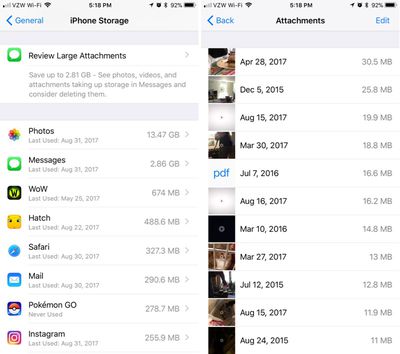
The "Review Large Attachments" feature lets you see a list of the largest files on your device, located in Photos, Mail, and Messages. A tap will let you view a file up close, and a swipe to the left on an item in the file list will bring up an option to delete it. You can mass delete files by tapping on the "Edit" button in the upper right corner of the device.
ios11storageattachments
Along with these three options for storing space, the Storage section of the Settings app also displays all of the apps you have installed, with the app using the most storage space at the top. It also lets you know how long ago the app was last used, making it easy to cull items that aren't used often.

Depending on what's installed on your device, you may or may not see all of these storage options, but if you're getting low on space, they should appear.


Related Forum: iOS 11

Top Rated Comments

ArtOfWarfare Avatar
119 months ago
Offloading your apps sounds risky to me. It ends with "if the app is still available in the App Store" - not sure about you guys, but when MacRumors tells me something will likely be remove from the App Store, I jump on it.

IE, I have Floppy Cloud on my iPhone, the app that has a secret NES emulator in it - just put an NES ROM in Dropbox and the app will load up and run the game. I also have a "flashlight app" on my iPhone that actually enables tethering without paying your carrier.

Score: 3 Votes (Like | Disagree)
HalGumbert Avatar
119 months ago
Is there any way to 'select all' rather than tapping each large attachment?
Score: 2 Votes (Like | Disagree)
M.PaulCezanne Avatar
119 months ago
Welcome features. Thanks for the tips!

Score: 2 Votes (Like | Disagree)
119 months ago
Should this only delete the attachment in the message, and not from the photo library?
Yes, this is only to clear up space associated with each app, so getting rid of the image/video/pdf attachments in Messages will not remove them from the photo library.
Score: 1 Votes (Like | Disagree)
119 months ago
While I was in the public beta, I saw the "Recommendations" section under Settings->General->Iphone Storage. But now that I have the final version of iOS 11, I don't - and my wife (who was never in the beta) doesn't see it either?!

Anyway, both of us have 16gb iPhone 6 and our category picture never looks like all these web sites swooning over the new chart - ours is mostly "Other" - our "System" category takes up 8.5gb!! And none of the web sites detailing how to 'free up space like a pro' says a peep about how to reduce that 'System' category. I know for a fact that base iOS 11 doesn't take up 8.5gb - there must be caches, logs, whatever that could be cleared. Anyone have any ideas on what we could try (short of factory reset)?

A couple things I already do:
- Disable "iCloud Photo Library" for a few minutes and then enable it again - that sometimes frees up a lot of storage (I'm guessing because some caches get cleared and, obviously, some low-grade images are no longer kept on the phone).
- Prune all old conversations in iMessage (especially those with photos). One of the storage recommendations allowed you to do pruning there (including deleting attachments) but like I said, we don't see the recommendations anymore.

Are there any other ways to affect the "System" category?

Any suggestions are much appreciated,
Tom
Score: 1 Votes (Like | Disagree)
macduke Avatar
119 months ago
It's also worth noting that iMessages in the cloud will be coming back (beta feature) with an update to iOS 11 at some point. Though I'd be fine with an option to keep messages for three months. One month is too short in case I need to reference something my wife sent me in search, but a year is too long.

Offloading your apps sounds risky to me. It ends with "if the app is still available in the App Store" - not sure about you guys, but when MacRumors tells me something will likely be remove from the App Store, I jump on it.

IE, I have Floppy Cloud on my iPhone, the app that has a secret NES emulator in it - just put an NES ROM in Dropbox and the app will load up and run the game. I also have a "flashlight app" on my iPhone that actually enables tethering without paying your carrier.
You can make copies of these apps in iTunes. I think. Though didn't they recently remove the App Store from iTunes? I just realized I haven't synced my iPhone to iTunes in years so I have no idea how it works any more, lol.

Apple doesn't force the removal from your phone if the app is banned?
The concern is that once the app is "removed" from your device using this feature (not using the app in a long time), it won't automatically come back if you tap on it because it's not in the app store.
Score: 1 Votes (Like | Disagree)

Popular Stories

apple pro tell logo

Apple Launching Five New Products Today

Thursday November 5, 2026 12:59 am PST by
Apple is launching five new products on Friday, November 6, following pre-orders that opened last week, including its first touchscreen MacBook Pro models. The following new products will be available from today: iPad mini with OLED display and A20 Pro chip iMac with M6 chip 14-inch MacBook Pro with M6 chip 14-inch MacBook Pro with OLED touchscreen 16-inch MacBook Pro with OLED...
duo aquarium

More Fun iPhone Duo Apps: 30 New Picks to Try

Friday November 6, 2026 3:27 pm PST by
When the iPhone Duo launched, we shared a list of some of the fun apps developers created for the new form factor. Two weeks out, developers are continuing to come up with fresh ideas, so we thought we'd share some of our favorites. Games Marbles Unhinged ($2.99) - Marbles Unhinged is a marble maze designed for the Duo. When you fold it, the floor turns into a ramp. If you stand the top...
silver iphone 18 pro

Apple Rumored to Drop the iPhone's Action Button Next Year

Friday November 6, 2026 6:07 am PST by
Apple plans to merge the iPhone's Action button with the Camera Control starting next year, according to the leaker known as "Instant Digital." In a new post on Weibo, the leaker claimed that a single press of the combined button would open the camera, while a long press would trigger the function assigned to the Action button. They explicitly clarified that the dedicated Action button would ...
Latest Stories
Siri AI Rumored to Become 'More Like an Agent' as Early as Next Year
52 minutes ago
Apple Taking New Approach to Developing iOS 28 and macOS 28
3 hours ago
Early Apple Black Friday Deals on Apple Watch, MacBook Air, and More
21 hours ago
'Backglow' Lets You Customize New MacBook Pro's Glowing Apple Logo
22 hours ago
Top Stories: Apple Product Launches, iOS 27.3 Beta, and More
1 day ago
More Fun iPhone Duo Apps: 30 New Picks to Try
2 days ago
Hands-On With Apple's New OLED Touchscreen MacBook Pro
2 days ago
Apple Store With All-New Design Opening Soon in Southern California
2 days ago
Control the Glowing Apple Logo on Your New MacBook Pro
2 days ago
Apple Shares New 'Apple Card: Apply and Use in Minutes' Ad
2 days ago
Apple Says More Than 100,000 Apps Optimized for iPhone Duo, Here's What's Still Missing
2 days ago
Early Black Friday Deals Kickoff With Steep Discounts on Apple Watch Ultras and More
2 days ago
The MacRumors Show: iOS 27.3 Looks Like a Huge Update
2 days ago
Best Buy's Black Friday Event Begins With Sitewide Savings on Apple, TVs, More
2 days ago
Apple Releasing Yet Another Two New Products Next Week
2 days ago
MacBook Air Drops to Lowest Price in Months With Amazon's $250 Discount
2 days ago
Apple Rumored to Drop the iPhone's Action Button Next Year
2 days ago
Apple's Extended Return Policy Now in Effect for 2026 Holiday Season
2 days ago
Apple Music Classical Updated With New Icon and Refreshed Design
2 days ago
OLED iPad Mini, M6 iMac, and New MacBook Pros Available From Today
2 days ago
Apple Surveys iPhone Duo Buyers About Crease and Camera
3 days ago
Apple's First Touchscreen Mac is Now Arriving to Customers
3 days ago
Claude Gets Personal Finance Feature With Bank Account Linking
3 days ago
Apple Arcade Adds Crossy Road Rush and NBA 2K27
3 days ago
Apple's New HomeView Smart Home Hub: Here's How Much RAM It Has
3 days ago
iPad Mini vs. iPad Air Buyer's Guide: Now Just $50 Apart
3 days ago
First iOS 27.3 and macOS Golden Gate 27.3 Public Betas Now Available
3 days ago
Apple Announces a New Mac Sales Record
3 days ago
Paid $200 for Logic Pro? Apple Says You Won't Get This New Feature
3 days ago
Instagram's Edits Video Editor is Now Available on Mac
3 days ago