

macOS Quick Tip: Screenshot Straight to the Clipboard - MacRumorsOpen MenuShow RoundupsShow Forums menuVisit ForumsOpen Sidebar
Skip to Content

macOS Quick Tip: Screenshot Straight to the Clipboard

by

There are several ways you can take screenshots on a Mac. Preview offers the option from its File menu. There's also a little screen capture app in the macOS Utilities folder called Screenshot. But the simplest and most common method is to use your Mac's built-in shortcut key combinations.
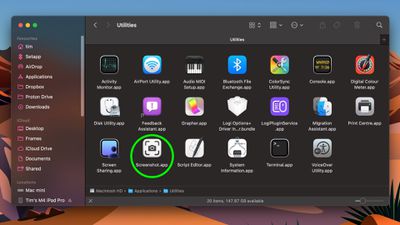
screenshot app 1
Taking a screenshot is as easy as hitting Shift-Command-3 to capture the whole screen, or Shift-Command-4 to capture a portion of the screen using the mouse cursor as a crosshair selection tool (a tap of the spacebar also turns it into a camera for capturing windows).

Screenshots taken using key shortcuts are typically saved on your desktop. However, if you tack the Control key onto either of these shortcuts, macOS will copy the captured image to the clipboard instead of saving it as a file on your desktop, which is useful if you want to paste it into an application that can edit or view images, or use Universal Clipboard to paste it on another Apple device.

In Preview, for example, Command-N creates a new document from the contents of the clipboard without you having to specify a filename until you're ready to save it. You can also access this function in Preview's menu bar (File ➝ New From Clipboard).


Top Rated Comments

Euge Avatar
13 months ago

There are just flat-out way too many modifier keys for these things. For a company like Apple that used to go out of their way to keep things simple by way of even eliminating buttons on our phones, it has always been ridiculous to figure out which finger salute you need to use to do certain things. Shift? Control? Option? Command? Maybe it's one of the 16 different combinations of them all together? There doesn't seem to be any rhyme or reason to which ones you need at any given time, and don't even get me started on trying to memorize the cute little icons they have for each of them, and the fact that sometimes instructions will only give you IKEA instructions on which combination to use...

Keep it simple, stupid!

While cool, damn is that the hardest key combo to hold while dragging a mouse. Why can't it be close to paste match style shft+ctrl+optn+cmd and maybe hold down right click until selection is made.
I don't know why MacRumors doesn't just suggest using cmd+shift+5

It's such a better interface to access all screenshot options.
Score: 13 Votes (Like | Disagree)
13 months ago

There are just flat-out way too many modifier keys for these things. For a company like Apple that used to go out of their way to keep things simple by way of even eliminating buttons on our phones, it has always been ridiculous to figure out which finger salute you need to use to do certain things. Shift? Control? Option? Command? Maybe it's one of the 16 different combinations of them all together? There doesn't seem to be any rhyme or reason to which ones you need at any given time, and don't even get me started on trying to memorize the cute little icons they have for each of them, and the fact that sometimes instructions will only give you IKEA instructions on which combination to use...

Keep it simple, stupid!
These keystrokes have been around for 20+ years. Apple isn't suddenly make it harder just recently.

These keystrokes used to be the _only_ way to capture screenshots (natively), but they more recently added the Screenshot app, as discussed in this article, for those that struggle with keystrokes.
Score: 12 Votes (Like | Disagree)
13 months ago
Better too many shortcuts than too few. Nobody forces you to use or memorize them. And for those of us who prefer keyboard control, having to use the mouse for more than we already do would suck.
Score: 10 Votes (Like | Disagree)
13 months ago
Since no one has mentioned it: you can also right-click the little screenshot preview for more options on what to do with it.


Attachment Image
Score: 7 Votes (Like | Disagree)
mrgraff Avatar
13 months ago

you dont need to hold all those keys while dragging shift-cmd 4 and released and you'll have a cursor on screen you can drag
And if you let go of the keys and then press spacebar, you can screenshot the window under the cursor. Hit spacebar again to toggle window/screen portion.
Score: 5 Votes (Like | Disagree)
13 months ago

While cool, damn is that the hardest key combo to hold while dragging a mouse. Why can't it be close to paste match style shft+ctrl+optn+cmd and maybe hold down right click until selection is made.
you dont need to hold all those keys while dragging shift-cmd 4 and released and you'll have a cursor on screen you can drag
Score: 4 Votes (Like | Disagree)

Popular Stories

macOS 27 on MacBook Pro

Apple Says macOS 27 Won't Be Compatible With These Macs

Wednesday June 3, 2026 8:29 am PDT by
During WWDC 2025, Apple revealed that macOS 26 Tahoe would be the final major macOS version for Intel-based Macs. macOS 27 will be compatible with Apple silicon Macs only, meaning that you will need a Mac with an M-series chip or a MacBook Neo with an A18 Pro chip in order to install the software update. Apple will unveil macOS 27 during its WWDC 2026 keynote this Monday, June 8, and the...
MacBook Neo on Yellow Feature

MacBook Neo is So Popular That Apple Reportedly Doubled Production

Wednesday June 3, 2026 9:24 am PDT by
On an earnings call in late April, Apple's CEO Tim Cook said that customer response to the MacBook Neo was "off the charts," and the popularity of the laptop has reportedly led the company to significantly boost production. Apple supply chain analyst Ming-Chi Kuo this week said he believes that MacBook Neo shipments to Apple were doubled from an initial target of 5 million units to 10...
iphone 18 pro blue%402x

iPhone 18 Pro: Dark Cherry, Light Blue, and Dark Gray Chassis Leaked [Update]

Thursday June 4, 2026 5:18 am PDT by
Update: Since publication, new information has come to light suggesting the images have been AI-manipulated and are not in fact iPhone 18 Pro chassis parts. The original article follows. The color options Apple is reportedly planning for the upcoming iPhone 18 Pro and ‌iPhone 18 Pro‌ Max have appeared online today in the form of images of chassis parts of unknown authenticity....













