iOS 15: How to Find Transit Stations Near You in Apple Maps - MacRumorsOpen MenuShow RoundupsShow Forums menuVisit ForumsOpen Sidebar
Skip to Content

iOS 15: How to Find Transit Stations Near You in Apple Maps

by

In iOS 15, Apple's Maps app benefits from a range of new features and improvements, including the ability get real-time information on the nearby transit options available to you.

apple maps icon ios 15 beta 2
This transit information can be found for major bus routes and rail lines in cities with updated maps. Transit riders can see all of the departures listed near them, including any existing delays on services, and even pin ones they use often to make them more easily discoverable in Maps. Here's how it works.

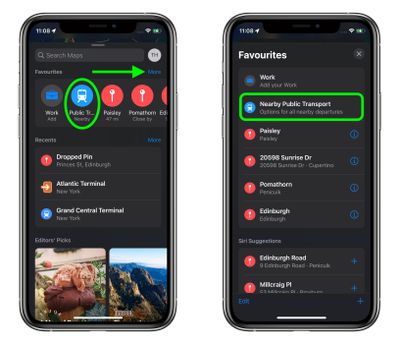
  1. In the Maps app, pull up the menu card and tap More next to "Favorites."
  2. Under "Siri Suggestions," select Nearby Public Transport. Tip: Tap the + icon next to it to add it to your Favorites.
    maps

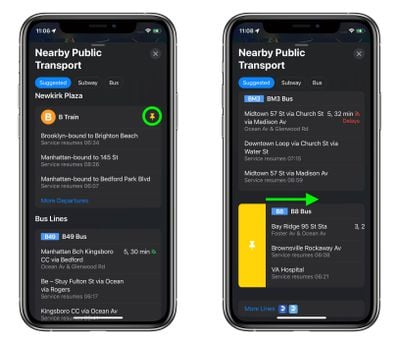
  3. You'll see any nearby transit links in a categorized list. Tap one to get more information on it, including the stops the train or bus has made and will be making, other upcoming departures for this destination, including details on any delays.
  4. To pin a route to make it easier to find, scroll down to the bottom of the stops view, and under "Line Options," tap Pin Line. Alternately, return to previous "Nearby Public Transport" menu, then swipe right on a transit line/route and tap the yellow Pin button that appears.
    maps

Note that pinned routes will always appear at the top of the "Nearby Public Transport" menu, and you can unpin a route just as easily by swiping right on it to reveal a yellow Unpin button.

Related Forum: iOS 15

Popular Stories

Apple Maps General

Apple Maps Flyover Gets a Visual Upgrade in iOS 27

Monday June 8, 2026 4:29 pm PDT by
Apple Maps is getting a visual update in iOS 27, with Apple planning to introduce new aerial imagery that's combined with Visual Intelligence models. Apple said everything will have sharper detail, from the "shapes of individual trees to the way light reflects off the glass of skyscrapers." Flyover is an Apple Maps view that lets users see more than 350 cities in 3D with detailed...
Apple Says iOS 27 Adds These 12 New Features to Your iPhone Feature

Apple Says iOS 27 Adds These 12 New Features to Your iPhone

Tuesday June 9, 2026 9:47 am PDT by
iOS 27's key new feature is a more intelligent and personal version of Siri, but the changes go well beyond that. In a press release, Apple outlined additional enhancements coming across Apple Maps, Find My, Apple Wallet, Apple Music, and more. Apple Maps has gained an enhanced Flyover experience powered by AI, enabling you to view aerial imagery in "stunning detail" for select cities. In ...
liquid glass app icon

Apple Maps to Get These 10 New Features in iOS 27

Thursday June 11, 2026 5:45 am PDT by
Apple Maps is getting a range of new features in iOS 27, headlined by an upgraded Flyover experience that uses AI to improve the realism and detail of its aerial imagery. Flyover is a longstanding feature of Apple Maps and lets users explore more than 350 cities in 3D with detailed landmarks, roads, parks, and buildings. Apple described the enhanced Flyover in iOS 27 as combining aerial...