

Select Faster on iPhone With This Two-Finger Trick - MacRumorsOpen MenuShow RoundupsShow Forums menuVisit ForumsOpen Sidebar
Skip to Content

Select Faster on iPhone With This Two-Finger Trick

by

Your iPhone has multiple touch and gesture capabilities that can enhance how you interact with apps. Some, like pinch and zoom, are well known enough to be considered second nature, but others are less obvious, like the one we're about to explain.

multiple select gesture

Two-Finger Drag to Select Items

If you have apps where you habitually tap on each individual item in a list to select them – emails in your Mail inbox, for example – it's time to dial in some efficiency and embrace this faster method.

This gestural feature allows you to easily select (or deselect) multiple items in apps like Contacts, Mail, Messages, Voice Memos, Notes, and indeed any Apple app that lists multiple items. Here's how it works.

  1. Open an app where multiple item selection is supported.
  2. Touch and hold the screen with two fingers at the same time.
  3. While keeping both fingers on the screen, drag them down (or up) to select multiple items. As you drag, items will be highlighted to indicate they are selected.
  4. Once the desired items are selected, you can perform actions such as moving, deleting, or organizing them.
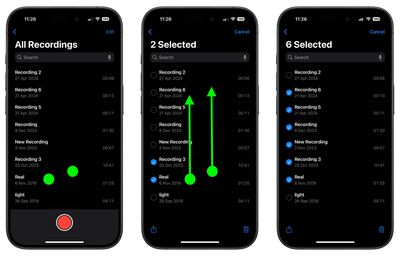
two finger select gesture

That's all there is to it. This simple yet powerful feature streamlines your workflow, saving you time and effort when handling multiple items. Looking to speed up your iPhone text editing skills? Check out our favorite hidden trick by following the link.


Top Rated Comments

15 months ago
Based on this comment thread so far, the actual steps seem to be:

1. Open an App that for some inexplicable reason does not support multi-select

2. Place two fingers on the screen over the items you'd like to select

3. Unpredictable behavior ensues.
Score: 9 Votes (Like | Disagree)
thiscatisfat Avatar
15 months ago
Just imagine that we're on iOS freaking 18. We had at least 100 releases of iOS updates so far! And you still can't select and delete multiple attachments in iMessage. Nice.
Score: 7 Votes (Like | Disagree)
neotint Avatar
15 months ago
If only Apple could make it easy to select all text in iOS. I know it's super advanced and harder to do than fixing Siri. But we can dream of a day that basic high utility features are focused on again instead of chasing hyped up slop generators. Pray to Saint Jobs for us all.
Score: 6 Votes (Like | Disagree)
15 months ago
Nice feature - thanks for the story!
Score: 5 Votes (Like | Disagree)
15 months ago

Just imagine that we're on iOS freaking 18. We had at least 100 releases of iOS updates so far! And you still can't select and delete multiple attachments in iMessage. Nice.
You have no idea how much computing power these gestures need. Every new gesture introduced needs a new gen chip that comes out every year.

Its what keeps the upgrade cycle going...
Score: 3 Votes (Like | Disagree)
15 months ago
Most of us are familiar with many of these gestures. But too many apps don’t allow them - at least not as we’ve come to use them in iOS or iPadOS. I’m looking at you, New York Times.
Score: 3 Votes (Like | Disagree)

Popular Stories

Aston Martin CarPlay Ultra Screen

Apple Says CarPlay Ultra is Coming to These Vehicle Brands

Thursday May 21, 2026 11:53 am PDT by
Last year, Apple launched CarPlay Ultra, the long-awaited next-generation version of its CarPlay software system for vehicles. Nearly a year later, CarPlay Ultra is still limited to Aston Martin's latest luxury vehicles, but that should change fairly soon. In May 2025, Apple said many other vehicle brands planned to offer CarPlay Ultra, including Hyundai, Kia, and Genesis. CarPlay Ultra...
iphone 18 pro blue%402x

iPhone 18 Pro: Dark Cherry, Light Blue, and Dark Gray Chassis Leaked [Update]

Thursday June 4, 2026 5:18 am PDT by
Update: Since publication, new information has come to light suggesting the images have been AI-manipulated and are not in fact iPhone 18 Pro chassis parts. The original article follows. The color options Apple is reportedly planning for the upcoming iPhone 18 Pro and ‌iPhone 18 Pro‌ Max have appeared online today in the form of images of chassis parts of unknown authenticity....
iOS 27 All the New App Features

iOS 27: All the Rumored App Features

Wednesday June 3, 2026 3:48 pm PDT by
Siri is getting a major overhaul in iOS 27, but Apple also has some big updates planned for apps like Camera, Photos, and Wallet. There are multiple new AI features in the works, plus some non-AI upgrades. Camera Apple is moving Visual Intelligence from the Camera Control button to the Camera app in iOS 27, according to Bloomberg. There will be a Siri mode that will be available alongside...















