

With iOS 17, Safari gained a feature called Profiles that's designed to help you separate your browsing sessions into categories like Work, School, Personal, or custom categories that you find useful to have siloed. This article explains how to use it on iPhone.
Apple in iOS 17 expanded on Tab Groups with a Profile feature that lets you separate out your browsing into different use cases. You can create a "Work" profile and a "Personal" profile, for example, so all of your work-related browsing is kept separate from your personal browsing.
Each profile gets its own icon and silos all of your history, Tab Groups, Favorites, Private Browsing tabs, and cookies. You can even assign specific third-party extensions to different profiles to optimize your browsing experience based on the task at hand. Here's how to create your own profile in Safari.
How to Create a Safari Profile
- Open the Settings app on you iPhone or iPad.
- Scroll down to Safari.
- Under the "Profiles" section, tap New Profile.
- Select a name, icon, and background color for your new profile.
- Under "Settings," choose a Favorites folder (or a new folder) and select which tabs (if any) that you want to be open when you're using the profile with the Open New Tabs option.
- Tap Done.
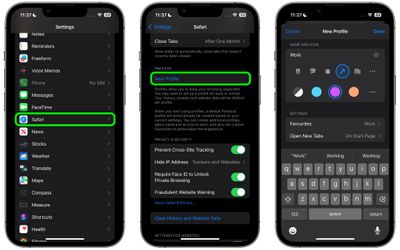
When you create a new profile, your device will automatically generate a "Personal" profile to differentiate other browsing sessions conducted outside of the profile you created.
Both profiles and additional ones you create can be edited in the same section of the Settings app. When editing an existing profile, you can also enable any Safari extensions you have installed on your device with the Manage Extensions option, as well as get rid of the profile using the Delete Profile option.
How to Switch Between Profiles in Safari
- In Safari, tap the Tabs icon with two overlapping squares.
- Tap the middle icon to bring up the active profile's menu.
- Tap the Profile option to change which profile is active.
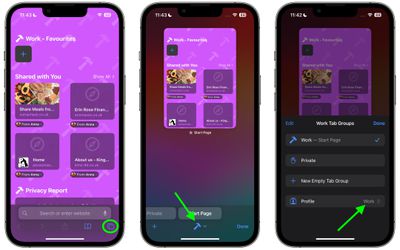
The Safari Profiles feature is available in iOS 17, iPadOS 17 and macOS Sonoma, as well as being part of Safari 17 for macOS Monterey and macOS Ventura. Any profiles you create will be synced across devices logged into the same Apple ID.















