How to Set a Custom Lock Screen Message on Your Mac in Case It's Lost - MacRumorsOpen MenuShow RoundupsShow Forums menuVisit ForumsOpen Sidebar
Skip to Content

How to Set a Custom Lock Screen Message on Your Mac in Case It's Lost

by

You can set a custom message to appear on the lock screen of your Mac, which is super useful if you ever misplace or lose your Mac. It lets people see who the Mac belongs to as soon as it's opened up, and there's no question about ownership.

You will need an administrator account to create a lock screen message on your Mac, but it's super easy to do.

  1. Click on the "" icon in the menu bar.
  2. Select System Preferences.
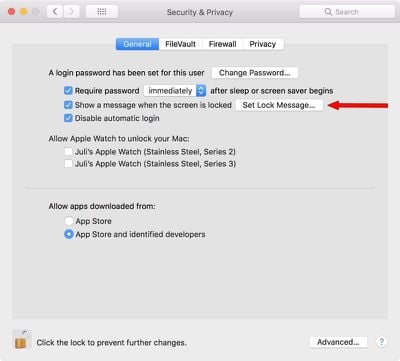
  3. Choose Security & Privacy.
  4. Select the "General" tab.
  5. Click on the lock icon at the bottom of the window.
  6. Enter your admin name and password. setlockscreenmessage
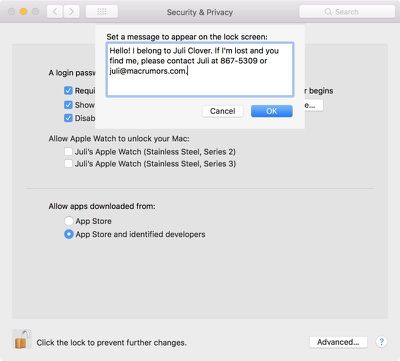
  7. Choose "Set Lock Message..."
  8. Enter your desired message. lockscreenmessageinput

It's useful to add contact details here, like your email address and phone number or the email address and phone number of someone who can easily get in touch with you in an emergency situation.
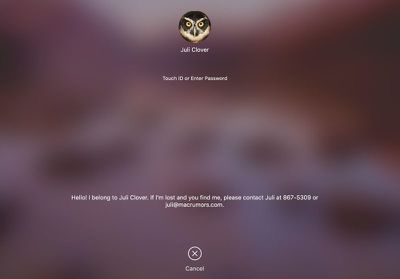
lockscreenmessage

What the lock screen message looks like when your Mac is locked.

If you misplace or Mac or have it stolen, this puts your contact information front and center as soon as your Mac is opened up, so whoever has it can see who it belongs to even before you activate Lost Mode using iCloud. It's also potentially useful in an emergency if someone needs to know who you are and how to get in contact with a loved one.

I'm personally always paranoid about losing my MacBook or having it taken at some location like an airport security lane, so this is a nice way to have instantly identifiable info readily available.


Top Rated Comments

108 months ago
Juli, you stole Jenny's number!
Score: 11 Votes (Like | Disagree)
tigres Avatar
108 months ago
I don't know who you are. I don't know what you want. If you're looking for ransom, I can tell you I don't have money... but what I do have are a very particular set of skills. Skills I have acquired over a very long career. Skills that make me a nightmare for people like you. If you let my MacBook Pro 15" go now, that will be the end of it - I will not look for you, I will not pursue you... but if you don't, I will look for you, I will find you... and I will kill you
Score: 9 Votes (Like | Disagree)
PBG4 Dude Avatar
108 months ago
You know times are lean when rumor sites start making their own content!

Just kidding, I’ve been loving the new tips and tricks articles you’ve been releasing. :-)
Score: 5 Votes (Like | Disagree)
keysofanxiety Avatar
108 months ago
I don't know who you are. I don't know what you want. If you're looking for ransom, I can tell you I don't have money... but what I do have are a very particular set of skills. Skills I have acquired over a very long career. Skills that make me a nightmare for people like you. If you let my MacBook Pro 15" go now, that will be the end of it - I will not look for you, I will not pursue you... but if you don't, I will look for you, I will find you... and I will kill you
Wouldn't work I'm afraid. There's a character limit.


Attachment Image
Score: 5 Votes (Like | Disagree)
jclo Avatar
108 months ago
Yea, she was bragging with her watches. :D

My point was, don't give people too much information, especially thieves. What I spoke of earlier happens a lot more than people realize.

I know Juli meant well but, it is a bad idea, in my opinion.
I personally started using this feature after I was in an airport security line and a woman grabbed my laptop. I saw her and got it back without proving ownership, but if I'd needed to, this would have been an easy way since my name is right there.

This is a valid criticism, though, and some people may not want to use the lock screen message for this reason, but I do think people should know the option is there.

You can also use a Google Voice number and an email with non-identifying info, which will provide reasonable security. I just used a standard phone number and my own email address as an example here. Less identifying contact information is absolutely a valid way to implement this without giving anything away.
Score: 4 Votes (Like | Disagree)
Kabeyun Avatar
108 months ago
Juli, you stole Jenny's number!
The second I saw that I knew I’d be beaten to the punch. Well done!

For those under 40, here’s a dose of 80s goodness:

Score: 4 Votes (Like | Disagree)

Popular Stories

iCloud iPhone 17 Pro

iPhone Users Who Pay for iCloud Storage Get Two New Perks on iOS 27

Thursday July 2, 2026 6:10 am PDT by
If you pay for certain iCloud+ storage plans beyond the 5GB that Apple offers for free, you will receive two more perks on iOS 27 at no additional cost. A summary of the two new iCloud+ perks on iOS 27:Increased daily usage limits for some new Apple Intelligence features, including image generation in the revamped Image Playground app. HomeKit Secure Video cameras receive generated video...
Apple Event Logo

Apple Just Released a New Product

Thursday July 2, 2026 8:04 am PDT by
Apple's first product release of summer 2026 occurred this week, but do not get too excited, as it is merely the Beats Solo Buds in a new color. Beats Solo Buds are now offered in orange through Best Buy in the U.S., with availability set to expand to 7-Eleven stores in Japan on July 4. Apple already offered orange Solo Buds in India for free with the purchase of an iPhone 15 or iPhone 15 ...
iPhone 4 on Black Feature

Apple Facing One of Its Worst Leaks Since the iPhone 4

Thursday July 2, 2026 9:53 am PDT by
Apple supplier Tata Electronics recently suffered a cyberattack that resulted in thousands of confidential files being published on the dark web, and this reportedly included some photos and documents related to the upcoming iPhone 18 Pro. We have elected not to share any of the leaked photos in this story due to the illegal nature in which they were obtained, but they can easily be found...