

iOS 16: How to Link an Apple Watch Face to a Focus Mode - MacRumorsOpen MenuShow RoundupsShow Forums menuVisit ForumsOpen Sidebar
Skip to Content

iOS 16: How to Link an Apple Watch Face to a Focus Mode

by

Introduced in iOS 15, Focus mode is an expansion of Do Not Disturb that allows you to set up different permissions for apps, contacts, and more depending on what you're doing. In iOS 16, Apple has expanded what Focus modes can do with new features, including the ability to activate a specific Apple Watch face when a specific Focus in enabled. Here's how it works.
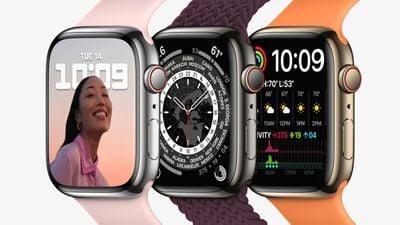
apple watch series 7 stainless steel colors
With ‌iOS 16‌, you can customize pretty much everything about your Focus. It's not just the Home Screen and Lock Screen that you can set – if you are an Apple Watch owner you can select one of your Apple Watch faces to activate on your wrist for a specific Focus mode. For example, if you have a Focus that you set when you're about to go out running, you could link a watch face to it showing lots of complications to do with weather conditions.

The following steps guide you through the process of setting an Apple Watch face to activate for a newly created Focus mode.

  1. On ‌iPhone‌, go to Settings -> Focus, and tap the + icon in the top-right corner of the screen to create a new Focus.
  2. Tap Custom in the next screen, proceed to give your Focus a name and related icon, then tap Next.
    focus

  3. Set any notification silence options for people and apps when your Focus is active, then under "Customize Screens," tap Choose under the watch face option.
  4. Choose a watch face from your Apple Watch face gallery, then tap Done.
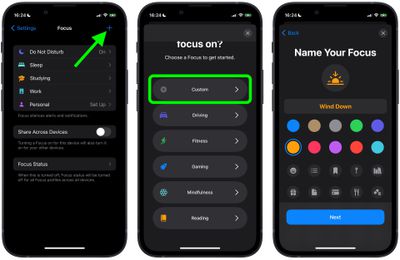
That's all there is to it. With your chosen Apple Watch face now linked to your Focus Mode, it will be activated automatically on your wrist the next time you enable the Focus on your iPhone.


Popular Stories

iCloud iPhone 17 Pro

iPhone Users Who Pay for iCloud Storage Get Two New Perks on iOS 27

Thursday July 2, 2026 6:10 am PDT by
If you pay for certain iCloud+ storage plans beyond the 5GB that Apple offers for free, you will receive two more perks on iOS 27 at no additional cost. A summary of the two new iCloud+ perks on iOS 27:Increased daily usage limits for some new Apple Intelligence features, including image generation in the revamped Image Playground app. HomeKit Secure Video cameras receive generated video...
iPhone 4 on Black Feature

Apple Facing One of Its Worst Leaks Since the iPhone 4

Thursday July 2, 2026 9:53 am PDT by
Apple supplier Tata Electronics recently suffered a cyberattack that resulted in thousands of confidential files being published on the dark web, and this reportedly included some photos and documents related to the upcoming iPhone 18 Pro. We have elected not to share any of the leaked photos in this story due to the illegal nature in which they were obtained, but they can easily be found...
Apple Event Logo

Apple Just Released a New Product

Thursday July 2, 2026 8:04 am PDT by
Apple's first product release of summer 2026 occurred this week, but do not get too excited, as it is merely the Beats Solo Buds in a new color. Beats Solo Buds are now offered in orange through Best Buy in the U.S., with availability set to expand to 7-Eleven stores in Japan on July 4. Apple already offered orange Solo Buds in India for free with the purchase of an iPhone 15 or iPhone 15 ...













