How to Set Communication Limits on Your Child's Allowed Screen Time and Downtime on iPhone and iPad - MacRumorsOpen MenuShow RoundupsShow Forums menuVisit ForumsOpen Sidebar
Skip to Content

How to Set Communication Limits on Your Child's Allowed Screen Time and Downtime on iPhone and iPad

by

screen timeIn iOS 13.3, Apple added new Communication Limits to its Screen Time options, which let parents control who their children are able to contact.

If you're not familiar with Apple's Screen Time functions, they enable users to keep track of their device usage and place self-imposed limits on the time they spend using their iPhone or iPad. Screen Time also serves as a parental control system for parents.

The latest feature addition, Communication Limits, lets parents manage who their children are able to contact through FaceTime, Phone, Messages, and iCloud Contacts.

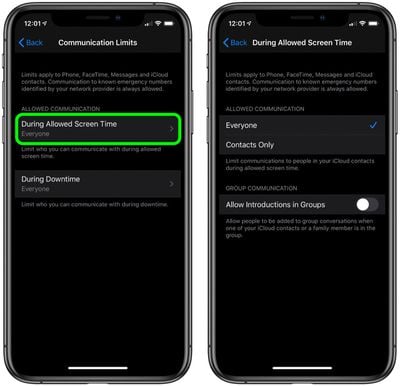
The new options allow contacts only or everyone to be contacted during a child's allotted Screen Time, and there's a toggle that either allows or prevents people from being added to a group chat when a contact or family member is in the group.

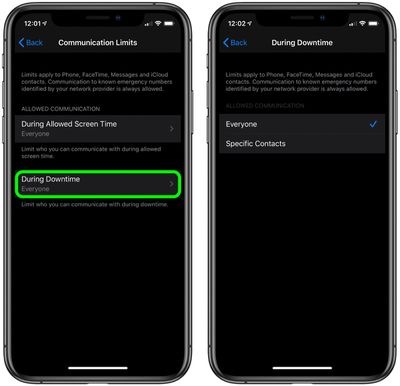
There's also a separate setting for communication limits during downtime, which can be set to allow everyone or just specific contacts. Follow the steps below to set your preferences for your child's Screen Time and Downtime.

How to Set Communication Limits During Allowed Screen Time in iOS

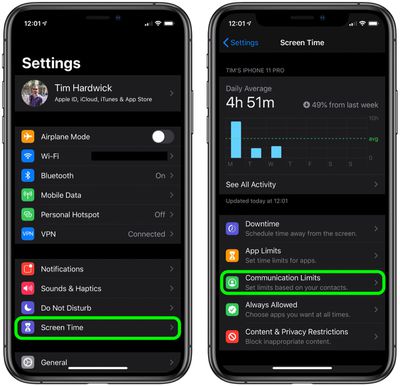
  1. Launch the Settings app on your iPhone or ‌iPad‌.
  2. Tap Screen Time.
  3. Tap Communication Limits.
    settings

  4. Tap During Allowed Screen Time.
  5. Under Allowed Communication, select Everyone or Contacts Only.
  6. To allow people to be added to group conversations when an ‌iCloud‌ contact or a family member is in the same group, tap the toggle next to Allow Introductions in Groups so that it's in the green ON position.
    settings

How to Set Communication Limits During Downtime in iOS

  1. Launch the Settings app on your iPhone or ‌iPad‌.
  2. Tap Screen Time.
  3. Tap Communication Limits.
    settings

  4. Tap During Downtime.
  5. Tap Specific Contacts.
  6. Tap Choose From My Contacts and select the people that can be contacted during downtime, then tap Done. If the person you want to allow to be contacted isn't in your contacts, tap Add New Contact and enter their details in a new contact card, then tap Done.
    settings

Note that calls to emergency numbers are always allowed and when placed, will turn off communication limits for 24 hours to make sure children are safe and not prevented from communicating with people in the event of an emergency.


Related Forum: iOS 13

Top Rated Comments

86 months ago
This works pretty well, i've got it set up on my 2 kids devices. One went great, the other didn't want to activate remote contact management no matter what I did...ended up having to log the child out of iCloud on their device, then back in...then request remote contact management again, approved and then it finally took.

I'd just like to see 2 things from screen time to get it closer to perfect - LONGER parental lock codes and a single button "kill switch" that would put a device into downtime with one touch.
Score: 4 Votes (Like | Disagree)
86 months ago
Setting the people your kid is allowed to receive calls from seems dangerous: if I don't have my phone, my phone dies, and I need to contact them from another number, I'm SOL.
Score: 1 Votes (Like | Disagree)
86 months ago
That’s all well and good. BUT if the kids can still change the time or date on their devices at will, it renders a big part of Screentime IE downtime useless.
Score: 1 Votes (Like | Disagree)

Popular Stories

iCloud iPhone 17 Pro

iPhone Users Who Pay for iCloud Storage Get Two New Perks on iOS 27

Thursday July 2, 2026 6:10 am PDT by
If you pay for certain iCloud+ storage plans beyond the 5GB that Apple offers for free, you will receive two more perks on iOS 27 at no additional cost. A summary of the two new iCloud+ perks on iOS 27:Increased daily usage limits for some new Apple Intelligence features, including image generation in the revamped Image Playground app. HomeKit Secure Video cameras receive generated video...
iPhone 4 on Black Feature

Apple Facing One of Its Worst Leaks Since the iPhone 4

Thursday July 2, 2026 9:53 am PDT by
Apple supplier Tata Electronics recently suffered a cyberattack that resulted in thousands of confidential files being published on the dark web, and this reportedly included some photos and documents related to the upcoming iPhone 18 Pro. We have elected not to share any of the leaked photos in this story due to the illegal nature in which they were obtained, but they can easily be found...
American Express Gold Apple Pay Feature

American Express Announces New Apple Pay Feature

Tuesday June 30, 2026 10:27 am PDT by
American Express today announced that you can now redeem Membership Rewards points when checking out with Apple Pay on the web and in apps on the iPhone and iPad. When checking out with Apple Pay on iOS 18 or iPadOS 18 or later, tap on your eligible American Express card (Platinum, Gold, Green, and others) and select the Membership Rewards points option. You can use points to cover all or...