How to Set Your Default iPhone Apps - MacRumorsOpen MenuShow RoundupsShow Forums menuVisit ForumsOpen Sidebar
Skip to Content

How to Set Your Default iPhone Apps

by

In iOS 18.2, Apple introduced a way for users to select their preferred default apps for iPhone. Apple initially promised that the feature would be coming to the European Union, but it is actually available worldwide.
Change Default Browser App 2025 Feature

The Freedom to Choose – Why It Matters

The freedom to choose default apps on iPhone represents a marked shift in Apple's traditionally closed ecosystem, giving you more control over how you interact with your device. Rather than being locked into Safari for web browsing or Apple Mail for email, you can now set third-party alternatives like Chrome, Firefox, Gmail, or Outlook as your go-to apps.

This means when you tap a link or email address, your iPhone will automatically open your preferred app instead of Apple's built-in options. The change effectively eliminates the extra steps of manually copying and pasting content between apps or navigating through share sheets to get to the apps you actually want to use.

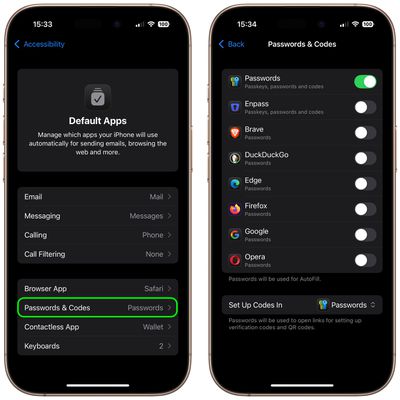
In iOS 18.2, there are Default App settings for Email, Messaging, Calling, Call Filtering, Browser App, Passwords and Codes, and Keyboards. For users in the European Union, there is also an additional App Installation option to choose an alternative app marketplace instead of the App Store.

On iPhones in select countries and regions, another option called Contactless Apps appears that lets you choose another app apart from the Wallet app to make contactless transactions using your device's NFC technology. Contactless Apps is available in the European Economic Area (European Union, Iceland, Liechtenstein, Norway), Australia, Brazil, Canada, Japan, New Zealand, Switzerland, the United Kingdom, and the United States.

How to Set Default Apps on iPhone and iPad

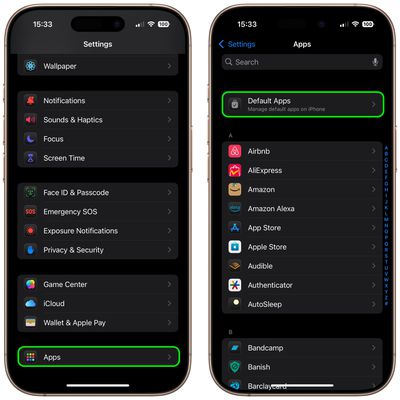
  1. Open Settings on your iPhone or iPad (running iOS 18.2/iPadOS 18.2 or later).
  2. Scroll to the bottom and select Apps.
  3. Tap Default Apps at the top of your list of apps.
    settings

  4. Tap a feature to change your default setting to a different app.
  5. Follow any additional onscreen steps if necessary to set up your default app.
    settings

In some cases, only one app at a time can be the default app for a feature. In other cases, you can prioritize the apps your device uses. If you can't see an option to set a particular app as the default for a feature, it's best to contact the app developer.


Top Rated Comments

Jason2000 Avatar
18 months ago
Wish we had the option to set defaults for maps and music.
Score: 24 Votes (Like | Disagree)
WarmWinterHat Avatar
18 months ago

I don't care, I buy Apple based on the fact that I like the Apple phone and it's ecosystem.

If I didn't like it I would buy an Android phone.

Additionally I don't appreciate governments forcing companies to make changes to their product. If people are not happy they buy a different product.
I buy Apple for the hardware, and ignore ecosystems. That way I've never tied to anything in particular.

This is available in the US. The US government didn't force Apple to do anything, or even ask.
Score: 17 Votes (Like | Disagree)
18 months ago
I don't care, I buy Apple based on the fact that I like the Apple phone and it's ecosystem.

If I didn't like it I would buy an Android phone.

Additionally I don't appreciate governments forcing companies to make changes to their product. If people are not happy they buy a different product.
Score: 16 Votes (Like | Disagree)
18 months ago
Too bad there's no default setting for maps. And even though the web link is a GMaps link, iOS will open it in Apple Maps no matter what I do.
Score: 14 Votes (Like | Disagree)
Frankied22 Avatar
18 months ago
Article image shows replacing the default music app...which can't be done. Nice one Macrumors!
Score: 12 Votes (Like | Disagree)
18 months ago

Wonder how much more viruses will spread in the iOS ecosystem and how Apple is increasing antivirus and antimalware protections. I get the need for options
Why would setting an existing app as the default result in viruses being spread?
Score: 12 Votes (Like | Disagree)

Popular Stories

Apple Card iPhone 16 Pro Feature

Apple Card Promo to Offer Free AirPods Pro 3

Friday May 15, 2026 8:59 am PDT by
Starting as early as next week, customers who sign up for an Apple Card at Apple's retail stores in the U.S. will receive $249 cash back when they purchase AirPods Pro 3, according to Bloomberg's Mark Gurman. The promotion has yet to be officially announced by Apple, so exact terms and conditions are not available at this time. AirPods Pro 3 are priced at $249 in the U.S., so customers who...
Apple WWDC25 iOS 26 CarPlay Light mode 250609

Six Popular iPhone Apps Now Available on CarPlay

Thursday May 14, 2026 9:10 am PDT by
Apple's CarPlay system for accessing iPhone apps on a vehicle's dashboard screen has received six popular apps in recent weeks: ChatGPT, Perplexity, Grok, Google Meet, WhatsApp, and the indie artist streaming platform Audiomack. Make sure you have the latest version of each app and they will automatically appear on CarPlay. ChatGPT Starting with iOS 26.4, CarPlay supports voice-based...
ipad mini 7 blue

OLED iPad Mini: Release Date, Pricing, and What to Expect

Thursday May 14, 2026 5:08 am PDT by
According to the latest rumors, Apple is close to launching its next-generation iPad mini. So what should we expect from the successor to the iPad mini 7 that Apple released over a year ago? Read on to find out. Processor and Performance Apple is working on a next-generation version of the iPad mini (codename J510/J511) that features the A19 Pro chip, according to information found in code...