iOS 16: How to Set a Dynamic Astronomy Lock Screen Wallpaper - MacRumorsOpen MenuShow RoundupsShow Forums menuVisit ForumsOpen Sidebar
Skip to Content

iOS 16: How to Set a Dynamic Astronomy Lock Screen Wallpaper

by

In iOS 16, Apple has added multiple options to customize the iPhone Lock Screen, including the ability to change the font and color, apply filters, and even add information-rich widgets to your wallpaper.
Lock Screen
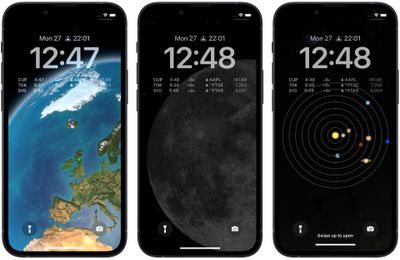
Apple has also included a handful of dynamic Lock Screen wallpapers that adapt to specific real-world variables, including an astronomy wallpaper that shows the current alignment of the Moon, Earth, and Solar System.

The astronomy wallpaper comes in several variations that let you view Earth from afar or close in on your current location, view the Moon from afar or in detail, or view the entire Solar System on your screen.

The following steps show you how to set up a dynamic astronomy wallpaper on an iPhone running iOS 16.

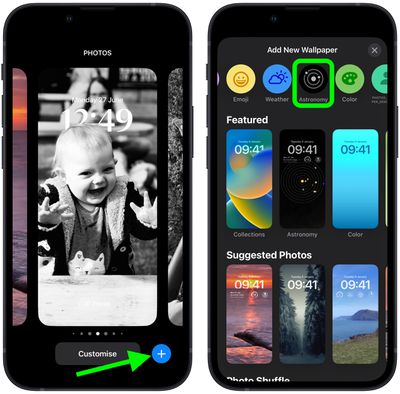
  1. Unlock your ‌‌iPhone‌‌ with Face ID or Touch ID, then press and hold the Lock Screen.
  2. Tap the blue + button, or swipe leftwards all the way to the end and then tap Add New.
  3. Tap the Astronomy button in the top row of options.
    Lock Screen

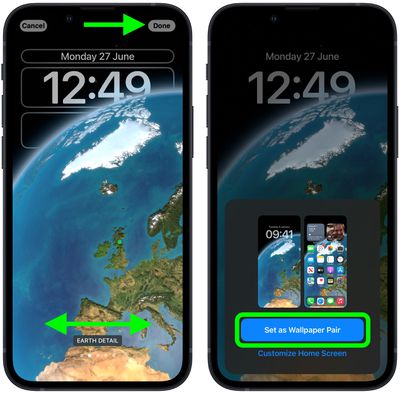
  4. Swipe left and right on the wallpaper to preview the different astronomical view options, including Earth, Earth Detail, Moon, Moon Detail, and Solar System.
  5. When you're happy with the look and have added any widgets, tap Done in the top-right corner of the screen.
  6. To make the dynamic wallpaper appear on both your Lock Screen and Home Screen, tap Set as Wallpaper Pair in the pop-up. Otherwise, tap Customize Home Screen to do so separately.
  7. Tap the Lock Screen you just created in the wallpaper gallery to activate it.
    Lock Screen

You can customize the current Lock Screen at any time by invoking the gallery view from the Lock Screen with a long press, or by going into Settings -> Wallpapers.


Popular Stories

Apple Card iPhone 16 Pro Feature

Apple Card Promo to Offer Free AirPods Pro 3

Friday May 15, 2026 8:59 am PDT by
Starting as early as next week, customers who sign up for an Apple Card at Apple's retail stores in the U.S. will receive $249 cash back when they purchase AirPods Pro 3, according to Bloomberg's Mark Gurman. The promotion has yet to be officially announced by Apple, so exact terms and conditions are not available at this time. AirPods Pro 3 are priced at $249 in the U.S., so customers who...
Apple WWDC25 iOS 26 CarPlay Light mode 250609

Six Popular iPhone Apps Now Available on CarPlay

Thursday May 14, 2026 9:10 am PDT by
Apple's CarPlay system for accessing iPhone apps on a vehicle's dashboard screen has received six popular apps in recent weeks: ChatGPT, Perplexity, Grok, Google Meet, WhatsApp, and the indie artist streaming platform Audiomack. Make sure you have the latest version of each app and they will automatically appear on CarPlay. ChatGPT Starting with iOS 26.4, CarPlay supports voice-based...
ipad mini 7 blue

OLED iPad Mini: Release Date, Pricing, and What to Expect

Thursday May 14, 2026 5:08 am PDT by
According to the latest rumors, Apple is close to launching its next-generation iPad mini. So what should we expect from the successor to the iPad mini 7 that Apple released over a year ago? Read on to find out. Processor and Performance Apple is working on a next-generation version of the iPad mini (codename J510/J511) that features the A19 Pro chip, according to information found in code...