How to Set a Sleep Goal on iPhone and Apple Watch - MacRumorsOpen MenuShow RoundupsShow Forums menuVisit ForumsOpen Sidebar
Skip to Content

How to Set a Sleep Goal on iPhone and Apple Watch

by

In iOS 14, Apple introduced a new Sleep Tracking feature that lets you monitor how much sleep you're getting each night and improve your sleep habits with the help of bedtime reminders and a winding down process.
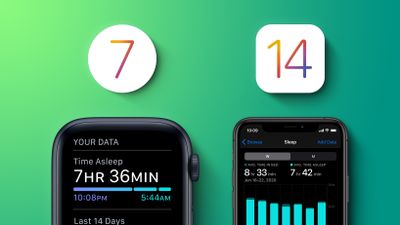
iOS 14 watchOS 7 Sleep Tracking Feature 1
In the Health app on ‌iPhone‌ or using an ‌Apple Watch‌, you can set up a Sleep Schedule with the amount of sleep you want to get each night. You can also select and adjust your Sleep Goal, and that's what we're going to show you how to do here.

The following steps guide you through the process of setting a Sleep Goal on ‌iPhone‌ and ‌Apple Watch. If you're tracking sleep, it will also let you know if you're hitting your sleep goals on a nightly basis.

How to Set a Sleep Goal on iPhone

  1. Launch Apple's Health app on your iPhone.
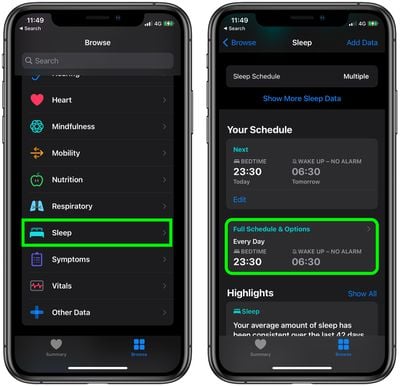
  2. Tap the Browse tab in the bottom-right corner of the screen.
  3. Scroll down and select Sleep.
  4. Under "Your Schedule," tap Full Schedule & Options. If this is your first time using the feature, tap on "Get Started."
    health

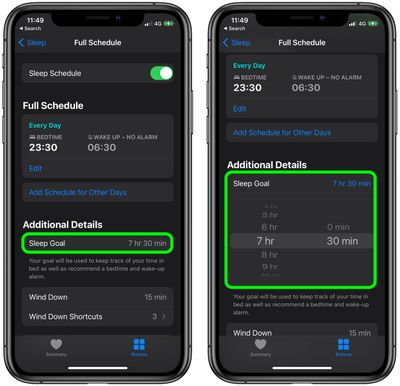
  5. Under "Additional Details," tap Sleep Goal and select the amount of time you'd like to sleep in hours and minutes. Use the + and - buttons if it's your first time setting a Sleep Goal.
    health

After adjusting your Sleep Goal, you may want to change the bedtime and wakeup times in your Sleep Schedule to ensure you're getting enough sleep to hit your goal.

How to Set a Sleep Goal on Apple Watch

  1. Press the Digital Crown on your Apple Watch to open the App View.
  2. Launch the Sleep app.
  3. Tap Full Schedule.
    sleep

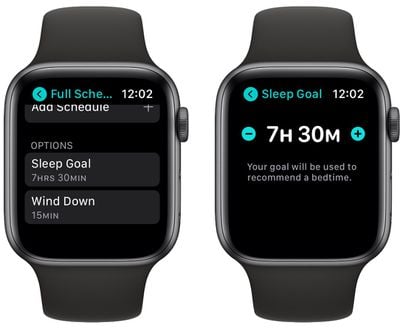
  4. Scroll down and tap Sleep Goal, then use the plus and minus buttons to select the amount of time you'd like to sleep in hours and minutes.
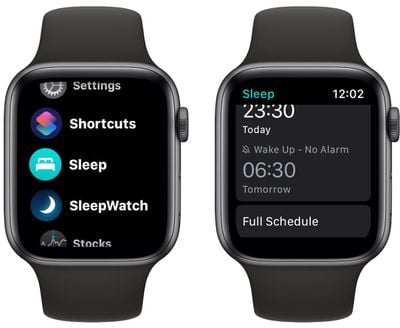
    sleep

After adjusting your Sleep Goal, you may want to change the bedtime and wakeup times in your Sleep Schedule to ensure you're getting enough sleep to hit your goal.


Popular Stories

Aston Martin CarPlay Ultra Screen

Apple Says CarPlay Ultra is Coming to These Vehicle Brands

Thursday May 21, 2026 11:53 am PDT by
Last year, Apple launched CarPlay Ultra, the long-awaited next-generation version of its CarPlay software system for vehicles. Nearly a year later, CarPlay Ultra is still limited to Aston Martin's latest luxury vehicles, but that should change fairly soon. In May 2025, Apple said many other vehicle brands planned to offer CarPlay Ultra, including Hyundai, Kia, and Genesis. CarPlay Ultra...
iphone 18 pro blue%402x

iPhone 18 Pro: Dark Cherry, Light Blue, and Dark Gray Chassis Leaked [Update]

Thursday June 4, 2026 5:18 am PDT by
Update: Since publication, new information has come to light suggesting the images have been AI-manipulated and are not in fact iPhone 18 Pro chassis parts. The original article follows. The color options Apple is reportedly planning for the upcoming iPhone 18 Pro and ‌iPhone 18 Pro‌ Max have appeared online today in the form of images of chassis parts of unknown authenticity....
iOS 27 All the New App Features

iOS 27: All the Rumored App Features

Wednesday June 3, 2026 3:48 pm PDT by
Siri is getting a major overhaul in iOS 27, but Apple also has some big updates planned for apps like Camera, Photos, and Wallet. There are multiple new AI features in the works, plus some non-AI upgrades. Camera Apple is moving Visual Intelligence from the Camera Control button to the Camera app in iOS 27, according to Bloomberg. There will be a Siri mode that will be available alongside...