How to Set Up Cardio Fitness Levels in watchOS 7.2 and iOS 14.3 - MacRumorsOpen MenuShow RoundupsShow Forums menuVisit ForumsOpen Sidebar
Skip to Content

How to Set Up Cardio Fitness Levels in watchOS 7.2 and iOS 14.3

by

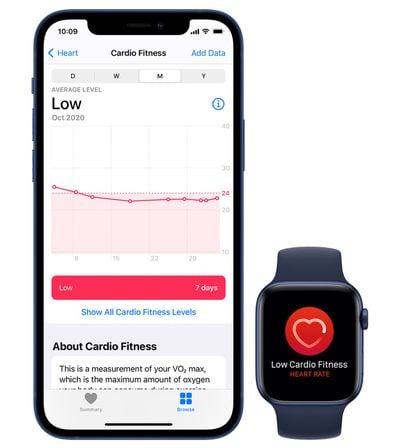
Apple in watchOS 7 and iOS 14.3 added a new cardio fitness feature that lets Apple Watch owners keep track of their cardio fitness levels through VO2 max measurements. VO2 max is the maximum amount of oxygen that the body can use during exercise, and it can be improved through physical activity.
watchos 7 cardio fitness 1
Prior to watchOS 7.2, the Apple Watch was only able to estimate higher levels of VO2 max with outdoor walks, runs, or hikes, but now it can also take cardio fitness measurements as users walk throughout the day, allowing those who don't engage in vigorous exercise to see their cardio fitness levels.

Apple measures cardio fitness levels as high, above average, below average, or low relative to people in your same age group and of the same sex, and it needs to be set up in the Health app on iPhone. Here's how:

  1. Open the Health app.
  2. Tap the Browse tab at the bottom.
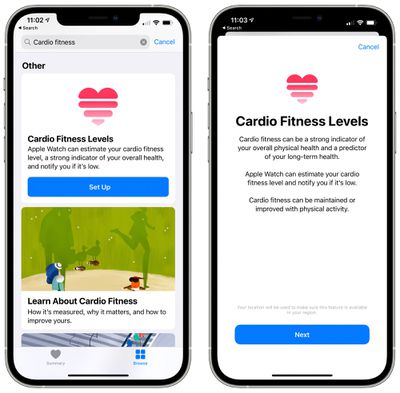
  3. Search for Cardio Fitness. cardio fitness levels setup
  4. Scroll down to Cardio Fitness Levels.
  5. Tap on "Set Up."
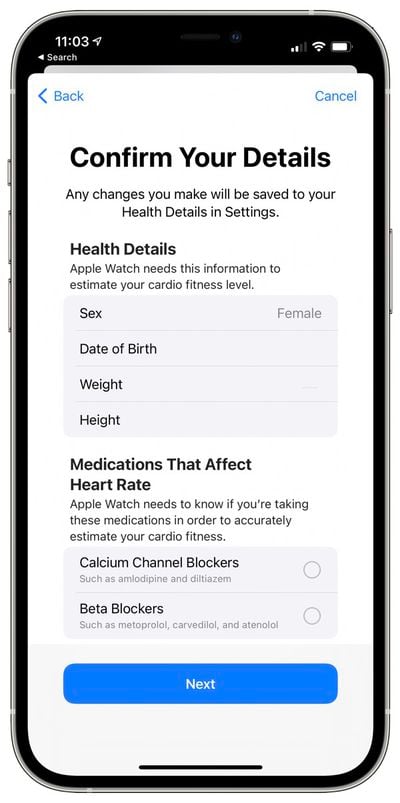
  6. Confirm your health details and enter medications you take that might affect heart rate like beta blockers. cardio fitness level confirm detail
  7. Tap through to learn about Cardio Fitness.
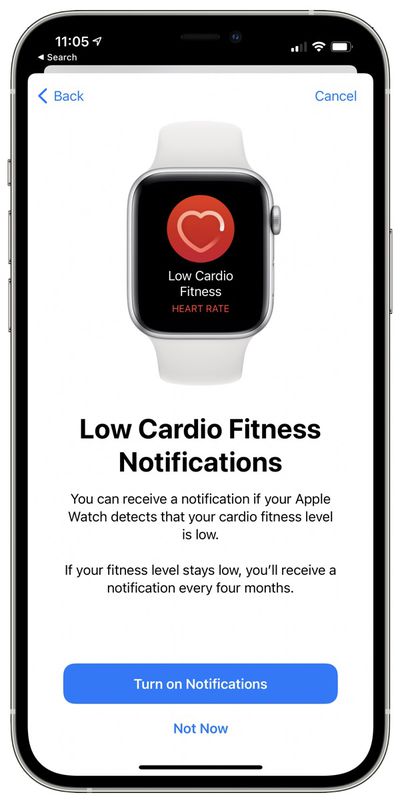
  8. Tap "Turn on Notifications" if you want to receive notifications when your cardio fitness level is low. Otherwise, tap "Not Now." cardio fitnessl level notification
  9. Tap "Done."

That's all there is to it. From there, the Apple Watch will take cardio fitness measurements during outdoor runs or walks, with the info then aggregated inside the Health app. If cardio fitness levels fall too low and notifications are enabled, the Apple Watch will send notifications with suggestions on how to improve it.
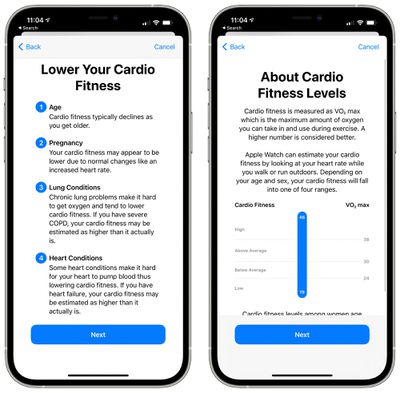
cardio fitness level details
Apple says that there are multiple factors that can lower cardio fitness levels including age, pregnancy, chronic lung conditions, heart conditions, medications, and illness or injury, which is something to be aware of.

Aerobic exercise that causes the heart rate to rise and makes you breathe hard will give you the biggest boost to cardio fitness. Apple recommends running, cycling, or high-intensity interval training, but says even just adding a few hills to a daily walk helps.

Related Roundup: watchOS 26
Related Forums: iOS 14, Apple Watch

Top Rated Comments

72 months ago

What’s your cardio level? Post your age also!
VO₂: 41.5 – age: 58
Score: 2 Votes (Like | Disagree)
72 months ago

Have you keyed in your personal details as well (age, weight etc)?

Any workouts you’ve done so far (I think) were indoors, so they didn’t count. Since the update, other activity will now be included in the VO2 max calculation, assuming you’ve followed the every step in the original post. How long this takes really depends on what activity you do.
Yes, I’ve inputed all of my personal details already. As well as enabled notifications for cardio fitness. I’ve done strength training and cardio/HIIT workouts all indoors today. Still no luck with getting any data for cardio fitness. I will try a short walk outdoors and see if that activates the cardio fitness/ VO2 readings.
Score: 1 Votes (Like | Disagree)
Moakesy Avatar
72 months ago

Does this cardio fitness only work with outdoor walks and runs? I only do home workouts and have already set up the cardio fitness in the health app but so far there is no data being displayed? When I check my health app under the tab “cardio fitness” it is blank. Even though I do daily home workouts.
It was mentioned in the main post:

"Prior to watchOS 7.2, the Apple Watch was only able to estimate higher levels of VO2 max with outdoor walks, runs, or hikes, but now it can also take cardio fitness measurements as users walk throughout the day, allowing those who don't engage in vigorous exercise to see their cardio fitness levels."

From now on you should be able to see your VO2 max.
Score: 1 Votes (Like | Disagree)
72 months ago

On your phone, go to the Watch app, Health, Health Details, Edit. It’s near the bottom.
Thanks so much. I was actually just found it and was doing it as you replied. I appreciate the assist!!
Score: 1 Votes (Like | Disagree)
chucker23n1 Avatar
72 months ago

I accidentally missed the part where you add the medications in. I take a beta blocker. Does anyone know if you can go through the process again and add them in?
On your phone, go to the Watch app, Health, Health Details, Edit. It’s near the bottom.
Score: 1 Votes (Like | Disagree)
72 months ago

AW takes your pulse throughout the day. Not sure if it’s continuous, but it’s close to that.

I have the HR min/max chart as one of my complications on my watch face. Like this one..

MacRumors content image
May I ask how you managed to set heart rate up to show like this? For me it looks like this:


EDIT: Nevermind, I found it. It's Infographic Modular.

Attachment Image
Score: 1 Votes (Like | Disagree)

Popular Stories

Apple Watch Series 10 Jet Black Touch ID

Apple Watch Series 12 and watchOS 27: What to Expect Later This Year

Friday May 8, 2026 2:07 pm PDT by
While not too much has been reported about the next Apple Watch models, there are a few rumors about potential design changes and watchOS 27 features. Apple Watch Series 12 and Apple Watch Ultra 4 models are expected to be released in September, and we have outlined some of the key rumored hardware and software changes below. A new Apple Watch SE is not expected this year, as that model was...
ios 26 5 luminance colors 2

A Closer Look at watchOS 26.5's New Luminance Watch Face

Friday May 8, 2026 3:38 pm PDT by
With watchOS 26.5, Apple is introducing a Pride Luminance face, and it's one of the most versatile and customizable watch faces. There are pre-configured color options, but the face also supports custom colors. You can select 1 to 12 colors from a palette that has every color of the rainbow, some in-between shades, and black, white, brown, and gray. The colors you pick are distributed...
watchos 26 gradient light

Apple Releases watchOS 26.5 With New Pride Luminance Watch Face

Monday May 11, 2026 10:03 am PDT by
Apple today released watchOS 26.5, the fifth major update to the watchOS 26 operating system that came out in September. watchOS 26.5 comes a month and a half after Apple released watchOS 26.4. watchOS 26.5 can be downloaded for free on an iPhone running iOS 26.5 by opening up the Apple Watch app and going to General > Software Update, or initiating an update in the Settings app on the...