Apple Card Family allows families and friends to share a single Apple Card with users above 13 years old, and includes the ability to set a spending limit.
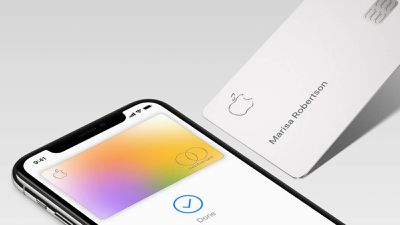
The process for sharing an Apple Card with a friend or teenager is enabled on iPhones running iOS 14.6 or later and requires that you are in the same iCloud Family as the person you wish to share the card with.
The following steps guide you through the process of adding another person to your Apple Card.
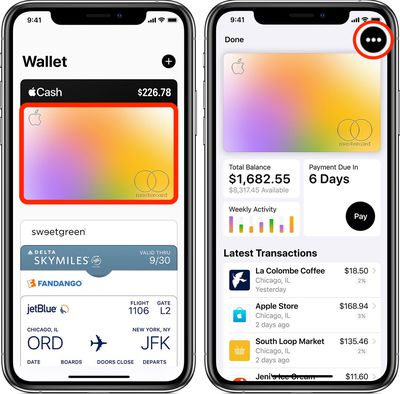
- Launch the Wallet app on your iPhone.
- Tap your Apple Card.
- Tap the black ellipsis button (the three encircled dots) in the top-right corner of the screen.

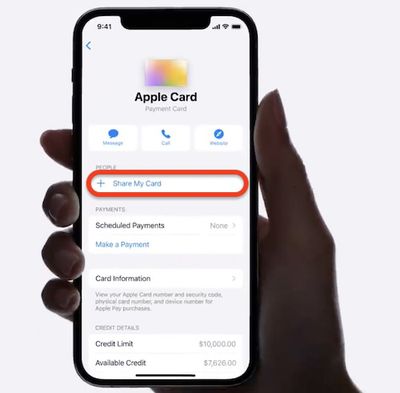
- Under "People," tap Share My Card.
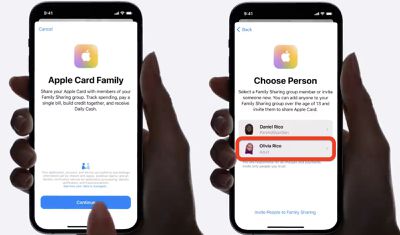
- Tap Continue and choose a person from your Family Sharing group. (If the person you want to share your card with isn't on the list, tap Invite People to Family Sharing.)
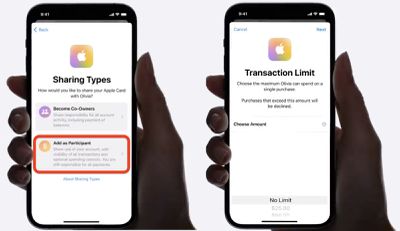
- To make them a participant, tap Add as Participant.
- Choose a Transaction Limit from the scrolling options at the bottom of the screen: You can select several limits between No Limit and up to $250.
- Tap Next.
Wait for the person to accept your invite. Once they've done so, they can start building credit on your shared Apple Card.
Apple also offers the ability for couples to co-own a single Apple Card, allowing them to build their credit score together.
Tag: Apple Card Guide