How to Make a One-Time Payment on Your Apple Card - MacRumorsOpen MenuShow RoundupsShow Forums menuVisit ForumsOpen Sidebar
Skip to Content

How to Make a One-Time Payment on Your Apple Card

by

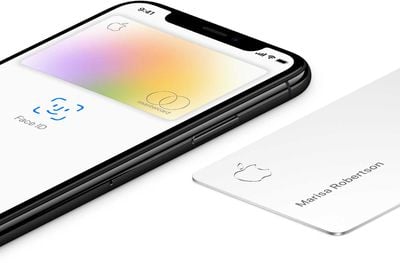
Apple Card aims to make your online and retail transactions simple and secure. The same goes for making timely credit card payments – the process is taken care of right on your iPhone in the Wallet app, so there's need to go searching for online statements.
apple card
You can make payments on your ‌Apple Card‌ in one of two ways. You can schedule a recurring payment, or you can make a one-off payment instantly or at a date of your choosing. This article focuses on the latter method, which really couldn't be easier. The steps below show you how.

Note that there are no fees or penalty interest rate hikes for making a late payment with ‌Apple Card‌, but you still have to pay interest on any outstanding balance. So if you're apt to forget to pay on time, scheduling a recurring payment might be the better option.

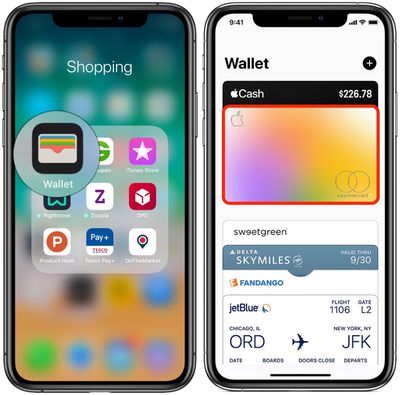
  1. Launch the Wallet app on your iPhone.
  2. Tap your Apple Card.
    wallet app apple card
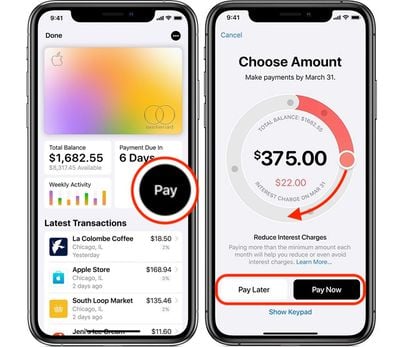
  3. Tap the black Pay button.
  4. Choose an amount to pay by sliding the circular dial with your finger. If the dial goes green, you're paying the total amount; if it turns red, you're paying the minimum amount. Your total balance will automatically adjust to reflect the payment you make toward your monthly balance. (Don't forget that if you pay your monthly balance in full each month by the due date, you won't be charged interest.)
    apple card make a one time payment
  5. Tap Pay Now to make an instant payment, or tap Pay Later and then choose a date for the amount to be taken from your bank account.
  6. Press your iPhone's Side button to authenticate with Face ID, or use Touch ID or your passcode to make the payment.
Did you know you can also use any Apple Cash that you've accrued to help make immediate one-time payments to your ‌Apple Card‌? Click here to learn how it works.

Popular Stories

Apple Card iPhone 16 Pro Feature

Apple Card Turns Seven With Big Change Ahead

Thursday August 20, 2026 9:18 am PDT by
Today marks the seventh anniversary of the Apple Card becoming widely available in the U.S., following a more limited preview period. Apple's credit card can be managed in the iPhone's Wallet app, with key benefits including color-coded spending summaries, no fees, and Daily Cash cash back paid out daily. Apple Card holders can also open a high-yield savings account. The anniversary comes ...
Apple iCloud Plus expansion hero

iCloud+ Now Includes Apple TV, Apple Arcade, and Curated Apple Music Stations in Over 100 Countries

Tuesday September 15, 2026 1:43 am PDT by
Apple today announced a new subscription initiative that turns paid iCloud+ subscriptions into a broader services bundle in more than 100 countries. In select countries, Apple says every paid iCloud+ plan, including the cheapest 50GB tier, now includes Apple TV and Apple Arcade "at no additional cost," while family sharing extends the storage, TV and Arcade access to up to five people....
Everything New Your iPhone Can Do on iOS 27 Feature 1

50 New Things Your iPhone Can Do in iOS 27 - Out Now!

Monday September 14, 2026 10:48 pm PDT by
Apple released iOS 27 this week, and despite the company's focus this year on refining its flagship operating system and nixing bugs, there are still many additional features to explore, not least of which is Apple's new context-aware Siri, re-tooled for the generative AI era. Which iPhones Support Every iOS 27 Feature? This year's major iPhone software update isn't all about AI, though,...