How to Add a Bank Account to Your Apple Card - MacRumorsOpen MenuShow RoundupsShow Forums menuVisit ForumsOpen Sidebar
Skip to Content

How to Add a Bank Account to Your Apple Card

by

Like all credit cards, Apple Card requires that you have a bank account for making payments. As you might expect, Apple makes it easy to select a bank account for ‌Apple Card‌ payments using the Wallet app on your iPhone.
applecardinwallet2
The first time you add a bank account, you'll be asked if you want to add the same bank account that you use with Apple Cash (assuming you've set up Apple Cash). If so, all you need to do is say yes, and you're good to go. Otherwise, you can manually add a different bank account for your ‌Apple Card‌.

You can add multiple bank accounts to your ‌Apple Card‌, but the first one that you add becomes your default bank account for making payments. To add a bank account, you'll need your bank account number and bank routing number. With those ready to hand, simply follow these steps.

  1. Launch the Wallet app on your iPhone.
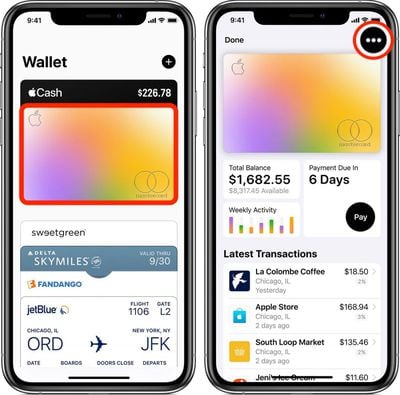
  2. Tap your ‌Apple Card‌. how to add a bank account apple card
  3. Tap the black ellipsis button (the three encircled dots) in the top-right corner of the screen.
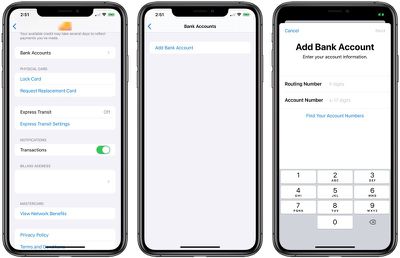
  4. Scroll down and tap Bank Accounts.
  5. Tap Add a Bank Account. applecardaddbankaccount
  6. Follow the onscreen instructions.

If you need to, you can easily delete a bank account from the Bank Accounts screen by tapping Edit and then tapping the red minus (-) button next to the bank account in question. Be aware, though, if you have scheduled payments set up, you'll need to shut those off before you can remove your bank account.

Did you know you can also use any Apple Cash that you've accrued to help make immediate one-time payments to your ‌Apple Card‌? Click here to learn how it works.

Popular Stories

apple card savings account feature 1

Apple Card Savings Account's Interest Rate Lowered

Thursday June 4, 2026 5:44 am PDT by
The annual percentage yield (APY) for the Apple Card's savings account was lowered from 3.5% to 3.4% this week. If you deposited $1,000 and made no withdrawals for one year, you would earn $34 in interest at the current APY. ...
Apple Card Sign Up Promo Offers Free AirPods Pro 3 Feature

Last Chance: Apple Card Sign-Up Promo Can Earn You Free AirPods Pro 3

Friday June 12, 2026 11:26 am PDT by
Time is running out on the Apple Card sign-up promo that began last month. For three more days, you can effectively receive AirPods Pro 3 for free when you sign up for a new Apple Card, but there are some strings attached. If you sign up for and are approved for an Apple Card for the first time, and use it to purchase AirPods Pro 3 by June 15, you can earn up to $250 in bonus cash back over...
apple nike daily cash

Apple Card Promo Doubles Daily Cash Back on Nike Purchases

Monday June 15, 2026 2:45 pm PDT by
Apple is teaming up with Nike for an Apple Card promotion that gives extra Daily Cash back. For the next month, Apple Card users can get 6% Daily Cash back when making a purchase with Apple Card using Apple Pay at a Nike retail store, the Nike website or Swoosh website, or Nike's apps. The Apple Card normally offers 3% cash back on Nike purchases, so the bonus is doubled during the...