How to Share Apple Watch Faces - MacRumorsOpen MenuShow RoundupsShow Forums menuVisit ForumsOpen Sidebar
Skip to Content

How to Share Apple Watch Faces

by

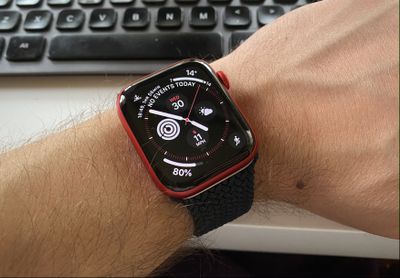
If you have an Apple Watch, chances are you've spent some time customizing your watch faces. Apple lets you adjust colors, choose complications, and select backgrounds so you can get watch to look just how you like, and you can share your personalized watch faces with others, too.
2blood oxygen app
The ability to share watch faces with other people is a fun addition because it means you can impress your friends with your creations, and perhaps surprise someone who's new to Apple Watch by showing them just what's possible. You can also receive watch faces from others. It's easy to do, so keep reading to learn how it works.

How to Share a Watch Face With Someone

  1. On your Apple Watch, swipe to the face you want to share.
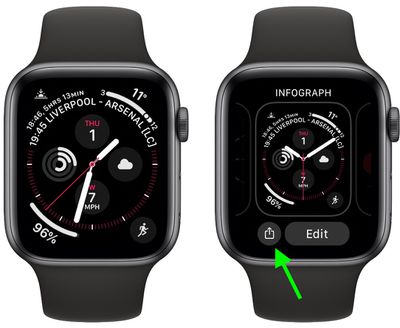
  2. Press and hold on the face until the Edit and Share buttons appear.
  3. Tap the Share button (it looks like a square with an arrow pointing out).
    1share apple watch face

  4. Tap Add Contact.
  5. If the person you want to share the face with is in the list of favorites and recent contacts, tap their name. Alternately, tap the Dictate button and say their name, then select it from the list that appears.
    3share apple watch face

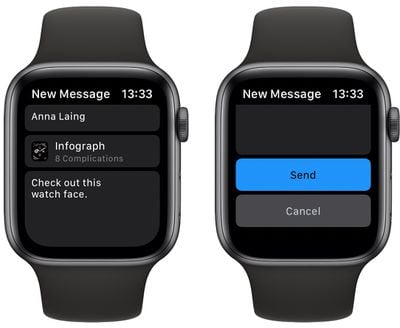
  6. Select one of the suggested text messages or use Dictate, Scribble, or emoji to create your own.
  7. Turn the Digital Crown to scroll down, then tap Send.
    2share apple watch face

You can also share a watch face from your iPhone. Simply open the Watch app on your iPhone, select a watch face in the My Watch tab or the Face Gallery tab, tap the Share button, then tap how you want to share it. You can send watch faces using Messages, Mail, AirDrop, or third-party apps like WhatsApp.

watch

How to Share a Watch Face Online

You can also share watch faces online, via websites, blogs, and social media, although the process is a bit more convoluted. Here's how it works.

  1. Launch Watch app on your iPhone, then select the watch face you want to share.
  2. Tap the Share button, then select Mail.
  3. Email the watch face to yourself.
  4. Open the email message that you receive, then touch and hold on the .watchface attachment at the bottom of the message.
  5. Tap Share, then tap Save to Files.
  6. Select a location, then tap Save.
  7. Open the Files app and navigate to the .watchface file that you just saved.
  8. Touch and hold the .watchface file, then tap Share.
  9. Tap Add People.
  10. Tap Share Options, then tap Anyone with the link if you want anyone to be able to download the watch face.
  11. Tap the Back arrow to go back.
  12. Swipe left on the sharing app icons, then tap Copy Link.
  13. Use the link that you copied to share the watch face online.

How to Receive a Watch Face From Someone

When someone shares a watch face with you, you'll receive a link in Messages, Mail, or another app. Here's what you need to do with it.

  1. On the iPhone that your Apple Watch is paired with, tap the shared watch face link.
  2. When the Watch app opens, tap Add to My Faces.
    watch face

  3. If there are any complications included in the watch face that you don't have the apps for, you'll be offered App Store links to download them. If you don't want the complication, select Continue Without This App and the face will be modified for your Apple Watch.

The shared face will be added to the My Faces section in the Watch app, and will appear on your Apple Watch when you select a watch face.

Related Roundups: watchOS 26, watchOS 27
Related Forum: Apple Watch

Top Rated Comments

aziatiklover Avatar
80 months ago
Can someone share their Hermes faces please?
Score: 5 Votes (Like | Disagree)
groove-agent Avatar
80 months ago
Even with the new faces there is still a limited combination.

Apple should allow developers to make faces and sell them on the store for $0.99 or something similar. This seems so obvious.

Maybe now that there's a dedicated watchOS store, this is in the works.
Score: 4 Votes (Like | Disagree)
magicschoolbus Avatar
80 months ago

Nope, already tried it. Do you think Apple is going to actually let you do that? I tried having my friend with his Nike watch share one of the Nike watch faces to my Series 6 Stainless steel watch. No such luck. It says "This watch face isn't available for your watch."


You can only share Hermes face to people that already have the Hermes watch. Same with Nike.
Wow, the faces are really that much on lockdown? A face store would make apple some serious $$$$.
Score: 1 Votes (Like | Disagree)
CarlJ Avatar
80 months ago

Can someone share their Hermes faces please?
Not gonna work. All this is sending is configuration data: "use the xyz watch face and put the abc complication in the left corner and the def complication in the right corner and make the background green". It's like a recipe.

If your watch gets something like that and the first step is, "use the Hermes watch face 1", and you don't have a Hermes watch, the watch will just say "nope".
Score: 1 Votes (Like | Disagree)
80 months ago

If you have an Apple Watch, chances are you've spent some time customizing your watch faces. Apple lets you adjust colors, choose complications, and select backgrounds so you can get watch to look just how you like, and in watchOS 7 you can share your personalized watch faces with others, too.

MacRumors content image

The ability to share watch faces with other people is a fun addition because it means you can impress your friends with your creations, and perhaps surprise someone who's new to Apple Watch by showing them just what's possible. You can also receive watch faces from others. It's easy to do, so keep reading to learn how it works.

How to Share a Watch Face With Someone

[LIST=1]
* On your Apple Watch, swipe to the face you want to share.
* Press and hold on the face until the Edit and Share buttons appear.
* Tap the Share button (it looks like a square with an arrow pointing out).
MacRumors content image

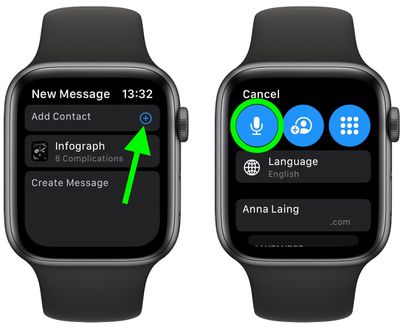
Tap Add Contact.
* If the person you want to share the face with is in the list of favorites and recent contacts, tap their name. Alternately, tap the Dictate button and say their name, then select it from the list that appears.
MacRumors content image

Select one of the suggested text messages or use Dictate, Scribble, or emoji to create your own.
* Turn the Digital Crown to scroll down, then tap Send.
MacRumors content image

You can also share a watch face from your iPhone. Simply open the Watch app on your iPhone, select a watch face in the My Watch tab or the Face Gallery tab, tap the Share button, then tap how you want to share it. You can send watch faces using Messages, Mail, AirDrop, or third-party apps like WhatsApp.
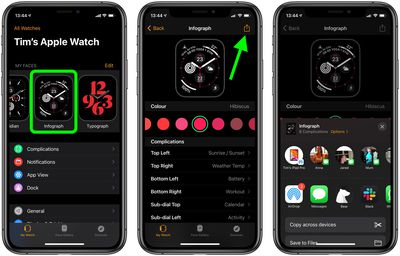
MacRumors content image

How to Share a Watch Face Online

You can also share watch faces online, via websites, blogs, and social media, although the process is a bit more convoluted. Here's how it works.
[LIST=1]
* Launch Watch app on your iPhone, then select the watch face you want to share.
* Tap the Share button, then select Mail.
* Email the watch face to yourself.
* Open the email message that you receive, then touch and hold on the .watchface attachment at the bottom of the message.
* Tap Share, then tap Save to Files.
* Select a location, then tap Save.
* Open the Files app and navigate to the .watchface file that you just saved.
* Touch and hold the .watchface file, then tap Share.
* Tap Add People.
* Tap Share Options, then tap Anyone with the link if you want anyone to be able to download the watch face.
* Tap the Back arrow to go back.
* Swipe left on the sharing app icons, then tap Copy Link.
* Use the link that you copied to share the watch face online.


How to Receive a Watch Face From Someone

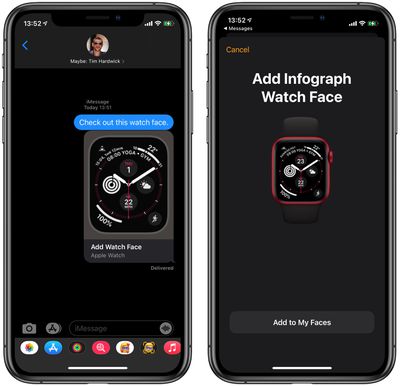
When someone shares a watch face with you, you'll receive a link in Messages, Mail, or another app. Here's what you need to do with it.
[LIST=1]
* On the iPhone that your Apple Watch is paired with, tap the shared watch face link.
* When the Watch app opens, tap Add to My Faces.
MacRumors content image

If there are any complications included in the watch face that you don't have the apps for, you'll be offered App Store links to download them. If you don't want the complication, select Continue Without This App and the face will be modified for your Apple Watch.
The shared face will be added to the My Faces section in the Watch app, and will appear on your Apple Watch when you select a watch face.

Article Link: watchOS 7: How to Share Apple Watch Faces ('https://www.macrumors.com/how-to/share-apple-watch-faces/')
Can exclusive Apple Watch faces be shared like Nike watch faces or Hermès watch faces? For example, if I have a Nike Apple Watch and want to share a watch face that include an exclusive Nike complication, can I sent that to a friend and will they be able to view/use it?
Score: 1 Votes (Like | Disagree)

Popular Stories

watchos 27

Apple Releases watchOS 27.2 With Siri AI Enhancements

Monday October 26, 2026 10:47 am PDT by
Apple today released watchOS 27.2, the first major update to the watchOS 27 operating system. watchOS 27.2 can be downloaded through the Settings app on the watch or the Apple Watch app on a connected iPhone. Software can only be installed when the Apple Watch is on the charger and has over 50 percent battery. According to Apple's release notes, watchOS 27.2 introduces new Siri AI...


watchos 27

Apple Seeds Updated watchOS 27.2 Release Candidate

Friday October 23, 2026 12:28 pm PDT by
Apple today seeded an updated version of the watchOS 27.2 release candidate, four days after the first RC became available. Registered developers and public beta testers can download software through the Apple Watch Settings app or using the Apple Watch app on iPhone. watchOS 27.2 adds new Siri AI features and extends Siri AI to more languages. This update provides enhancements to Siri...
siri recap live rewind

watchOS 27.3 Brings Live Rewind and Siri Recap to Apple Watch

Tuesday November 3, 2026 10:35 am PST by
With the first beta of watchOS 27.3, Apple is introducing new Audio Intelligence features it previewed for the Apple Watch Series 12 and Ultra 4 earlier this year. Powered by the S11 chip, Audio Intelligence includes Live Rewind, Siri Recap, Sound Recognition, and Shazam Music Recognition. Sound Recognition and Shazam are already on the watch, but Live Rewind and Siri Recap are now available ...
Latest Stories
Apple Store Subscription Sign-Up Controversy Exposed
7 hours ago
Siri AI Rumored to Become 'More Like an Agent' as Early as Next Year
17 hours ago
Apple Taking New Approach to Developing iOS 28 and macOS 28
19 hours ago
Early Apple Black Friday Deals on Apple Watch, MacBook Air, and More
2 days ago
'Backglow' Lets You Customize New MacBook Pro's Glowing Apple Logo
2 days ago
Top Stories: Apple Product Launches, iOS 27.3 Beta, and More
2 days ago
More Fun iPhone Duo Apps: 30 New Picks to Try
2 days ago
Hands-On With Apple's New OLED Touchscreen MacBook Pro
3 days ago
Apple Store With All-New Design Opening Soon in Southern California
3 days ago
Control the Glowing Apple Logo on Your New MacBook Pro
3 days ago
Apple Shares New 'Apple Card: Apply and Use in Minutes' Ad
3 days ago
Apple Says More Than 100,000 Apps Optimized for iPhone Duo, Here's What's Still Missing
3 days ago
Early Black Friday Deals Kickoff With Steep Discounts on Apple Watch Ultras and More
3 days ago
The MacRumors Show: iOS 27.3 Looks Like a Huge Update
3 days ago
Best Buy's Black Friday Event Begins With Sitewide Savings on Apple, TVs, More
3 days ago
Apple Releasing Yet Another Two New Products Next Week
3 days ago
MacBook Air Drops to Lowest Price in Months With Amazon's $250 Discount
3 days ago
Apple Rumored to Drop the iPhone's Action Button Next Year
3 days ago
Apple's Extended Return Policy Now in Effect for 2026 Holiday Season
3 days ago
Apple Music Classical Updated With New Icon and Refreshed Design
3 days ago
OLED iPad Mini, M6 iMac, and New MacBook Pros Available From Today
3 days ago
Apple Surveys iPhone Duo Buyers About Crease and Camera
3 days ago
Apple's First Touchscreen Mac is Now Arriving to Customers
4 days ago
Claude Gets Personal Finance Feature With Bank Account Linking
4 days ago
Apple Arcade Adds Crossy Road Rush and NBA 2K27
4 days ago
Apple's New HomeView Smart Home Hub: Here's How Much RAM It Has
4 days ago
iPad Mini vs. iPad Air Buyer's Guide: Now Just $50 Apart
4 days ago
First iOS 27.3 and macOS Golden Gate 27.3 Public Betas Now Available
4 days ago
Apple Announces a New Mac Sales Record
4 days ago
Paid $200 for Logic Pro? Apple Says You Won't Get This New Feature
4 days ago