How to Show Function Keys on a Mac's Touch Bar - MacRumorsOpen MenuShow RoundupsShow Forums menuVisit ForumsOpen Sidebar
Skip to Content

How to Show Function Keys on a Mac's Touch Bar

by

When Apple first introduced the Touch Bar on its Macs in 2016, the company touted the adaptive app-specific features of the OLED strip and framed it as an improvement over the traditional function keys that it replaced.
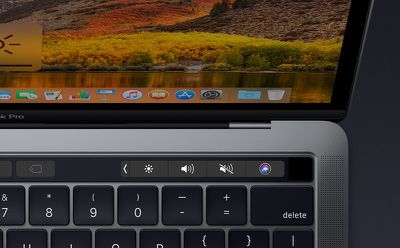
macbookprotouchbar2
What Apple didn't expect was the number of users who mourned the physical function keys, which often play an important role in the workflows of creative professionals and other Mac users. If you're the owner of an earlier Touch Bar-equipped Mac model and you want to get function key functionality back, there are a couple of things you can do.

Use the fn Key

One solution is to hold down the fn key (or Globe key depending on your keyboard) on the bottom left of the keyboard layout. This will make the original row of function keys appear on the Touch Bar, including the Escape key if your Mac doesn't have a physical one.

When you stop holding down the fn key, the typical Touch Bar strip of virtual keys will re-appear. That's not entirely convenient if you use the function keys a lot in combination with other keys, but fortunately there's a way to reinstate them permanently.

Make the Function Keys Show Permanently

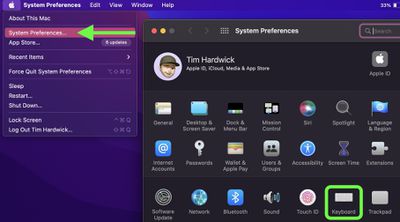
  1. Launch System Preferences from your Mac's Dock, from the Applications folder, or from the Apple menu bar ( -> System Preferences...).
  2. Select Keyboard in the preferences panel.
    sys prefs

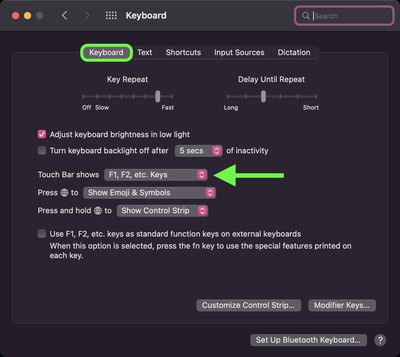
  3. Make sure the Keyboard tab is selected.
  4. Click the dropdown menu next to "Touch Bar shows" and select F1, F2, etc. Keys from the options.
    keyboard

Once that's done, the Touch Bar will always display the entire F1 through F12 key number row until you change the "Touch Bar shows" preference to something else (Spaces or Quick Actions, for example).


Popular Stories

iCloud iPhone 17 Pro

iPhone Users Who Pay for iCloud Storage Get Two New Perks on iOS 27

Thursday July 2, 2026 6:10 am PDT by
If you pay for certain iCloud+ storage plans beyond the 5GB that Apple offers for free, you will receive two more perks on iOS 27 at no additional cost. A summary of the two new iCloud+ perks on iOS 27:Increased daily usage limits for some new Apple Intelligence features, including image generation in the revamped Image Playground app. HomeKit Secure Video cameras receive generated video...
iPhone 4 on Black Feature

Apple Facing One of Its Worst Leaks Since the iPhone 4

Thursday July 2, 2026 9:53 am PDT by
Apple supplier Tata Electronics recently suffered a cyberattack that resulted in thousands of confidential files being published on the dark web, and this reportedly included some photos and documents related to the upcoming iPhone 18 Pro. We have elected not to share any of the leaked photos in this story due to the illegal nature in which they were obtained, but they can easily be found...
Apple Event Logo

Apple Just Released a New Product

Thursday July 2, 2026 8:04 am PDT by
Apple's first product release of summer 2026 occurred this week, but do not get too excited, as it is merely the Beats Solo Buds in a new color. Beats Solo Buds are now offered in orange through Best Buy in the U.S., with availability set to expand to 7-Eleven stores in Japan on July 4. Apple already offered orange Solo Buds in India for free with the purchase of an iPhone 15 or iPhone 15 ...