

Show More (or Fewer) Recent Apps in Your Mac's Dock - MacRumorsOpen MenuShow RoundupsShow Forums menuVisit ForumsOpen Sidebar
Skip to Content

Show More (or Fewer) Recent Apps in Your Mac's Dock

by

In macOS, a handy option called "Show suggested and recent applications in Dock" (found in System Settings ➝ Desktop & Dock) adds a divider to the right-hand side of your Mac's Dock, and after it displays any apps you recently used – or any that macOS thinks may be useful to your workflow – that aren't permanently docked.
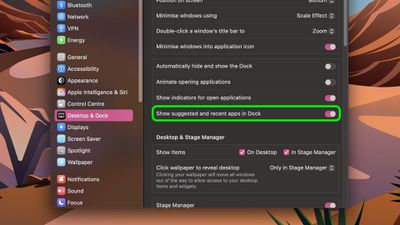
settings
Assuming that you have no undocked apps that are currently open, the right side of the divider shows three of the most recently used apps that have since been closed. However, there is a way to make it show more, which can be useful if your workflow involves using a lot of undocked apps consecutively.

If you're comfortable pasting commands into Terminal, it's perfectly possible to increase or decrease the number of recently opened apps that show in your Dock.
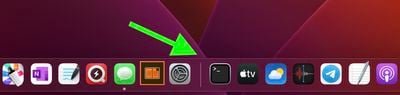
recently opened
Open a Terminal window (the app can be found in /Applications/Utilities/) and paste the following at the command prompt, then press Enter:

defaults write com.apple.dock show-recents -bool true;
defaults write com.apple.dock show-recent-count -int 10;
killall Dock

Note that the -int argument defines the number of recently opened apps that you want to display in the Dock after the divider (10 in this example). You can change the number to suit, and you can revert back to showing three apps anytime by using -int 3 in the second command.


Top Rated Comments

winxmac Avatar
13 months ago
macOS: Suggested
Windows 10/11: Recommended

I always make sure to disable it on both systems.
Score: 7 Votes (Like | Disagree)
13 months ago

If you're comfortable pasting commands into Terminal, it's perfectly possible to increase or decrease the number of recently opened apps that show in your Dock.

Open a Terminal window (the app can be found in /Applications/Utilities/) and paste the following at the command prompt, then press Enter:

defaults write com.apple.dock show-recents -bool true;
defaults write com.apple.dock show-recent-count -int 10;
killall Dock

OnyX ('https://titanium-software.fr/en/onyx.html') is also excellent for tweaking such things:


Attachment Image
Score: 7 Votes (Like | Disagree)
DribbleCastle Avatar
13 months ago
Ha, this is one of the first settings I suggest to any new Mac user. Never loved the recently used apps. I like to keep things classy.
Score: 4 Votes (Like | Disagree)
13 months ago
I immediately turn off “recently used” for the dock. Then I make the dock and top bar only appear when I go to them. It’s the cleanest experience possible for a Mac.
Score: 3 Votes (Like | Disagree)
13 months ago

I wish there was a way to stop the task-switcher (cmd-tab) appearing on the wrong display in a multi-monitor setup, when you have the dock orientation set to left or right (instead of bottom).
I feel like I saw a utility recently that fixes this and lets you pin your task switcher to a specific display. Unfortunately can't recall the name of it but maybe someone else can...
Score: 2 Votes (Like | Disagree)
Sirious Avatar
13 months ago
I used to switch off the recent apps feature but have kept it on for the last couple of years. Its actually handy!
Score: 2 Votes (Like | Disagree)

Popular Stories

iphone 18 pro blue%402x

iPhone 18 Pro: Dark Cherry, Light Blue, and Dark Gray Chassis Leaked [Update]

Thursday June 4, 2026 5:18 am PDT by
Update: Since publication, new information has come to light suggesting the images have been AI-manipulated and are not in fact iPhone 18 Pro chassis parts. The original article follows. The color options Apple is reportedly planning for the upcoming iPhone 18 Pro and ‌iPhone 18 Pro‌ Max have appeared online today in the form of images of chassis parts of unknown authenticity....
Aston Martin CarPlay Ultra Screen

Apple Says CarPlay Ultra is Coming to These Vehicle Brands

Thursday May 21, 2026 11:53 am PDT by
Last year, Apple launched CarPlay Ultra, the long-awaited next-generation version of its CarPlay software system for vehicles. Nearly a year later, CarPlay Ultra is still limited to Aston Martin's latest luxury vehicles, but that should change fairly soon. In May 2025, Apple said many other vehicle brands planned to offer CarPlay Ultra, including Hyundai, Kia, and Genesis. CarPlay Ultra...
iOS 27 All the New App Features

iOS 27: All the Rumored App Features

Wednesday June 3, 2026 3:48 pm PDT by
Siri is getting a major overhaul in iOS 27, but Apple also has some big updates planned for apps like Camera, Photos, and Wallet. There are multiple new AI features in the works, plus some non-AI upgrades. Camera Apple is moving Visual Intelligence from the Camera Control button to the Camera app in iOS 27, according to Bloomberg. There will be a Siri mode that will be available alongside...















